


Ive stored multiple mispelled words to my dictionary. I navigated to mozilla profile folder & cannot find persdict.dat file.

As the question stated I have navigated to my mozilla profile folder, ( C:\Users\User\AppData\Roaming\Mozilla\Firefox\Profiles\pw1dnvcy.default-release ) but there is no file called persdict.dat. I have ensured all file name extensions are visible, & none are hidden in windows file explorer (Win 10). I am at al loss I cannot figure this out.
Все ответы (4)
Can you find persdict without .dat? Windows hides some file extensions, so to be confident about which file is which, you may want to turn off that unhelpful behavior. See:
Also, just in case you have multiple profiles, you can confirm the active folder by going through the Troubleshooting Information page, and using the button on the Profile Folder row: Use the Troubleshooting Information page to help fix Firefox issues.
I just realized you already fixed that setting, sorry for the duplication.
jscher2000 - Support Volunteer said
I just realized you already fixed that setting, sorry for the duplication.
No problem. Thank you for trying to help. For the sake of troubleshooting/for the record I did navigate to the profile folder through troubleshooting. I posted a screenshot of my profile folder so that you guys know I am not just blind lol.
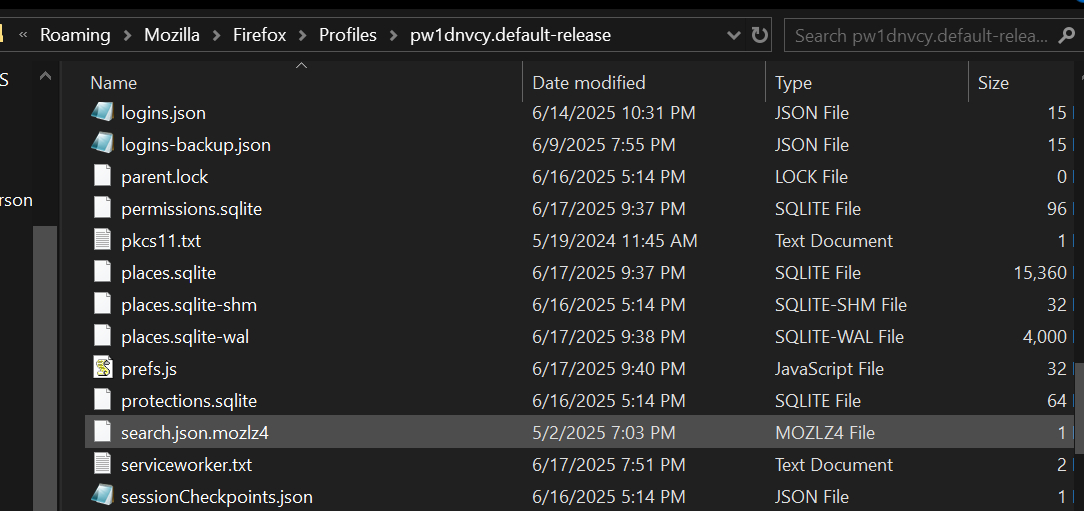
What if you add a new word, then sort the folder by Last Modified Date. Does some other file seem to be getting updated?