


About the display of the total number of Thunderbird messages

How to make Thunderbird not display the total number of messages, it's driving my OCD crazy, I've been looking for almost an hour and still can't find where to set this.

Выбранное решение
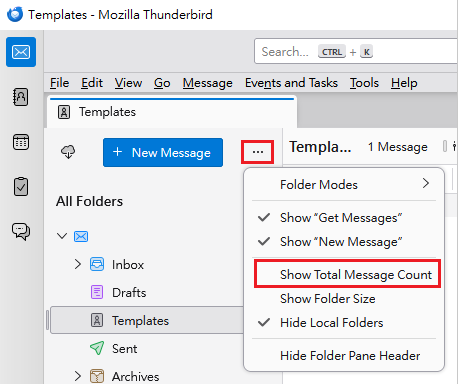
The following steps might be helpful: 1. Click "Folder pane options" (three horizontal dots located on the right hand side of "+ New Message" button). 2. Untick "Show Total Message Count".
Please see the attached image.
Прочитайте этот ответ в контексте 👍 2Все ответы (4)
That is the unread messages not the total.
I do not think there is an option to disable display of the number of unread messages in a folder.

Выбранное решение
The following steps might be helpful: 1. Click "Folder pane options" (three horizontal dots located on the right hand side of "+ New Message" button). 2. Untick "Show Total Message Count".
Please see the attached image.
I don't have '+ New Message'. How else can I hide msg count?
Andrew said
I don't have '+ New Message'. How else can I hide msg count?
The following methods might be helpful:
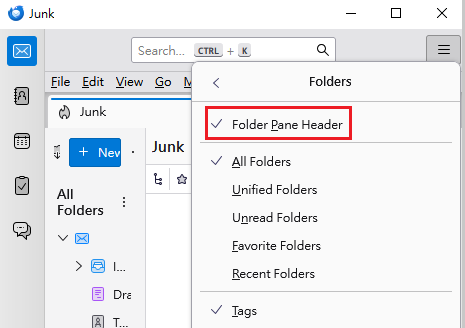
Method 1: (On the menubar) click "View". > "Folders" > Tick "Folder Pane Header".
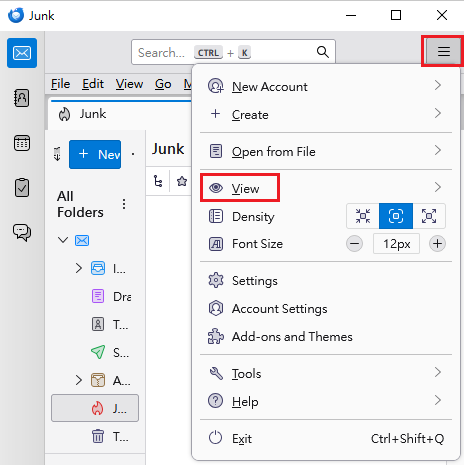
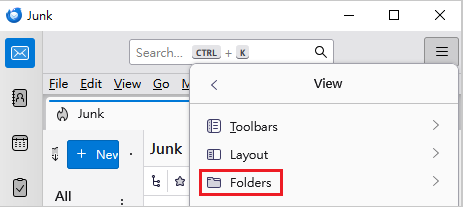
Method 2: Click the hamburger button (the three horizontal bars on the top right corner). > Click "View". > Click "Folders". > Tick "Folder Pane Header".
After Folder Pane Header appears, you can click "Folder pane options" as I said in my previous response.
Please see attached images.

Изменено Yu5tiqX9og