


Screenshot icon not avaialabe to customize toolbar

Screenshot icon is no longer available to customize toolbar. How do I restore it.?
Все ответы (4)
Hi, it should still be available, but first, could you check whether it is enabled? If it's enabled, these should both call up the same tool:
- right-click the page > Take Screenshot
If the site replaces the right-click context menu, try Shift+right-click > Take Screenshot - press the keyboard shortcut Ctrl+Shift+S
Do either of those work?

I have one desktop with Mozilla Firefox 64 bit version 140, Windows 11 pro and a laptop with similar Firefox, but windows 10 pro. The icon for Screenshot vanished from my toolbar after I got Firefox 140. It was still working before it, when I had previous version installed, I guess it was 139. These two pc:s Firefox have both this bug.
Screenshots are working, when I using any of these two keyboard. When I look for the Icons available (selection) for toolbar customization, the icon is no more there.
My third desktop: I installed older version, and refused to receive updates for newer versions. I lost my bookmarks and passwords. I think I'll get along with that.
einomies said
When I look for the Icons available (selection) for toolbar customization, the icon is no more there.
Didn't it used to be a pair of scissors? Hmm, yes, the article "Take screenshots in Firefox" shows this:  .
.
It seems to have changed to a camera:
Can you spot that new icon anywhere?
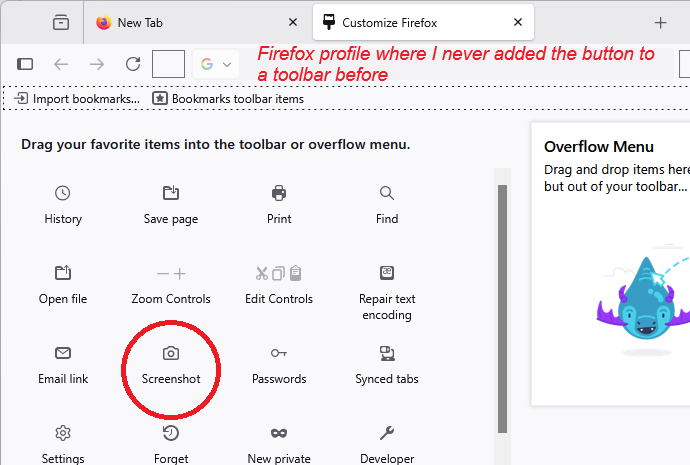
Yes, I found that Screenshot (camera image) icon which you marked with red circle. I have found it already on the toolbar line, on the right side of it - my windows 10 laptop. I have forced my desktop (windows 11) to keep Firefox 139, and it has scissors pointing to right icon.
So, thanks to you. Problem solved. Now I can allow Firefox to update it for version 140.
Greetings from 🇫🇮