

Эта тема была архивирована.
Если вам нужна помощь, задайте новый вопрос.

Архивировано
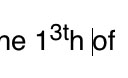
Superscript Glitch on OWA
Hi,
I've been getting a glitch while typing emails in Outlook Web Access for the last couple of days where superscript type in dates looks like the image attached. It was working fine until sometime this week. I've tried using Microsoft Edge and the issue doesn't happen so I'm thinking it might be browser specific.
I'm running Firefox Version 135.0.1 (aarch64) on a Mac Studio with Sequoia 15.3.1 (24D70).
Can you advise please?
Thank you very much.
Calum.
Все ответы (1)

Where are you using Edge from what I can find there isn't a Mac version? And could be that Outlook it is a browser specific programming because of it's programming to work on Windows OS environment. Did you try with Safari to see what else happens with Outlook?