Missing Cookie Banner Blocker?

Hi all,
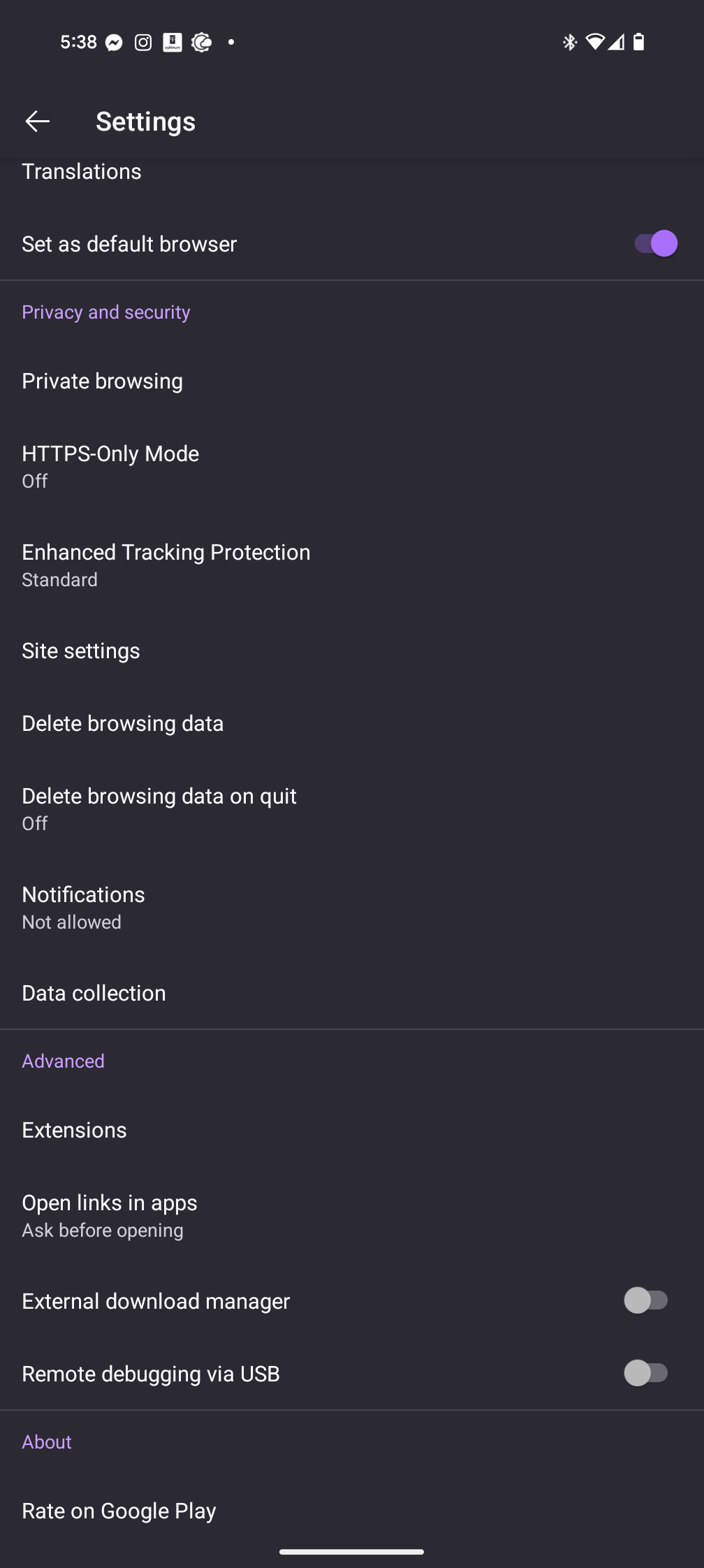
I am on Firefox for Android version 133 and am trying to stop getting cookie banners. According to this article: https://support.mozilla.org/en-US/kb/cookie-banner-reduction-firefox-android, there should be an option under Privacy and security, but no options for the cookie banner blocker exists.
I live in Canada, not sure if it is only available in certain countries?
Thanks
Hi all,
I am on Firefox for Android version 133 and am trying to stop getting cookie banners. According to this article: https://support.mozilla.org/en-US/kb/cookie-banner-reduction-firefox-android, there should be an option under Privacy and security, but no options for the cookie banner blocker exists.
I live in Canada, not sure if it is only available in certain countries?
Thanks
Все ответы (2)

hi you need version 121 or higher, I'm running 153 and I can see the options.
- Check your version of Firefox
   Tap the menu button android menu icon
   Menu button - Template:menupreview
   Tap Settings.
   Scroll down to the About section and tap About Firefox.
   The version number will appear underneath the Firefox logo.
To enable or disable the Cookie Banner Blocker:
   Open Firefox and tap the menu button android menu icon next to the address bar.
   Select Settings.
Scroll to the Privacy and security section.
   Look for the Cookie Banner Blocker in private browsing option.
   Toggle the switch on or off as needed (purple means enabled, gray means disabled).
Block cookie banners on Firefox for Android enable/disable
Thank you, as I mentioned in my first post, I'm running android Firefox version 133 and do not see the options.