


"open image in new tab" instead of "open link in new tab"
So I want to open an image in new tab but that image has attached a link to it so if I click the image, it just goes to the page linked.
Soluție aleasă
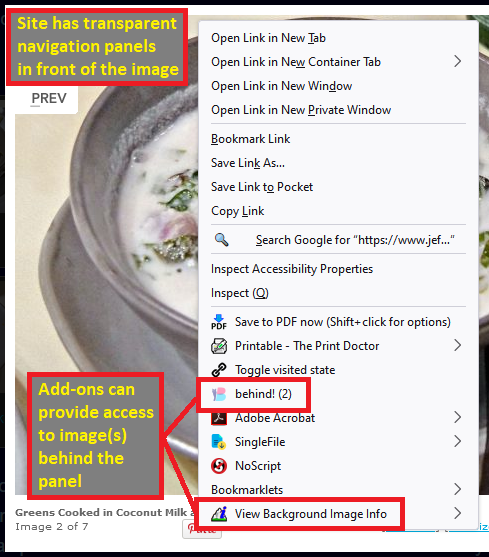
Okay, yes, there are cases where the context menu doesn't have image items on it. The most common scenario is when there is a transparent element in front of the image. Firefox doesn't pierce that element to show image items. You can work around this with an add-on (assuming you are not the type to open the Developer Tools to find the address). The "behind!" extension is great for this, and I used some of its code in my "View Image Info Reborn" extension.

- https://addons.mozilla.org/firefox/addon/behind/
- https://addons.mozilla.org/firefox/addon/view-image-info-reborn/ (uses a popup window)
Toate răspunsurile (6)
You should find "Open Image in New Tab" in the right-click context menu of that image.
Also: if a page doesn't show Firefox's context menu when you right click something, try holding Shift: Shift+right-click
Doesn't work, it doesn't show open image in new tab. More info: it's on 9anime.id. If I am on the home page and right-click a cover from an anime, it only show open link in new tab. Btw, it works on edge.
Soluție aleasă
Okay, yes, there are cases where the context menu doesn't have image items on it. The most common scenario is when there is a transparent element in front of the image. Firefox doesn't pierce that element to show image items. You can work around this with an add-on (assuming you are not the type to open the Developer Tools to find the address). The "behind!" extension is great for this, and I used some of its code in my "View Image Info Reborn" extension.
In some cases you could use a JavaScript bookmarklet to look for an image further down in the DOM.
javascript:/*activeElement|image*/
(function(){
var E,O,i;
function N(A){O=[];for(i=0;A[i];i++){O.push(A[i].name+': '+A[i].value)}return(O.join('\n'))}
if(E=prompt('document.activeElement: '+document.activeElement.nodeName+'\n\n'+N(document.activeElement.attributes),document.activeElement.getAttribute('href'))){
E=document.activeElement.querySelector('img');
prompt(E.nodeName+'\n'+N(E.attributes),E.getAttribute('src'))
}})()jscher2000 - Support Volunteer said
Okay, yes, there are cases where the context menu doesn't have image items on it. The most common scenario is when there is a transparent element in front of the image. Firefox doesn't pierce that element to show image items. You can work around this with an add-on (assuming you are not the type to open the Developer Tools to find the address). The "behind!" extension is great for this, and I used some of its code in my "View Image Info Reborn" extension.
Thank you, it works.