


How to remove fixed items from bookmarks menu

The following css used to work to remove items from Bookmarks menu:
#bookmarksToolbarSeparator,#bookmarksMenuItemsSeparator{display: none !important;}
#bookmarksToolbarSeparator,#organizeBookmarksSeparator{display: none !important;}
#bookmarksToolbarSeparator,#menu_bookmarkAllTabs{display: none !important;}
#bookmarksToolbarSeparator,#bookmarksShowAll{display: none !important;}
It no longer works in FF88. How to fix?
N.B. There wasn't a way to hide "other bookmarks" from the bookmarks MENU (This has nothing to do with the unrelated TOOLBAR issue, and the settings for that do not affect the menu)
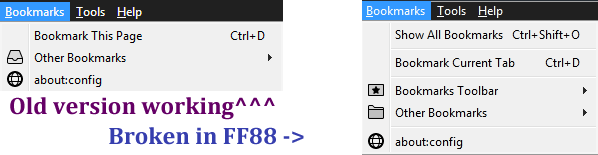
Modificat la de cor-el
Soluție aleasă
You can possibly leave a space at the start of a line to force rendering as a PRE tag.
The IDs you use look correct, so you can check for other issues like a hidden .txt appended or not having enabled userChrome.css.
Does other CSS code in userChrome.css still work in case you have more rules in your file ?
- https://www.userchrome.org/what-is-userchrome-css.html
- https://www.userchrome.org/how-create-userchrome-css.html
In Firefox 69 and later you need to set this pref to true on the about:config page to enable userChrome.css and userContent.css in the chrome folder.
- toolkit.legacyUserProfileCustomizations.stylesheets = true
Toate răspunsurile (3)
For reasons best known to itself the page replaced the hashes with the numbers 1-4 it ACTUALLY looked like this (... added to stop bizarre autoformatting)
... #bookmarksToolbarSeparator,#bookmarksMenuItemsSeparator{display: none !important;} ... #bookmarksToolbarSeparator,#organizeBookmarksSeparator{display: none !important;} ... #bookmarksToolbarSeparator,#menu_bookmarkAllTabs{display: none !important;} ... #bookmarksToolbarSeparator,#bookmarksShowAll{display: none !important;}
Soluție aleasă
You can possibly leave a space at the start of a line to force rendering as a PRE tag.
The IDs you use look correct, so you can check for other issues like a hidden .txt appended or not having enabled userChrome.css.
Does other CSS code in userChrome.css still work in case you have more rules in your file ?
- https://www.userchrome.org/what-is-userchrome-css.html
- https://www.userchrome.org/how-create-userchrome-css.html
In Firefox 69 and later you need to set this pref to true on the about:config page to enable userChrome.css and userContent.css in the chrome folder.
- toolkit.legacyUserProfileCustomizations.stylesheets = true
Added spaces at the start of the line and moved the code to the top of the CSS. Did the trick, thanks.