


can no longer send out an e-mail

I can no longer receive nor send out e-mail messages on my desktop. Note - I can receive and send out messages on my phone.
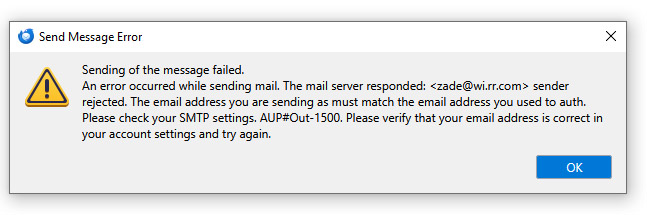
So on my desktop, I get this warning message now after earlier today changing a password in Spectrum which is required to be longer than my former password for the old roadrunner wi.rr.com
Sending of message failed. see more in attached .jpg
I have no idea what to do.
Todas as respostas (5)
This error occurs when you don't have separate smtp servers for each account:
I am not sure I follow this at all and perhaps there is a misunderstanding. Facts: I have had this desktop primary Thunderbird account for decades. A few years ago, I set up my phone so it could see incoming e-mails that were coming to my desktop. It cannot, however, see sent e-mails from my desktop nor can I see on my desktop past e-mails sent from my phone. Furthermore, if I deleted an incoming e-mail on my phone, it would still appear in my Inbox on my desktop when I open Thunderbird on my desktop.
This morning (Sat), I went into Spectrum to see what benefits I had and in the process had to create a new password because I had somehow lost the old one. That evidently changed something with respect to my Thunderbird account. As I tried different settings in Thunderbird, I somehow screwed up my ability to receive and send e-mails from my desktop. My phone was unaffected but I rely on my desktop e-mailing for most matters. My current settings on Thunderbird from my desktop are:
Description:25 Server Name: pop-server.wi.rr.com Port:25 User Name [my e-mail address] Authentication Method: No Authentication Connection Security: None
By the way, when I now try to open Thunderbird on my desktop, I get the following Yellow Warning message: Unable to establish TLS connection to POP3 server. The server may be down or maybe incorrectly configured. Please verify the correct configuration in the server settings for your mail server in the account settings window and try again.
Two things to correct: first, you should have the account as IMAP instead of POP on the desktop, so mail is synced between it and the phone, which probably already has an IMAP setup. Second, the settings for a wi.rr account should be:
incoming IMAP server: mail.twc.com, port 993, SSL/TLS security, authentication = normal password, User Name = email address
outgoing smtp server: same as incoming, except port 587, STARTTLS security
https://www.spectrum.net/support/internet/mobile-email-setup
You can't change from POP to IMAP just by changing the settings. Add the account as a separate IMAP account.
http://kb.mozillazine.org/Convert_a_POP_account_to_a_IMAP_account