


no jigsaw icon in the toolbar

I was going to pin some add-ons to the tool bar, but the jigsaw icon was not there.
How do i get it back?

Wybrane rozwiązanie
If you go to More tools -> Customize toolbar the extension icon might appear in the toolbar. Right click on it and select "Always show in Toolbar". (Screenshot 2)
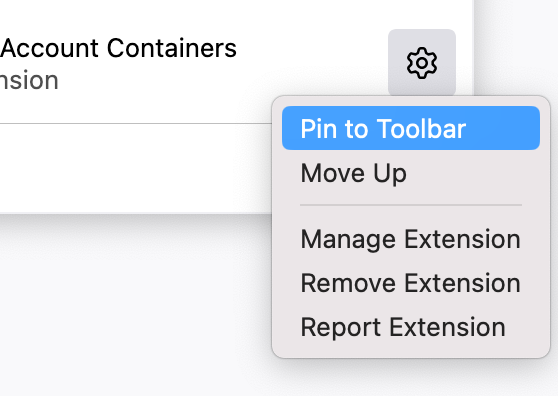
"I can find it on the settings page,l and view extensions when I click on it." If you can view the extensions, then click on the settings icon associated with an extension and select "Pin to toolbar. This will restore the icon to the toolbar. (Screenshot 1)
Zmodyfikowany przez Mark w dniu
Wszystkie odpowiedzi (5)
Hello,
You can try going to menu>more tools> customize toolbar, and drag the individual extension icon from the customize panel to the toolbar.
The jigsaw icon is not on the customize page. I can find it on the settings page,l and view extensions when I click on it. But, there is no way to restore the icon to the to the toolbar (that I have found). Bob
The add-on extensions do not appear on the customize p[anel. Bob
Help! I have not yet found an answer to my question. How do I restore the extension button? I tried using the default button on the Toolbar Customization page. All that happened was that all my add-ons were removed from the toolbar. I have no way, short of uninstalling and reinstalling add-ons, to get the extensions back to the toolbar. I am unable to use several of the extensions because their function relies on the toolbar icon. Uninstalling Firefox and installing it fresh is the only way I can think of to repair the browser. (That would be a real pain...) Does anybody have a suggestion? Bob
Wybrane rozwiązanie
If you go to More tools -> Customize toolbar the extension icon might appear in the toolbar. Right click on it and select "Always show in Toolbar". (Screenshot 2)
"I can find it on the settings page,l and view extensions when I click on it." If you can view the extensions, then click on the settings icon associated with an extension and select "Pin to toolbar. This will restore the icon to the toolbar. (Screenshot 1)
Zmodyfikowany przez Mark w dniu