


"Compact all folders when it will save over" not triggering right? (bug1853584)

Hello! I have used Thunderbird for many years. Lately, it waits much too long to prompt compacting all accounts. When "Compact all folders when it will save over ..." is set down to 1MB total, it still does not prompt until it has to clear 30 or 40 MB.
It didn't do this in the past, prompting me every 2 or 3 days at higher settings. So, I'm curious if this is "normal" now and I need to manually compact, or if there is a problem with 'Account Settings > Disk Space > Compact all folders' ... ?

Zmodyfikowany przez Wayne Mery w dniu
Wszystkie odpowiedzi (6)
There are still a couple bugs not fixed in version 128, for example I had filed Bug 1903174 - Automatic compact doesn't compact all folders when it encounters folders to which it does not have write access.
Zmodyfikowany przez Wayne Mery w dniu
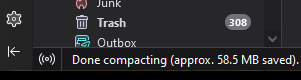
Just an update for context - just after the first posting, Thunderbird prompted to compact all folders. The setting was 1MB (as above), and the saved space was reported as 58.5MB (below).
Please let me know either how to force *all folders* to compact manually, or any info I can provide to help this function work as expected. Thanks!
psig said
Please let me know either how to force *all folders* to compact manually,
Right click on the account, pick compact, for each account.
Please post here to let us know whether your problem is solved. Thanks
@Wayne Mery - thank you for responding! To your queries in-order:
• This alternate workaround question was how to "force *all folders* to compact manually". I manage multiple accounts, requiring excessive time to perform separate compaction, thus my question. Your reply "for each account" is already followed, and the source of the original question on improving auto-compact triggering.
• No, the problem is not solved, either on the Thunderbird function "Compact all folders when …", nor an alternative to manually trigger *all* folders to compact, similar to how the compact function should be operating – just manually for *all* accounts and folders.
Thank you for asking, and any solutions are very welcome!
Right, there is currently no manual equivalent, and no immediate plans to fix/provide it.
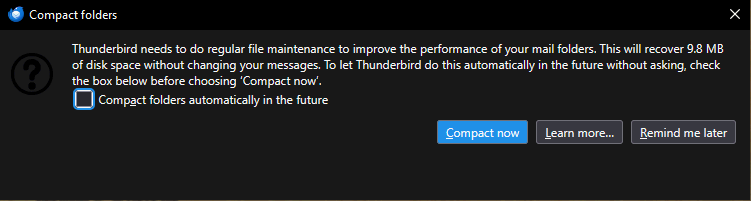
In order to make compacting all folders in all accounts easy, all I need is to capture or duplicate the function of the blue button...
I'm sure it's simple, but I don't know how to do that. Anyone here know?
Zmodyfikowany przez psig w dniu