Payment Methods of Settings Exposed vs Passwords Being Protected

Hi there,
I'll preface this by saying that I use a Primary Password (formerly Master Password) to protect my information on my computer.
Today I was going to pay a bill and noticed I couldn't autofill my payment methods. So, I went to my settings to get my payment information to copy paste it. I found out that when I go to look at my payment methods, even with a primary password, I can just double click on my saved CC information and it opens up showing everything. This contrasts with saved passwords where if I were to go look at one of my passwords, I have to confirm my password again before I can look at it. In my opinion, this is a security risk and it's quite odd that it is just readily available like that. There really should be another step to confirm your password before autofilling/checking it in settings. I see there is a 'device sign in' option in settings, but that's not really what I had in mind.
I'd love to hear from you if there is a way to add this protection or if there is technical reasoning behind this. Thank you,
Wybrane rozwiązanie
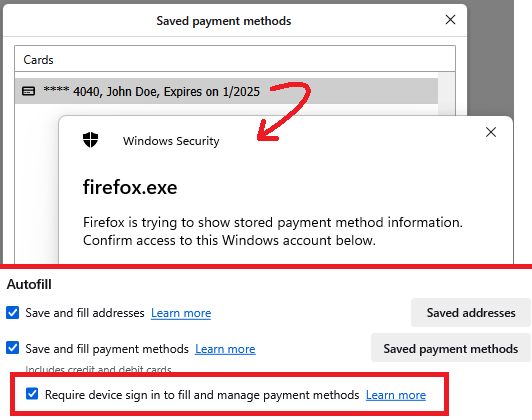
On mine, the "Saved payment methods" shows a box, and that list only shows the last 4 digits of the card. and if I want to see the whole thing, I need to enter my Windows password. It is possible to turn that off (screenshot attached).
Ref. Automatically fill in credit card and payment method data on Web forms
Przeczytaj tę odpowiedź w całym kontekście 👍 1Wszystkie odpowiedzi (2)

This goes beyond what the password manager does. You need to password protect your system to prevent anyone other then yourself from accessing.
Wybrane rozwiązanie
On mine, the "Saved payment methods" shows a box, and that list only shows the last 4 digits of the card. and if I want to see the whole thing, I need to enter my Windows password. It is possible to turn that off (screenshot attached).
Ref. Automatically fill in credit card and payment method data on Web forms