Firefox Microsoft Store Version MSIX 1.0 126 crash on exit
Windows 11 Pro x64 Firefox 126 downloaded from MICROSOFT Store crashes on exit. Repeatedly


Windows 11 Pro x64 Firefox 126 downloaded from MICROSOFT Store crashes on exit. Repeatedly
I am trying to use a <select> tag to display a color selector. So each <option> has a background color to match its displayed text: ```<select id="stroke… (les mer)
I am trying to use a <select> tag to display a color selector. So each <option> has a background color to match its displayed text:
```<select id="strokeColor" name="strokeColor" style="width: 10em;">
             <option value="black" style="background: #000000; text: #FFFFFF">
                     black
             </option>
<option value="aqua" style="background: #00FFFF">
                     aqua
             </option>
<option value="blue" style="background: #0000FF">
                     blue
             </option>
<option value="brown" style="background: #A52A2A">
                     brown
             </option>
<option value="gray" style="background: #808080">
                     gray
             </option>
<option value="green" style="background: #00FF00">
                     green
             </option>
<option value="magenta" style="background: #FF00FF">
                     magenta
             </option>
<option value="orange" style="background: #FFA500">
                     orange
             </option>
<option value="purple" style="background: #800080">
                     purple
             </option>
<option value="red" style="background: #FF0000">
                     red
             </option>
<option value="white" style="background: #FFFFFF">
                     white
             </option>
<option value="yellow" style="background: #FFFF00">
                     yellow
             </option>
<option value="#000000" selected="" style="background: #000000">
                     #000000
             </option>
         </select>```
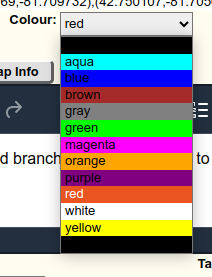
On Chrome this displays as expected:
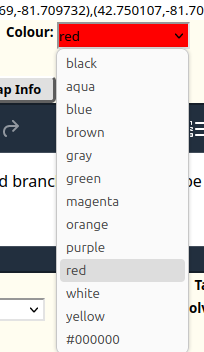
But on Firefox the background colors are ignored:
How can I get Firefox to display the background colors?
How do I disable enterprise management?
Is there a way to enlarge the header that shows the bookmarks?
My Firefox is the most recent version 126. I am having trouble with pop-ups being blocked. I have added the website to the pop-up exception list. When I go to the site, i… (les mer)
My Firefox is the most recent version 126. I am having trouble with pop-ups being blocked. I have added the website to the pop-up exception list. When I go to the site, it shows me the little icon showing I have added exceptions for this site. However; the pop-up still gets blocked.
The site is: https://www.foxit.com/ I try clicking the Log In drop down then Foxit Account. Before this would pop-up the log in screen for the site but since version 125, it does not. I just updated to version 126 to see if that resolved it before creating this post but it didn't. Thus I am here trying to get help.
Once again Firefox has decided to take over and change all my settings! I had finally managed to prevent it updating, as each and every time I had to reinstall all my set… (les mer)
Once again Firefox has decided to take over and change all my settings! I had finally managed to prevent it updating, as each and every time I had to reinstall all my setting and extentions from scratch. Today, it decided to clear all my preferences and change itself to its own default settings. OK, so I can change my profile option, except all three are using the same defaults: I appear to have lost all my settings and extensions entirely. OK, I'll copy from my backup, but once again the three backup profiles are being overwritten with the defaults. Even my third backup of last March overwrites to the defaults! How and why is Firefox managing to keep overwriting my defaults to its own preferred settings? How do I stop it doing this and regain my own preferences?
I also tried Sync and now I am getting bookmarks from over five years ago! And once again my settings are changing to the defaults. Surely a Sync should overwrite with the current bookmarks and settings not just keep adding more and more. I am now in a right mess again. Back to losing everything with updates. I am a great believer in the 'if it ain't broke don't fix it' mentality, but Firefox has broken itself and is refusing to allow me to change to how it used to be! How do I restore my own preferences and prevent Firefox from changing them to what it wants.
Suddenly I can't sign-in to Sharepoint or Sharepoint admin console using my normal Firefox window. It works with the private window, but not the normal one. I've tested o… (les mer)
Suddenly I can't sign-in to Sharepoint or Sharepoint admin console using my normal Firefox window. It works with the private window, but not the normal one. I've tested on another computer with the same firefox account sign-in and synced and it lets me sign-in there no problem. I've tried "Refreshing" Firefox, and that didn't work. I've tried uninstalling Firefox, deleting all the folders in appdata, then re-installing. Then I tried again before signing in to my Firefox account or syncing anything and it still didn't work. Any other suggestions? All the other O365 cloud login sites work, just not Sharepoint for some reason! It'll ask for my login credentials, then try and load, and then ask for my credentials again, over and over. Windows 10 Enterprise, Version 10.0.19043 Build 19043. Firefox 126.0 (x64).
When I open the application it loads as a small window that I have to maximize to make it full screen. It never used to do this so I need some help to fix this. I've take… (les mer)
When I open the application it loads as a small window that I have to maximize to make it full screen. It never used to do this so I need some help to fix this. I've taken a quick look through settings etc and can't see anything wrong...
Solution listed on help page appears outdated. The screens do not match what happens when i try it.
Sorry to have this same issue again, knowing full well it can happen after finding this some years ago (https://support.mozilla.org/en-US/questions/1319823), I tried to c… (les mer)
Sorry to have this same issue again, knowing full well it can happen after finding this some years ago (https://support.mozilla.org/en-US/questions/1319823), I tried to carefully connect two older PC devices back to firefox sync, however on one I managed to enable sync before disconnecting my profile (it seemed as if reconnecting sync temporarily was the only way to disconnect a profile from firefox's UI - I should have been more careful and removed the profile from the filesystem level): at which point I polluted the sync server.
I've noticed that `about:sync` has an option under bookmarks/engine actions 'wipe bookmarks', which sounds exactly what I need, and if I watch what happens once pressed it does the right thing and repopulates the sever with the 'correct' PC's bookmark set (when run from that PC), however it also says 'other devices will act like a reset', which i'm finding NOT to be the case: eventually one of my other device repollutes the server with bad bookmarks which propogate.
I'm thinking the culprits are my phones, If I wipe and do a sync on a phone, my phone's bookmarks stay polluted. If i'm right about that, I think my question is: can I wipe my profile (or preferably only my bookmarks) from my phones' Firefox without having to entirely uninstall/reinstall (or do you have any other advice for not re-polluting the server from some already-polluted device's bookmarks?
thanks in advance
Hi I cannot get this site to load up on my phone it will load up but not on my laptop . am I missing a setting https://wordpress-700233-2343916.cloudwaysapps.com/wp-adm… (les mer)
Hi I cannot get this site to load up on my phone it will load up but not on my laptop . am I missing a setting
Using mobile browser for the same to the software
Prior to about a month ago, downloading worked as expected: - click a link - the save to... dialog opened - choose the folder - the download is off and running No more. … (les mer)
Prior to about a month ago, downloading worked as expected: - click a link - the save to... dialog opened - choose the folder - the download is off and running
No more. For about the past month - click a link - wait for a long time with FF frozen - the a wheel starts rotating - after a full minute (or more) the save dialog appears.
Something has been broken in the mad-dash to push updates. It's fine for browsing, but the, you need to download. At that point you wish you were using a different browser (any other browser, in fact) since FF is the only oe that has this problem. Downloading works fine in a 8 chromium browsers that I have and in the 5 FF clones (like Waterfox)
It's just FF that's broken. I can no longer afford to set it as default because of this. The others are not perfect (WF won't activate Pocket, foe example) but downloading promptly is critical.
Firefox is opening in a small window, now. How do I fix this?
For some reason, recent updates caused my Firefox address bar to misbehave. I have already murdered the unwanted search engine suggestions which the standard settings fa… (les mer)
For some reason, recent updates caused my Firefox address bar to misbehave.
I have already murdered the unwanted search engine suggestions which the standard settings failed to kill - I just kept turning things off in about:settings until the garbage feature died.
However, I am still unable to address the most annoying bug.
When I start typing in address bar, the pop-up box with suggestions, rather than attach itself to the bottom of the address bar, goes to some imagined, predefined anchor point which is off screen, somewhere outside the confines of the window. As a result, I see some suggestions, but I no longer see what the hell I'm even typing. I am attaching a screenshot. This is super annoying, as I am literally forced to either use bookmarks, or type out urls in notepad then paste them over.
Anyone can help?
One annoying page at handelsbanken is missing scrollbars, and there is no way to navigate down I have a memory of a "always show scrollbar" but it seems gone. firefox 11… (les mer)
One annoying page at handelsbanken is missing scrollbars, and there is no way to navigate down
I have a memory of a "always show scrollbar" but it seems gone. firefox 115.11 on mac
peter h
Hello Since an update from a few days ago (May 2024), my address bar/search bar is now basically outside of my PC screen, see here: https://vimeo.com/948314161 It's not… (les mer)
Hello
Since an update from a few days ago (May 2024), my address bar/search bar is now basically outside of my PC screen, see here: https://vimeo.com/948314161
It's not a local problem, it's also happening on other PCs/Laptops I have.
How can I fix this? PS should the answer be that I need an add-on or anything like that, then it's bye bye Firefox, hello Chrome
Thank you
Within 24 hours this weekend I was notified by my anti virus application (Avast) that they are no longer supporting Firefox browser (to concentrate on Outlook and Chrome)… (les mer)
Within 24 hours this weekend I was notified by my anti virus application (Avast) that they are no longer supporting Firefox browser (to concentrate on Outlook and Chrome), and a political news website that I frequent (Meidas) blocked me with a "captcha" type puzzle. The website said my browser was mimicking robot or bot use. I was presented with a puzzle requiring me to slide a tab rightward. It repeatedly told me I had slid the tab incorrectly. I believe all of this happened after an update of Firefox about the middle of last week.
Running under latest Windows 11 Firefox 126.0 will not start unless I click Run as Administrator. I changed permission for my User acct in Firefox to Full since I am the… (les mer)
Running under latest Windows 11 Firefox 126.0 will not start unless I click Run as Administrator. I changed permission for my User acct in Firefox to Full since I am the administrator but the problem persists
So within the past couple of days my twitter/x display setting suddenly switched to "Lights out" from "Default". I can reset it in t/x settings but if I close my browser … (les mer)
So within the past couple of days my twitter/x display setting suddenly switched to "Lights out" from "Default". I can reset it in t/x settings but if I close my browser it resets back to "Lights out" on reopen.
However, this same change happened with other browsers chrome and brave, but if I reset it on t/x it remains changed for those browsers if I close them and reopen.
When I say close I do not mean just that window/tab. I mean close the browser completely and restart it.
What do I need to do to get FF to retain this t/x setting?
Using FF 126.0 64bit on Win11