


New Thunderbird version inadapted to my Pc

Probably my falt, the last version of Thunderbird got instaled on my PC. I do not like it, impossibility to read my message on the side of the screen, impossible to reorganise mails via there date after they reorganised themself throw sender order... So, I would like to go back on my old version, probably 143 or 144 ? Does anybody know how to do it without loosing all my data ? Thanks in advance... Pierre A. PS : Please forgive my english mistakes, beeing french does not have only advantages... ;-))
Valgt løsning
Suggestion: - your prior setup was view>layout>classic
- you currently have view>layout>vertical and you could easily just change from vertical to classic. If menu bar is now visible, press the Alt key first.
Prior to switching back, I encourage installing the addon, folder pane toggler, as it lets you easily hide or show the leftside folder pane. Often, it isn't used, and hiding it opens up lots of screen space.
Les dette svaret i sammenhengen 👍 1All Replies (7)
These steps normally work, but going backwards always has the risk of more problems than wanted:
Try:
   Exit Thunderbird if running.
   click windows key and 'r' key
   Enter: thunderbird.exe -P --allow-downgrade
   click on 'OK'
My suggestion is to stay with the release you're on and explain your issue. There were only minor changes, so I don't know what the problem is.
AND, your English is fine - and far superior to my French. :)
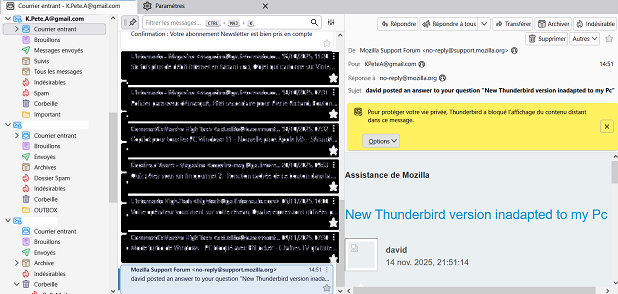
Thanks for your answer. As a matter of fact, I did not accept the request for upgrating T.Bird for long, until I did click on the wrong point... The old version had : on left my accounts, on right, a line with the selected mail / mail box content, and below, a window opening the selected mail. Now, I have 3 windows : - Left : the mail boxes - "middle" : the list of stocked mails - "right" (when you find the way to see them...) : the selected mail, so formated that it's almost impossible to read it ! If I'd been clear, the change is real ! But I did may be refused the upgrating quite for a long time, and this version might be some monthes old. Any how, on my 14' screen, it's unusable ! Plus, I did a mistake in changing the organisation of the central windows, witch is blocked with the alphabetic order when I want them to be organised through there date / age ... Impossible to get back from alphabetic to age order ! So I would like to re-install the old version that was perfectly adapted to my screen and ... myself ! I add a sceen copy for you to see. For your french, don't worry, unfortunatly I see every day french desapearing in my own country ! People are using less and less words, but, that's an other problem... Thanks again for your help.
Valgt løsning
Suggestion: - your prior setup was view>layout>classic
- you currently have view>layout>vertical and you could easily just change from vertical to classic. If menu bar is now visible, press the Alt key first.
Prior to switching back, I encourage installing the addon, folder pane toggler, as it lets you easily hide or show the leftside folder pane. Often, it isn't used, and hiding it opens up lots of screen space.
YES....... Thanks a lot ! As a matter of fact, I never realy hade to modified the way the openning of TBird was done. By the way it was done, it was simple & easy to use, and no release did change the way it looked . The last release changed things that I use "for ever" in a certain way... Any how, you showed me the way and I found the little "botton" where to go back to "classic" ! Thanks again !!! Ah... getting old... I did put my hands on a computer in ... 1970 ! I was in an engineering school, and we hade the chance to work by our own on a computer. Fortran, and each line of the program was on a perforated card... As the song says "Yesterday, when I was young..." ! Anyhow, thanks a lot for your help ! If you come to France, in order to exercise your french, give me a sign ! Will be my turn to help ! ;-))
I'm glad all is well. I was programming in assembler and COBOL in 1970. Yep, on punch cards. Nice memories. Thanks for sharing. :)
We probably did our studies in the same years ! If by any chance, your way passes through France, I'll be more than happy to be able to thank you face to face. Thanks again, and have nice days ! Pierre.