

This thread was archived.
Jei jums reikia pagalbos, užduokite naują klausimą.

Archyvinta
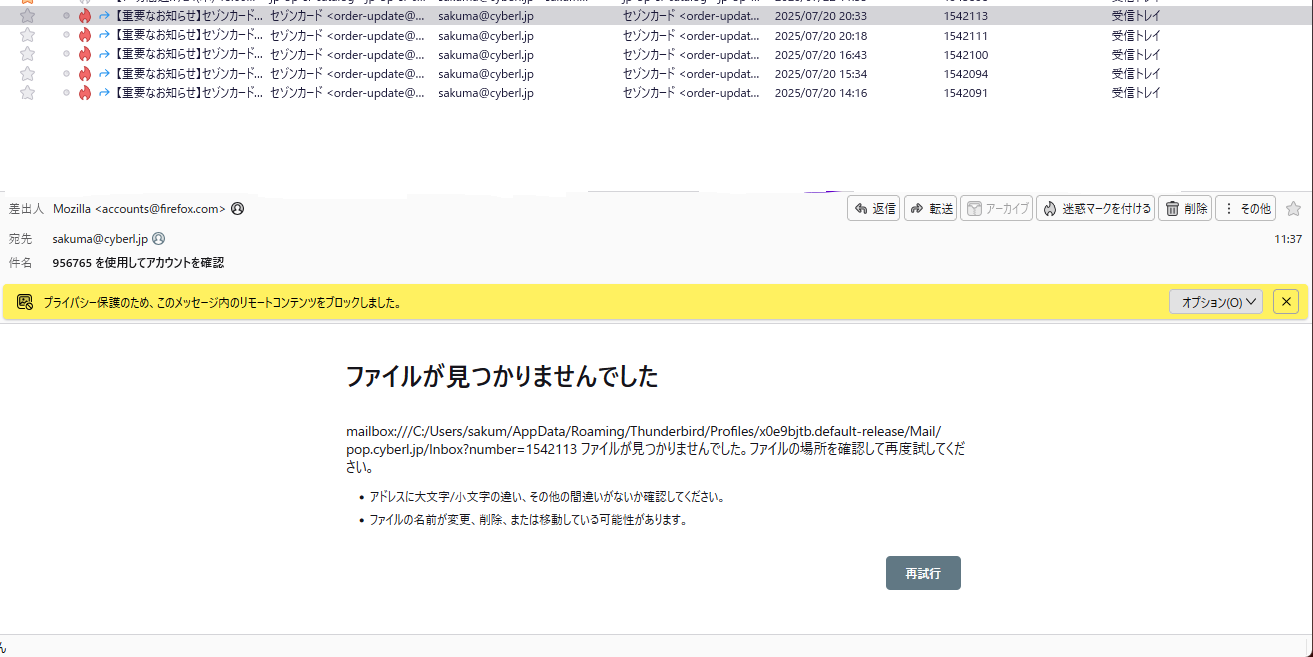
「ファイルが見つかりませんでした」表記のメールが消えない

ファイルが見つかりませんでした。ファイルの場所を確認して再度試してください。
   アドレスに大文字/小文字の違い、その他の間違いがないか確認してください。
   ファイルの名前が変更、削除、または移動している可能性があります。
メッセージのコピーはこちら mid:20250720193325552457@saisoncard.co.jp
上記のメッセージが表示されますが、削除できません。 ローカルmailbox内に保存もされていません。 Trashも作り直しましたが無理でした。 差出人は最新のメールアドレスになっていてバグっています。
消す方法を教えてほしいです。
-------------------
ファイルが見つかりませんでした。ファイルの場所を確認して再度試してください。
アドレスに大文字/小文字の違い、その他の間違いがないか確認してください。
ファイルの名前が変更、削除、または移動している可能性があります。
メッセージのコピーはこちら
mid:20250720193325552457@saisoncard.co.jp
------------------
上記のメッセージが表示されますが、削除できません。
ローカルmailbox内に保存もされていません。
Trashも作り直しましたが無理でした。
差出人は最新のメールアドレスになっていてバグっています。
消す方法を教えてほしいです。
All Replies (1)

TRANSLATION/翻訳
"File Not Found" Email Won't Delete
File not found. Please check the file location and try again.
  Check the address for uppercase/lowercase differences or other mistakes.
  The file may have been renamed, deleted, or moved.
A copy of the message is here.
The above message is displayed, but I cannot delete it. It is also not saved in the local mailbox. I even recreated the Trash folder, but it didn't work. The sender's address is showing the latest email address and seems to be bugged.
I would like to know how to delete it.
RESPONSE/応答
I cannot help. I have translated to make it easier for other people to help.
お力にはなれません。ほかの人が助けやすいように翻訳しました。