


Thunderbird Fails to Create or Support Junk/Spam Folder for Gmail Workspace Account (Critical Issue)

Hello,
I am requesting immediate assistance with a critical and persistent problem in Thunderbird.
For my Google Workspace account max@dantanas.com
, Thunderbird refuses to create or recognize a Junk/Spam folder. This is not a cosmetic issue — it directly affects email safety, filtering, and daily usability.
Summary of the Issue
Thunderbird does not automatically create a Junk or Spam folder for this account.
Attempts to manually create a Junk or Spam folder fail or are ignored.
Thunderbird’s junk filtering settings for this account are disabled or inaccessible, making filtering impossible.
Other clients (Gmail web, Outlook, mobile apps) create and use a Spam folder normally, which shows the problem is specific to Thunderbird.
This problem has persisted across restarts, folder repairs, and full account removal/re-addition.
Why This Is Critical
Without a Junk/Spam folder, Thunderbird cannot move suspected spam anywhere, leaving the inbox vulnerable.
The built-in adaptive junk filter becomes unusable.
Thunderbird does not comply with Gmail’s standard IMAP folder structure.
This issue prevents Thunderbird from functioning as a secure, reliable mail client for this account.
Steps Already Attempted
Removed and re-added the account multiple times.
Forced folder synchronization.
Repaired folders.
Reset folder permissions in Gmail.
Verified IMAP settings (X-GM-EXT-1, special-use flags, etc.).
Tested other devices — only Thunderbird fails.
Expected Behavior
Thunderbird should automatically recognize Gmail’s [Gmail]/Spam folder as the Junk folder OR allow me to assign one manually.
Instead, Thunderbird behaves as if the account is not permitted to have a Junk folder at all, which is incorrect and breaks essential functionality.
Request
I need help determining:
Why Thunderbird is refusing to create or map a Junk/Spam folder for my Google Workspace domain.
Whether there is a known bug with Gmail Workspace integration that causes Junk folder support to fail.
How to force Thunderbird to recognize or create a valid Junk folder.
Whether this issue requires special IMAP flags, folder mapping changes, or intervention from Thunderbird developers.
This is not a minor inconvenience — it prevents Thunderbird from acting as a secure or usable email client for this account. I would appreciate prompt assistance or escalation.
Thank you, Max Makowski max@dantanas.com
All Replies (7)
This sounds like an issue for your sys admin.
Thunderbird never has it's junk setting disabled unless the system administrator sets it up that way. I have not had any reason to investigate how these corporate settings are used or managed for more than 10 years. But on windows policies are the control measure of choice I understand.
BTW Thunderbird does not create any folders for an IMAP account when the account is first setup, they are created based on offerings from the server. As it synchronizes those offered by the server, it may well be that someone has disabled the setting to offer spam as an IAP folder with Google. I would guess it would be unlikely Thunderbird would subscribe the spam folder if it's spam settings are disabled. There would be nothing to prompt the subscription. Have you tried right clicking the account in the folder pane and selecting subscribe from the offered menu?
Check this link (it is to a free google account, but I think workspaces offers the same thing. https://mail.google.com/mail/u/0/#settings/labels Gmail only requires the inbox to be offered via IMAP, perhaps your administrator has limited folders offered at google directly.
Yes, I did. And I sent images. I have also included a different account which HAS the spam/junk folder which I set up the exact same way. So, in short, you are saying it is a gmail problem. If so, I don't know how to navigate that site either. So I am hoping in your ten years you know and can explain to me how to do it in gmail. The second image is what I get after I seriously click on dantanas.com then click subscribe. Much appreciated.
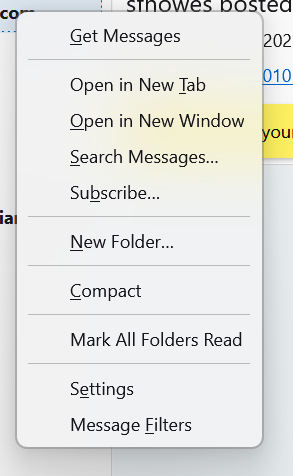
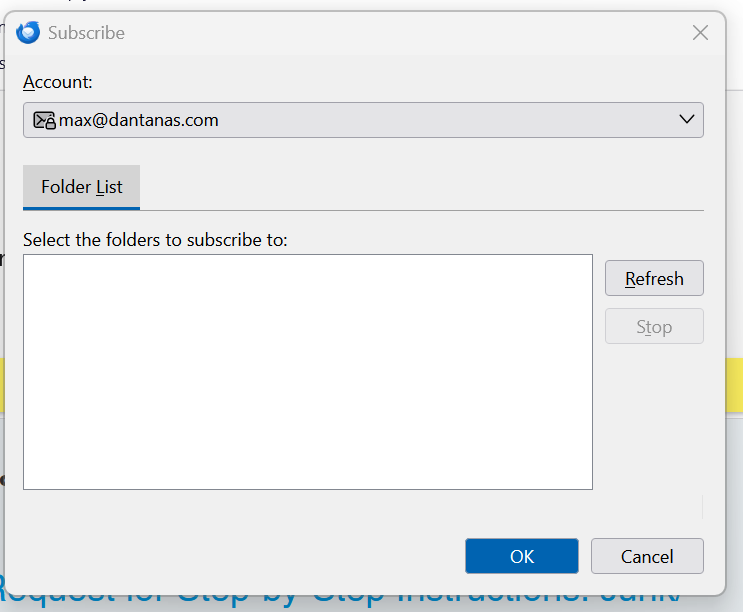
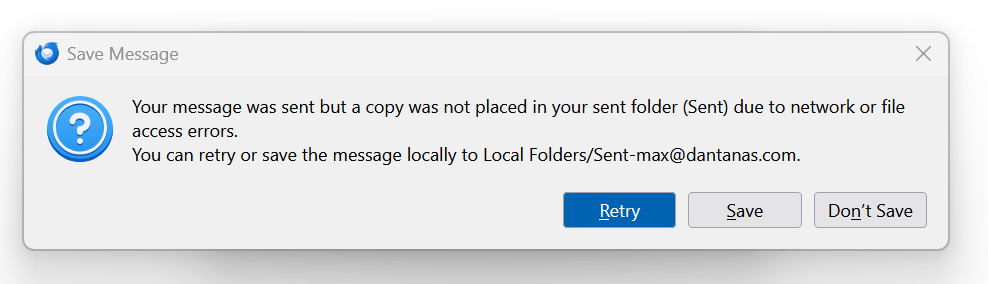
I also do not receive messages. I can send but they do not get saved in the save box.
Hello Matt,
Yes, I did click the link, and I also posted images showing the Gmail label settings for this account. The Spam label is enabled in Gmail, exactly the same as all my other Gmail and Workspace accounts.
I need to emphasize the key point again:
This is the ONLY Gmail/Workspace account in Thunderbird that does NOT show a Spam/Junk folder. All of my other accounts — set up using the exact same steps — show that folder normally.
In addition, this account is also not receiving messages in Thunderbird at all. Messages sent to max@dantanas.com
do not appear in the Inbox, even after repairs, resyncs, or reinstalling the account.
So this is no longer just a Junk folder issue — Thunderbird is failing to synchronize basic IMAP folders for this account only.
This is not caused by:
• Gmail settings • Workspace admin controls • IMAP subscriptions • Server restrictions • A provider-side limitation
The account works normally in Gmail webmail and on other devices. The issue appears only in Thunderbird.
I have already tried:
• Subscribe (Spam is not offered) • Removing and readding the account • Comparing Gmail IMAP label settings with working accounts • Repairing folders • Rebuilding the folder list • Resetting junk settings • Confirming that other Gmail/Workspace accounts receive mail and display Spam correctly
None of these change the outcome: Thunderbird does not display the Spam/Junk folder and does not receive any messages for this account.
What I need is a clear, step-by-step Thunderbird-specific procedure that forces:
Thunderbird to resync all IMAP folders for this account
Thunderbird to recognize and map Gmail’s Spam folder
Thunderbird to restore normal mail reception for this account
If this issue is outside your scope or if someone else has deeper experience with Google Workspace behavior in Thunderbird, please feel free to pass this case to a colleague who may be better positioned to help.
Thank you, Max
Hi Max,
I appreciate your wish for step-by-step instructions to fix the problem, and I expect that people here will do their best to provide them. First, people are trying to understand the cause of this unusual problem.
Matt and sfhowes (who responded to this same question that you posted in a different discussion) know much more than I do. I may be able to help diagnose the problem by trying to be thorough. So …
1. Are the incoming server settings for this account the same as your normally functioning gmail accounts (other than user name)? Check settings by going to account settings and clicking on server settings under each account. Server name, port, connection security, authentication method -- all the same? User name is always the full e-mail address?
2. While you are in account settings, click on "Copies & Folders" in the left pane. Enable "Place a copy in:", then select "Other". Click on the drop-down list that is right of the "Other" option. Hold the mouse pointer over the name of the troublesome account. Which folders are listed?
3. Leave account settings and return to the main tab. Right click again on the account name in the folder pane, as you did before, and click on "Subscribe". In the window that appears next, click on "Refresh". Do any folder names appear?
4. What steps did you take to re-add the account? Did you see any error messages or anything unusual in that process?
5. Is there any difference in how your gmail accounts are administered? Are they all at your own domains? If you had to create the MX records, are they correct for this account? Did the page that Matt referred you to have any useful information about administration of these accounts?
6. Do you see any error message when trying to receive messages in this account?