


Windows 10 reached EOS (end of support) on October 14, 2025. If you are on Windows 10, see this article.

Search Support

Avoid support scams. We will never ask you to call or text a phone number or share personal information. Please report suspicious activity using the “Report Abuse” option.

Learn More

Mulongo oyo etiyamaki na archive. Tuna motuna mosusu soki osengeli na lisalisi

Can't Send or Receive Email After Update May 2024

  • 1 eyano
  • 0 eza na bankokoso oyo
  • 72 views
  • Eyano yasuka ya Einvlieger
  • Eza archivé

Please provide guidance on how to fix this issue. When I attempt to transmit an email I get the error: "Add security exception, Location: smtp.aol.com:465 This site attempts to identify itself with invalid information." When I Confirm Security Exception I get: "Send Message Error: Sending of the message failed. Peer Certificate issuer is not recognized. The configuration related to smtp.aol.com must be corrected." I cannot receive any emails either. No error message just no new emails since 5/29/2024. I have verified the settings needed and checked my system that they are correct. As this happened after an update I think this is your bug.
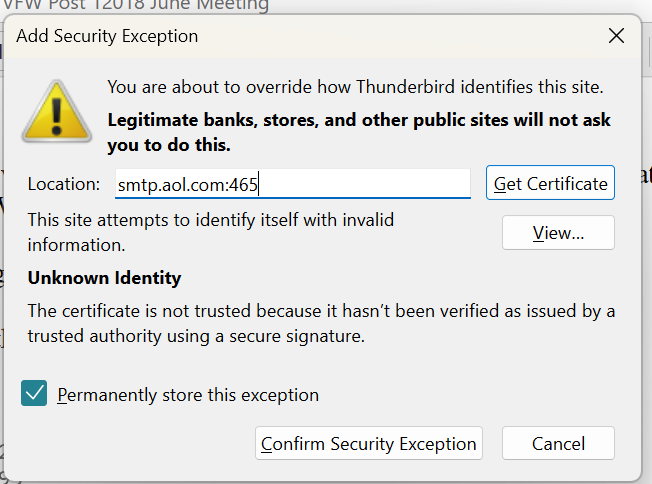
Please provide guidance on how to fix this issue. When I attempt to transmit an email I get the error: "Add security exception, Location: smtp.aol.com:465 This site attempts to identify itself with invalid information." When I Confirm Security Exception I get: "Send Message Error: Sending of the message failed. Peer Certificate issuer is not recognized. The configuration related to smtp.aol.com must be corrected." I cannot receive any emails either. No error message just no new emails since 5/29/2024. I have verified the settings needed and checked my system that they are correct. As this happened after an update I think this is your bug.
Bafoto sur écran jointes

All Replies (1)

Never mind. Evidentially Norton needed hand holding to allow normal email traffic. Sigh. Thank anyway.