


Thunderbird

The default amount of entries for "all day" events seem to be limited to 5 items. Is there a way to increase this? I sometimes have more than 5 "all day" events on a particular day, and the excess events are then "hidden" on the calendar.
The default amount of entries for "all day" events seem to be limited to 5 items. Is there a way to increase this? I sometimes have more than 5 "all day" events on a particular day, and the excess events are then "hidden" on the calendar.
모든 댓글 (3)
They aren't hidden, but there is a scroll bar on the right to view all the events (see picture).
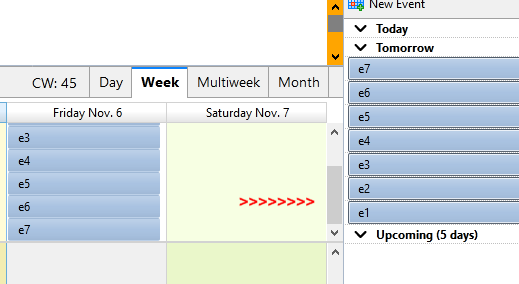
This sort of solves the issue. I had not been clicking on the "Today" pane at the the lower right of the calendar. I will do this henceforth; however, I wish I could just expand the daily all day events at the top of each calendar day to include more than 5 events at a glance. Thanks so much for your reply.
Events & Tasks/Find Events is another option; press Alt if the Menu Bar with E & T is hidden.