


Ok. I am in permanant private browsing mode. Do not know how I got there but how do I get out? so I can just click on private browsing I ned it?

somehow I am in private browsing mode permanently. When I click on file ans go to 'new private window", I get a new window but no little mask in the upper right. I understand this means I am always in private browsing mode. How do I turn this feature off so I can open a private window only when I need one?
모든 댓글 (4)

선택된 해결법
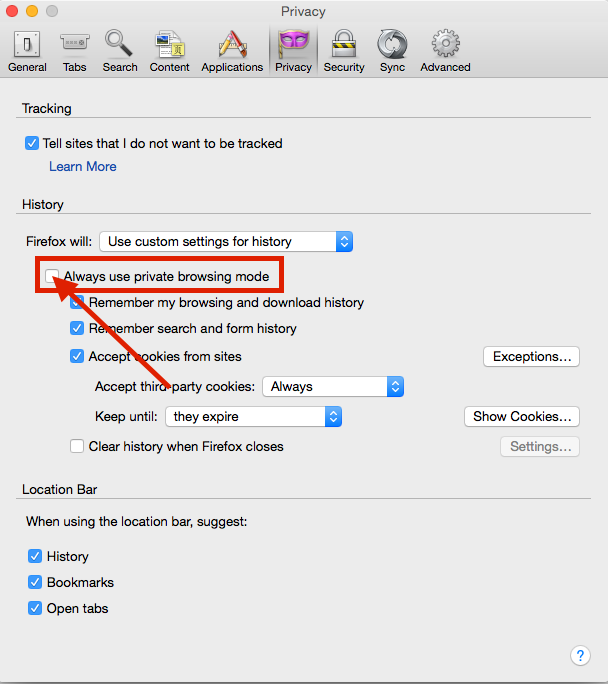
Hello Smokenguns, Thank you for asking!! It looks like you are using custom settings for history, and have an option enabled locking you in permanent private browsing mode. Here's how to get out: Go to Menu>Settings>Privacy From there, uncheck the box that says "Always Use Private Browsing Mode". See the screenshot if you can't find it.
Have a great day!!
Jon

smokenguns said
somehow I am in private browsing mode permanently. When I click on file ans go to 'new private window", I get a new window but no little mask in the upper right. I understand this means I am always in private browsing mode. How do I turn this feature off so I can open a private window only when I need one?
Jon Gregory said
Hello Smokenguns, Thank you for asking!! It looks like you are using custom settings for history, and have an option enabled locking you in permanent private browsing mode. Here's how to get out: Go to Menu>Settings>Privacy From there, uncheck the box that says "Always Use Private Browsing Mode". See the screenshot if you can't find it. Have a great day!! Jon
Well, so how is that my tabs always open in private browsing since this afternoon, and I don't have custom settings for history and there's no "Always Use Private Browsing Mode" option anywhere? There's nothing new in the options window, the tab menu doesn't say a thing about provate browsing on/off and about:config doesn't let me customize either?
I don't want private browsing!
To see all History and Cookie settings, choose:
- Tools > Options > Privacy > Firefox will: "Use custom settings for history"
What is the value of the browser.privatebrowsing.autostart pref on the about:config page?
Start Firefox in Safe Mode to check if one of the extensions (Firefox/Tools > Add-ons > Extensions) or if hardware acceleration is causing the problem.
- Switch to the DEFAULT theme: Firefox/Tools > Add-ons > Appearance
- Do NOT click the Reset button on the Safe Mode start window
- https://support.mozilla.org/kb/Safe+Mode
- https://support.mozilla.org/kb/Troubleshooting+extensions+and+themes
You can check the target line in the Firefox desktop shortcut (right-click: Properties) to make sure that nothing is appended after the path to the Firefox program.