


Links opening in new tab
Links on iPhone open in new tab that has to be closed rather than return using back navigation. I saw bug reports about this, but they affect iPad users with keyboard while I have vanilla iPhone. The same happens on Vivaldi so IMHO this is underlying iOS browser engine bug affecting all custom browsers.
Chosen solution
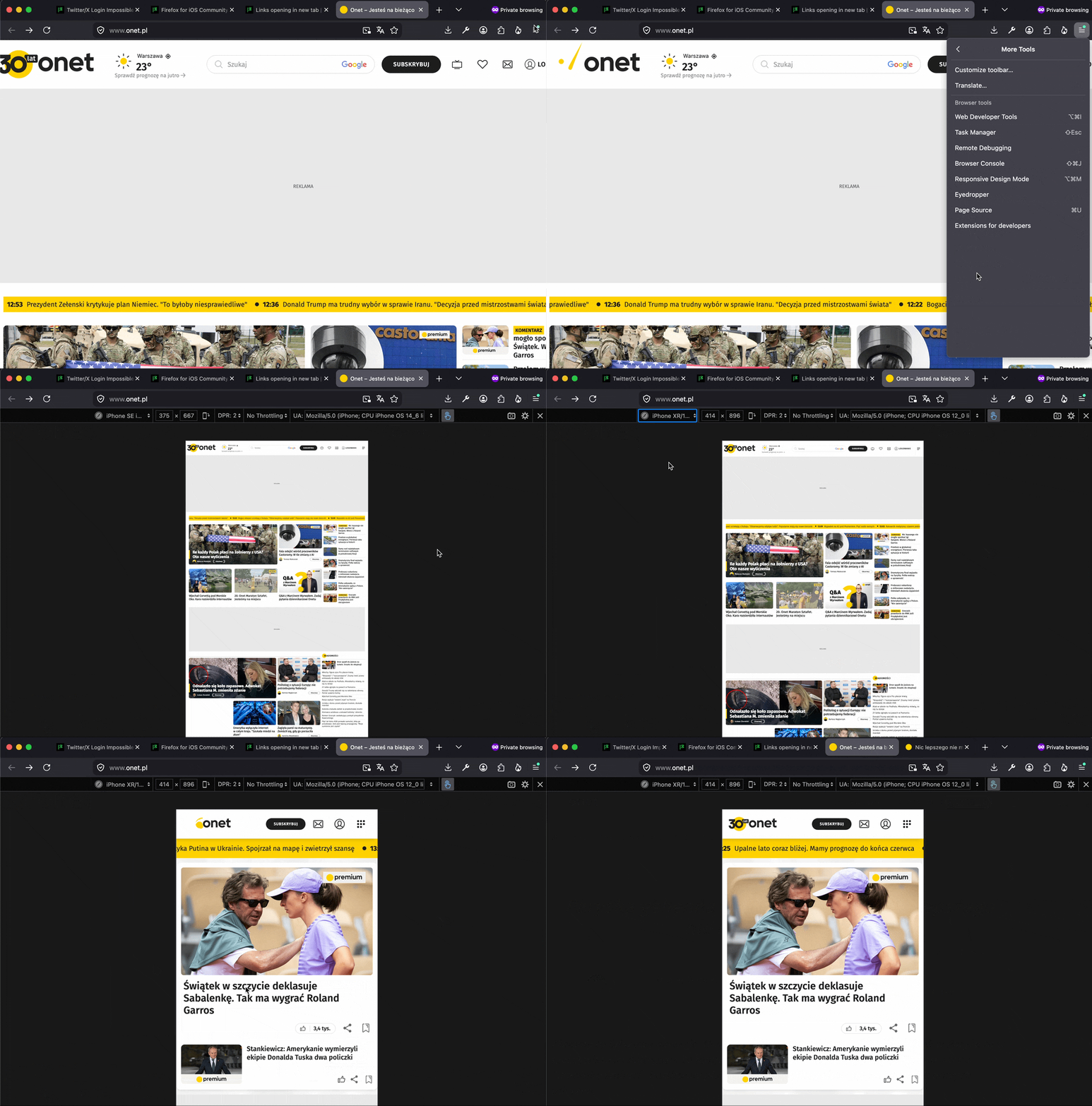
To give you some insight — I've attached a GIF showing how you can verify yourself it has nothing to do with the browser, but it's the site deciding when it sees a mobile/touch/iPhone identification, that changes the behavior and starts opening new tabs on its own — here demonstrated by simulating mobile site just from desktop Firefox:
(where you can see the site change on the reload, presumably switching behaviors too to adapt to mobile delivery)
Read this answer in context 👍 0All Replies (7)
Hi Morvael,
Can you share the bug report you referenced above?
It appeared with iOS 26 I guess: https://connect.mozilla.org/t5/discussions/firefox-ios-opening-all-links-in-new-tab-os26-beta/td-p/103304
The bug report (one of many) is here: https://github.com/mozilla-mobile/firefox-ios/issues/32463
For me it happens on https://www.onet.pl
Please report this to Onet.pl operators. This is how their site is coded. There is no bug involved, just a messy site.
One tip though: The single-tab Firefox Focus on iOS will be able to avoid this, so you may want to try using that for the site above, to work around their navigation choices.
Reported to the portal. However if other browsers or Firefox on other platforms isn’t doing that, why doing it on iOS should be acceptable?
Startpage.com does that, DDG at some point did it, believe these can be now set in their prefs (if you allow cookies — if not, they will use their defaults, which e.g. for Startpage is always open results in new tabs). This is a web platform functionality that's up to the site operator to decide and weigh in their potential retention vs. user frustration.
Chosen Solution
To give you some insight — I've attached a GIF showing how you can verify yourself it has nothing to do with the browser, but it's the site deciding when it sees a mobile/touch/iPhone identification, that changes the behavior and starts opening new tabs on its own — here demonstrated by simulating mobile site just from desktop Firefox:
(where you can see the site change on the reload, presumably switching behaviors too to adapt to mobile delivery)
Modified by jbr