


Windows 10 reached EOS (end of support) on October 14, 2025. If you are on Windows 10, see this article.

Avatar for Username

ძიება მხარდაჭერაში

ნუ გაებმებით თაღლითების მახეში. აქ არავინ უნდა მოგთხოვოთ ტელეფონზე დარეკვა, შეტყობინების გაგზავნა ან პირადი მონაცემების გაზიარება. რამე საეჭვოს შემჩნევისას გთხოვთ გვაცნობოთ „დარღვევის მოხსენებით“.

ვრცლად

2FA on firefox.com keeps disabling itself

  • 1 პასუხი
  • 0 მომხმარებელი წააწყდა მსგავს სიძნელეს
  • 168 ნახვა
  • ბოლოს გამოეხმაურა adrien

I've been trying to set up 2fA on my firefox account, the whole process seems to work, I downloaded the backup codes and entered one to confirm and then got confirmation that 2FA was enabled (see screenshot). However, after reloading the page 2fA is shown as being disabled and indeed if I try to log out then in again I'm not asked for a code. I've tried this a couple of times now and it does the same every time. The auth app I'm using is Aegis.

Does anyone knows why this is happening ? Thanks.

[Edit: I just saw that after each time I tried to set it up, in "recent account activity" I add an error saying "Two-step authentication failed" which doesn't really makes sense...]
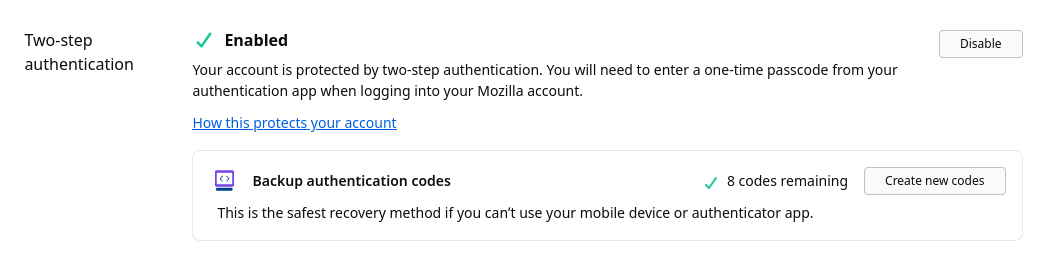
I've been trying to set up 2fA on my firefox account, the whole process seems to work, I downloaded the backup codes and entered one to confirm and then got confirmation that 2FA was enabled (see screenshot). However, after reloading the page 2fA is shown as being disabled and indeed if I try to log out then in again I'm not asked for a code. I've tried this a couple of times now and it does the same every time. The auth app I'm using is Aegis. Does anyone knows why this is happening ? Thanks. [Edit: I just saw that after each time I tried to set it up, in "recent account activity" I add an error saying "Two-step authentication failed" which doesn't really makes sense...]
მიმაგრებული ეკრანის სურათები

ჩასწორების თარიღი: , ავტორი: adrien

ყველა პასუხი (1)

I had Firefox running on another computer and this instance was also logged on my account, and it seems it's what was causing these failed login attempts, weird... I logged out on the other computer, re did the 2FA setup and this time it worked....