


サポート詐欺に注意してください。 私たちはあなたに通話やショートメッセージの送信、個人情報の共有を求めることはありません。疑わしい行為を見つけたら「迷惑行為を報告」からご報告ください。

詳しく学ぶ
Open

How to fix PDF page numbers and remove parentheses

christine80

I use Firefox to read a lot of PDFs. Some of the documents have their own internal sections embedded into them. Because of this, Firefox PDF organizes the page numbers in a strange way. Instead of just page 1 through page 112, each section will have its own numbers starting over from 1. Thus, when I try to skip to page 3, it doesn't actually bring me to page 3 of the entire document, it brings me to page 3 of whatever section I'm in.

A large part of my job is digging through documents, and I don't have time to try and figure out which section of the document I'm in. I need page 3 to be the actual page 3. And I refuse to go back to Edge or Adobe.

I know there's a way to fix this in about:config because I've done it before on a previous computer, but I recently got a new computer and all my settings are gone. How to I turn on just regular page numbers in about:config?
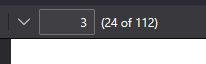
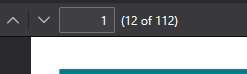
I use Firefox to read a lot of PDFs. Some of the documents have their own internal sections embedded into them. Because of this, Firefox PDF organizes the page numbers in a strange way. Instead of just page 1 through page 112, each section will have its own numbers starting over from 1. Thus, when I try to skip to page 3, it doesn't actually bring me to page 3 of the entire document, it brings me to page 3 of whatever section I'm in. A large part of my job is digging through documents, and I don't have time to try and figure out which section of the document I'm in. I need page 3 to be the actual page 3. And I refuse to go back to Edge or Adobe. I know there's a way to fix this in about:config because I've done it before on a previous computer, but I recently got a new computer and all my settings are gone. How to I turn on just regular page numbers in about:config?

添付されたスクリーンショット

投稿に返信するには あなたのアカウントにログイン する必要があります。まだアカウントをお持ちでなければ、新しい質問を開始 してください。