


Seeking to create filter to auto delete msgs from a sender

I want to auto delete all msgs from a specific sender. I want to create a filter which will delete them so I won't see them at all (auto deleted). I tried to create one but could only move the messages frm the sender to the spam folder. But I don't even want to see them there. I want them gone automatically.
How do I do this?

選ばれた解決策
Two settings that can affect that...
- There's a setting found at <Account Settings | Server Settings | Message Storage | "Empty Trash on Exit">. It would be a bit too brute force for me, but maybe it would be OK for you.
- If you right-click on the Trash folder name in the Folders List pane, and choose "Properties" from the pop-up context menu, one of the tabs is "Retention Policy". If you untick "Use my account settings" you can choose to automatically delete messages based on their age. I've never actually used this feature.
Otherwise, most email providers delete Trash messages after some period of time.
すべての返信 (3)
One of the available filter actions is "Delete". This will send them directly to the Trash folder. Are you using that? See the attached image.
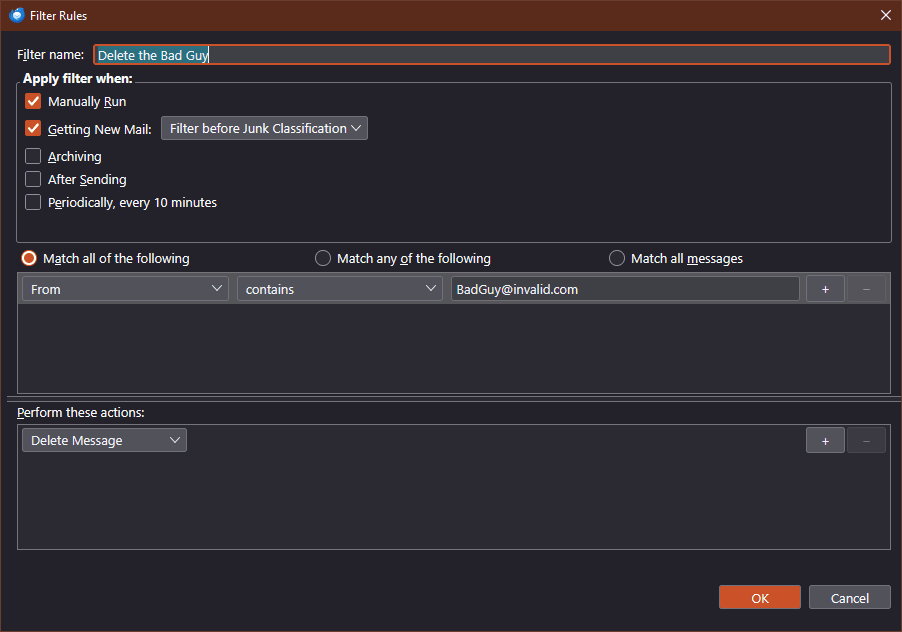
I didn't see it among all the drop down options. Thanks for pointing it out. I've set up a 30 day retention setting so I don't even have to see the msg!
この投稿は Richard Silverstein により に変更されました
選ばれた解決策
Two settings that can affect that...
- There's a setting found at <Account Settings | Server Settings | Message Storage | "Empty Trash on Exit">. It would be a bit too brute force for me, but maybe it would be OK for you.
- If you right-click on the Trash folder name in the Folders List pane, and choose "Properties" from the pop-up context menu, one of the tabs is "Retention Policy". If you untick "Use my account settings" you can choose to automatically delete messages based on their age. I've never actually used this feature.
Otherwise, most email providers delete Trash messages after some period of time.