Google search bar
Recently I have seen the following appended onto the Google search bar :zx=1756239204128&no_sw_cr=1
Anyone know what this is?
Recently I have seen the following appended onto the Google search bar :zx=1756239204128&no_sw_cr=1
Anyone know what this is?
i cant reach https://myaccount.esbnetworks.ie/ site. Can some one help me
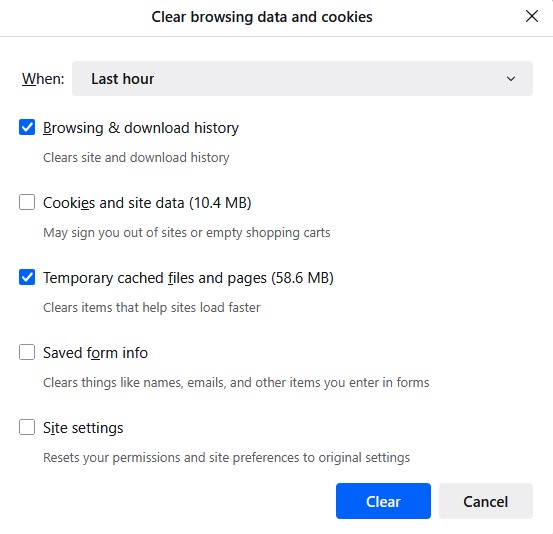
Ok so I usually choose these option to remember history and from time to time delete Browsing & download history and Temporary cached files and pages. https://assets… (gụkwuo)
Ok so I usually choose these option to remember history and from time to time delete Browsing & download history and Temporary cached files and pages.
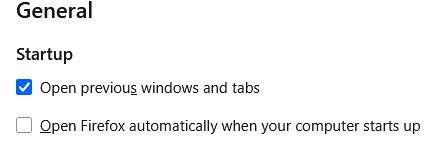
Note: I have "Open previous window and tabs" ticked in general settings which also has a restore previous session option in the history menu. This brings back previous session with tabs etc as is when I close FF. https://assets-prod.sumo.prod.webservices.mozgcp.net/media/uploads/images/2025-06-28-08-45-51-cf2daf.png
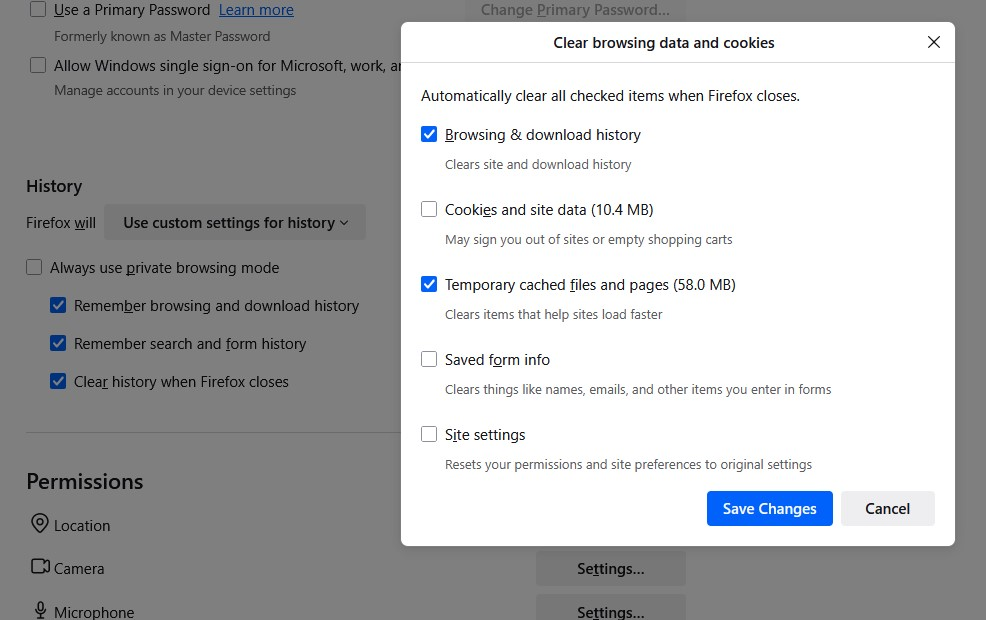
I thought I could automate this on exit but don't think its working right. So I change the option to "use custom settings for history" and tick all three options:
Remember browsing and download history Remember search and form history Clear history when Firefox closes For "Clear history when Firefox closes" I ticked Browsing & download history and Temporary cached files and pages. https://assets-prod.sumo.prod.webservices.mozgcp.net/media/uploads/images/2025-06-28-08-45-43-b10213.png
The issue is the restore session option is missing and FF opens with all previous tabs gone. I am frankly not even sure what else is missing such as cookies, site data etc. Is this meant to work like so?
Make a search where I can ask my question with out having to be intimately with ALL options available.
Tell me where is the REFRESH button on Firefox,
I am running an iMac that is about eight years old.This afternoon my Firefox browser was taken over by a "warning" from "MacOS security center" that I should go to THEIR … (gụkwuo)
I am running an iMac that is about eight years old.This afternoon my Firefox browser was taken over by a "warning" from "MacOS security center" that I should go to THEIR macOS support site to get my system unfrozen. The number they give is 1-877-xxx-xxxx. I cannot get this intruder to go away, even by restarting the computer.
Since 141 update I have constant problems with youtube. Page does not load at all or loads only partially. Icons on sidebar are broken, youtube logo is black. I tried dis… (gụkwuo)
Since 141 update I have constant problems with youtube. Page does not load at all or loads only partially. Icons on sidebar are broken, youtube logo is black. I tried disabling ublock and greasemonkey but it did not help. Refreshing page multiple times and using ctrl+f5 sometimes helps but issue returns often, every few videos/visits. Clearing cookies helps but only for few hours and then issue returns.
Is it related to WebGPU support that was supposed to be added in 141? Can I disable it somehow?
Is it possible to view the contents of two tabs simultaneously? I have been in many situations where it would be very helpful to view two different web pages side-by-side… (gụkwuo)
Is it possible to view the contents of two tabs simultaneously? I have been in many situations where it would be very helpful to view two different web pages side-by-side to more easily make comparisons. Opening a new window and viewing them side-by-side is similar but being able to pick two tabs to view in one browser would be a lot faster and easier to control.
I took a look today and I had 237 MB in cookies! This was after clearing the cache of all files. I've only had this (new) machine a couple months. Short version: Sites h… (gụkwuo)
I took a look today and I had 237 MB in cookies! This was after clearing the cache of all files. I've only had this (new) machine a couple months.
Short version: Sites have "cookies" from 200kb to as much as 34MB! For many of the sites over 3MB I have no account and have visited them only briefly.
To be clear, I don't care about the space being used. It's trivial. But what the heck is FFox storing and calling it "cookies"? Last I checked, a site was still limited to 4K size cookies and perhaps 50 per domain. So how are we getting to MB+ sized "cookies" per site? Again, the cache was cleared, so what's left aside from trivial cookie files of <4KB?
Desktop; Windows 11; Firefox 139.0.4 64 bit

On certain websites , the audio and video still auto play even though the option, "AutoPlay" is blocked for both audio and video. Please see the attached screenshot whi… (gụkwuo)
On certain websites , the audio and video still auto play even though the option, "AutoPlay" is blocked for both audio and video.
Please see the attached screenshot which shows that auto play is blocked, it is circled in red. While the video has auto played, circled in orange with a timestamp of 17 seconds being played prior to it being manually stopped.
Please fix this issue.
Hii. Amazing browser tho, whenever i pin something on top or chuck it into essentials - when i close that tab - it disappears (and reappears on browser restart) - i could… (gụkwuo)
Hii. Amazing browser tho, whenever i pin something on top or chuck it into essentials - when i close that tab - it disappears (and reappears on browser restart) - i could not locate any setting pertaining to essentials that would stop that behavior (ideally when i close the pinned/essential tab i would love it to stay there as a bookmark - anyone know of a way to achieve this?
The blue star is not working since I cleared my caches.
I do not see a setting to remove the redundant tab listing. This takes up about 2" in a vertical column of the screen. I want the RH list removed. See attached.
I got a new PC and tried to import my Firefox bookmarks. But on the right side menu when you click bookmarks, it only show recent ones which actually aren't recent at all… (gụkwuo)
I got a new PC and tried to import my Firefox bookmarks. But on the right side menu when you click bookmarks, it only show recent ones which actually aren't recent at all. How do you get that selection to show all of the bookmarks instead of recent?
Also I'm still getting a prompt underneath the address box to manage bookmarks and I can't get rid of it. How do I clear that out?
i attached a pic when i put my curser on the firefox icon in my task bar.... i changed my device while ago... previous device show windows not the all tabs... can i fix i… (gụkwuo)
i attached a pic when i put my curser on the firefox icon in my task bar.... i changed my device while ago... previous device show windows not the all tabs... can i fix it... i searched everywhr in settings but i couldnt find any thing related to it....
I am starting to use the new utility which allows me to group tabs. But I would like to see only the name of the group and not the whole list. How can I collapse the list… (gụkwuo)
I am starting to use the new utility which allows me to group tabs. But I would like to see only the name of the group and not the whole list. How can I collapse the list of tabs which belong to a group leaving only the group name shown. Then with a click I should be able to see the corresponding list of tabs if I need it. Saving and closing a group is not a solution, as the group disappears from the Sidebar. Thank you for your help. Best regards Ray Ballisti [edited] @bluewin.ch Switzerland
second time asked pay attention and answer the question!!!!!!!!!!!!!!!!!!!!!!!!!!!! how does one stop private browsing and then when wanted reset back to private simple q… (gụkwuo)
second time asked pay attention and answer the question!!!!!!!!!!!!!!!!!!!!!!!!!!!! how does one stop private browsing and then when wanted reset back to private simple question now answer
Running Firefox 133.0.3 on Windows 10 22H2 The last week or so, when I try to download my photos from iCloud, Firefox blocks the download, saying it contains a virus or m… (gụkwuo)
Running Firefox 133.0.3 on Windows 10 22H2
The last week or so, when I try to download my photos from iCloud, Firefox blocks the download, saying it contains a virus or malware. Of course it does not - it's a zip file of screenshots! Running a scan on the folder once unzipped confirms there is nothing malicious in it. Can you fix that please?
What is the small medium hotel and big hotel?
Netflix says I need the the latest version of firefox. At the top of the screen it says "Firefox is installing components needed to play the audio or video on this page. … (gụkwuo)
Netflix says I need the the latest version of firefox. At the top of the screen it says "Firefox is installing components needed to play the audio or video on this page. Please try again later"
As far as I can tell nothing is installing and I need to actually do something to resolve this issue. Unfortunately I don't know what. Please help me resolve this issue.