


Firefox has too much space between text

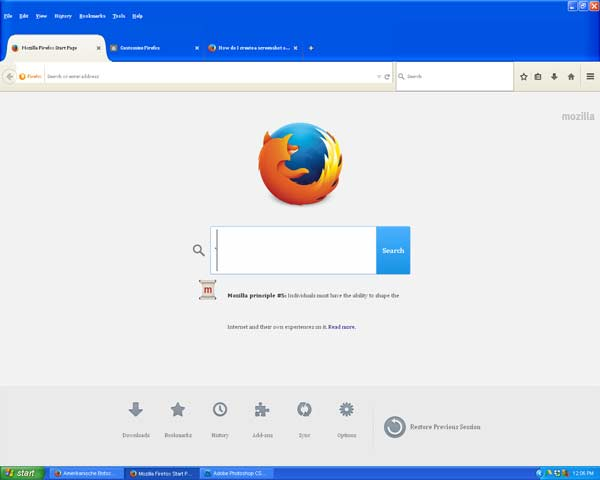
Something changed in my Firefox display. It is now showing a large amount of space between text. Also, the fields for data entry have increased their size. Text size is okay. Thank you for your help.
Wšě wotmołwy (5)
Open firefox then Try Ctrl+c use scroll down in mouse.
Thank you Sriram for your reply. Unfortunately that didn't solve it. Does anything think it could be a problem with the settings in Windows? Although, Google Chrome and Internet Explorer are working properly.
You can try to disable OMTC and leave hardware acceleration in Firefox enabled.
- about:config page: layers.offmainthreadcomposition.enabled = false
You can open the about:config page via the location/address bar. You can accept the warning and click "I'll be careful" to continue.
You can try to disable hardware acceleration in Firefox.
- Tools > Options > Advanced > General > Browsing: "Use hardware acceleration when available"
You need to close and restart Firefox after toggling this setting.
You may have zoomed web page(s) by accident. Reset the page zoom on pages that cause problems.
- View > Zoom > Reset (Ctrl/Command+0 (zero))
Thank you cor-el. I worked through all your suggestions and unfortunately the problem was not resolved. It starts with the Firefox title bar being too big and wasting space. Then there are other anomalies in the way text is displayed. I'm wondering if something in Windows is causing this?
Start Firefox in Safe Mode to check if one of the extensions (Firefox/Tools > Add-ons > Extensions) or if hardware acceleration is causing the problem.
- Switch to the DEFAULT theme: Firefox/Tools > Add-ons > Appearance
- Do NOT click the Reset button on the Safe Mode start window
- https://support.mozilla.org/kb/Safe+Mode
- https://support.mozilla.org/kb/Troubleshooting+extensions+and+themes
You can set the layout.css.devPixelsPerPx pref on the about:config page to 1.0 You can adjust layout.css.devPixelsPerPx starting from 1.0 in 0.1 or 0.05 steps (1.1 or 0.9) to make icons show correctly.
You can open the about:config page via the location/address bar. You can accept the warning and click "I'll be careful" to continue.
Use an extension to adjust the text size in the user interface and the page zoom in the browser window.
You can look at this extension to adjust the font size for the user interface.
- Theme Font & Size Changer: https://addons.mozilla.org/firefox/addon/theme-font-size-changer/
You can look at the Default FullZoom Level or NoScript extension if web pages need to be adjusted after changing layout.css.devPixelsPerPx.
- Default FullZoom Level: https://addons.mozilla.org/firefox/addon/default-fullzoom-level/
- NoSquint: https://addons.mozilla.org/firefox/addon/nosquint/