

Ova tema je arhivirana.
Postavi novo pitanje ako trebaš pomoć.

Solved
Arhivirano
Firefox did an unauthorized update and I would just like to go back to my previous version. How do I find out what that version was?

Firefox did an unauthorized update and I would just like to go back to my previous version. How do I find out what that version was?
Firefox did an unauthorized update and I would just like to go back to my previous version. How do I find out what that version was?
Svi odgovori (3)

Odabrano rješenje
Go into your settings and you can see the update history. see screenshot With this link you can get your desired version. https://ftp.mozilla.org/pub/firefox/releases/
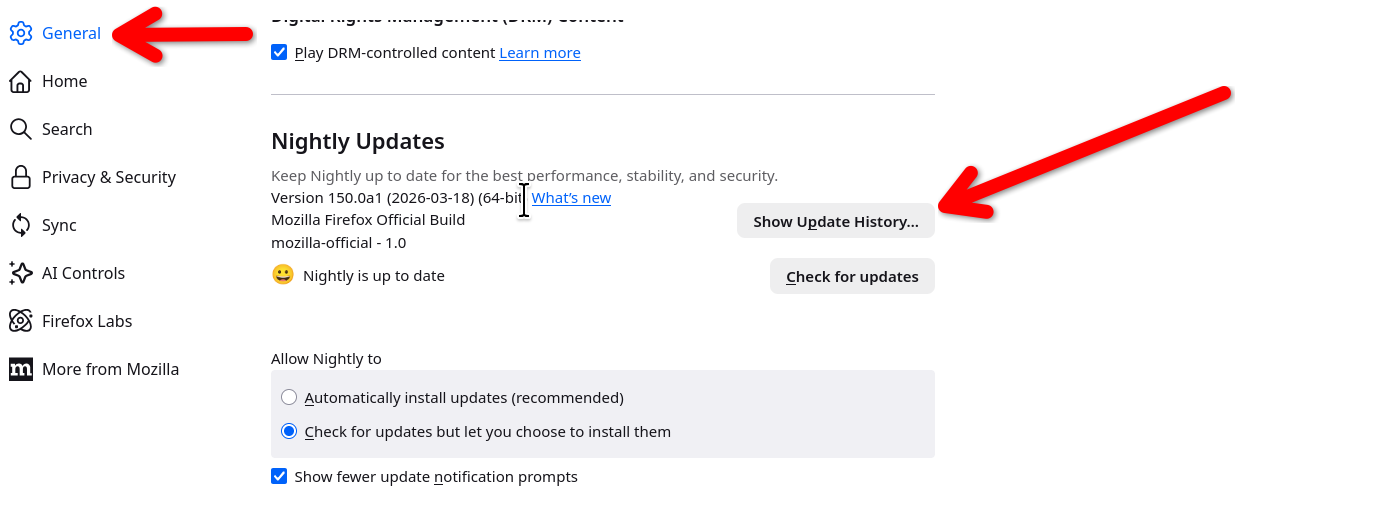
Hello
About, Show fewer update notification prompts https://connect.mozilla.org/t5/ideas/remove-the-update-dot-from-application-menu-on-nightly/idc-p/45397/highlight/true#M26249
For information purposes, about, DisableAppUpdate https://connect.mozilla.org/t5/discussions/upgrade-notification-spam/m-p/64080/highlight/true#M22529

multiple options for 149.0.2. How do i know which one to choose?
Izmjenjeno od jtdmatt