How to you move the imported Chrome bookmarks listed as "from google chrome" so they all spread out on the Firefox toolbar ? (on a mac)
I imported the chrome bookmarks but they won't appear on the toolbar like they do in Chrome. I don't want to have to click the "From Google Chrome" every time I want to go to a bookmark and want to see them on the toolbar like they looked on Chrome. BTW I have a mac. Thanks.
Svi odgovori (3)

Follow the below steps:
- Select "Bookmarks" from the menu at the top and then click on "Show All Bookmarks" (Keyboard shortcut: Command+Shift+B)
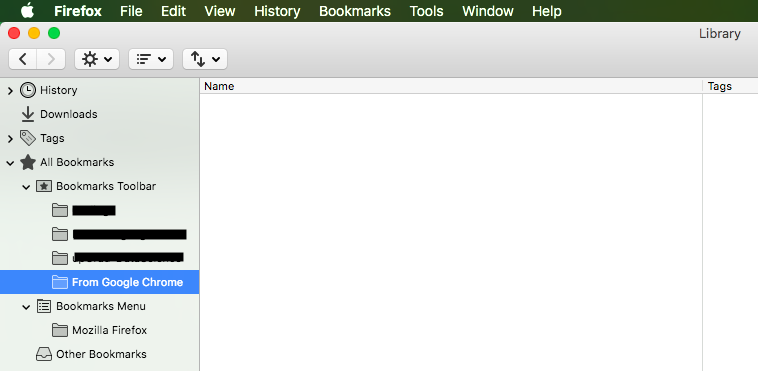
- In the window that opens, select "From Google Chrome" folder in left pane.
- Click on any of the bookmark that you have in that folder and then press the keyboard shortcut (Command+A) to select all the bookmarks in the folder.
- Drag the selection to the folder "Bookmarks Toolbar" in the left pane.
All your bookmarks that were imported from Google Chrome should now be moved from the "From Google Chrome" folder to the "Bookmarks Toolbar" folder. Verify that your imported bookmarks are listed in the toolbar, then you can safely delete the "From Google Chrome" folder from the toolbar, after making sure that it's empty.
Doesn't seem to show the "From Google Chrome" in the left pane as suggested in step #2. I guess I can't attach a screen shot to show you.
Check out the image I've attached. Expand the "Bookmarks Toolbar" if it's collapsed.
BTW, "You can add a screenshot to your forum question by clicking the Browse button below the Post a Reply box. " Source: How do I create a screenshot of my problem?