


New Firefox seems to be missing the ability to create a new bookmark folder--any help is appreciated.

I just updated to the new Firefox, and now, when I try to create a new bookmark folder, the option is no longer there (I can see all my old folders, but the option "New folder," which used to be on the bottom of the drop-down menu, is gone. Nor do I see it anywhere else.
פתרון נבחר
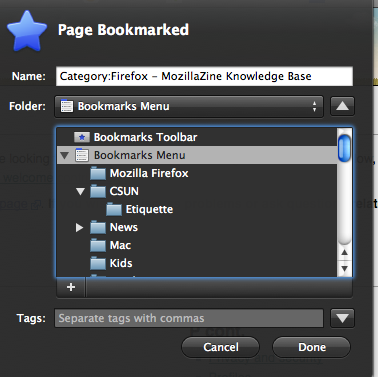
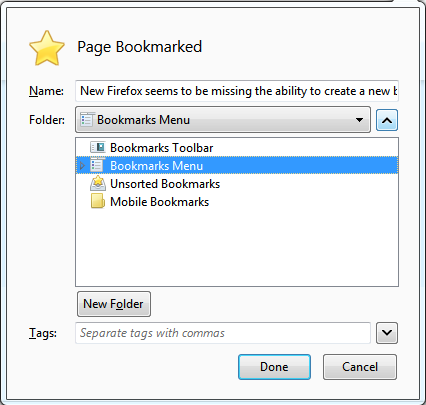
It looks like the theme you're using has changed the "New Folder" button. It's probably the '+' icon below the folder treeView (you can also type Alt+o on the bookmark dialog to create a new folder).
See my screenshot for the placement w/ the Default theme.
Read this answer in context 👍 1כל התגובות (4)
Hi KathyLeslie,
Take a look at the Knowledge Base article Use bookmark folders to organize your bookmarks. There are steps in there that show you how to create new bookmark folders and other useful information.
Hopefully this helps!
Hi, Matt,
I really appreciate the speedy response. I did go into the Bookmarks Folder of the Knowledge Base, but actually don't see any article (I skimmed each of them) that deals with folders. The frustrating thing is that I've been able to create bookmark folders with no problem up until I updated Firefox to the latest version yesterday. Now the option to create a new folder does not appear.
I'm enclosing a screen shot of the dialog box; previously, when adding a bookmark, an option to "create folder" would appear at the lower left of this box.
I'm sorry if I'm missing something obvious. I really appreciate your time.
Best,
Kathy
פתרון נבחר
It looks like the theme you're using has changed the "New Folder" button. It's probably the '+' icon below the folder treeView (you can also type Alt+o on the bookmark dialog to create a new folder).
See my screenshot for the placement w/ the Default theme.
השתנתה ב־ על־ידי dsfirth
You're right! The + was indeed where "new folder" lay--and I'll keep the shortcut in mind, too. Not sure how my "theme" changed--I never do anything fancy with Firefox; in fact I didn't even know different themes were possible--but you saved the day. Thanks so much for your response.