פתוחה
Getting notifications on android?

How can I get thunderbird to sync on its own and send notifications of new emails without having to manually open the app to get new emails?
How can I get thunderbird to sync on its own and send notifications of new emails without having to manually open the app to get new emails?
כל התגובות (1)

A. The first thing to check is that you have enabled the app to run in the background and excluded it from any Android battery optimisations. This is the common reason for background sync not running.
- Open android settings > apps > Thunderbird > battery usage
- Select the option to allow background activity.
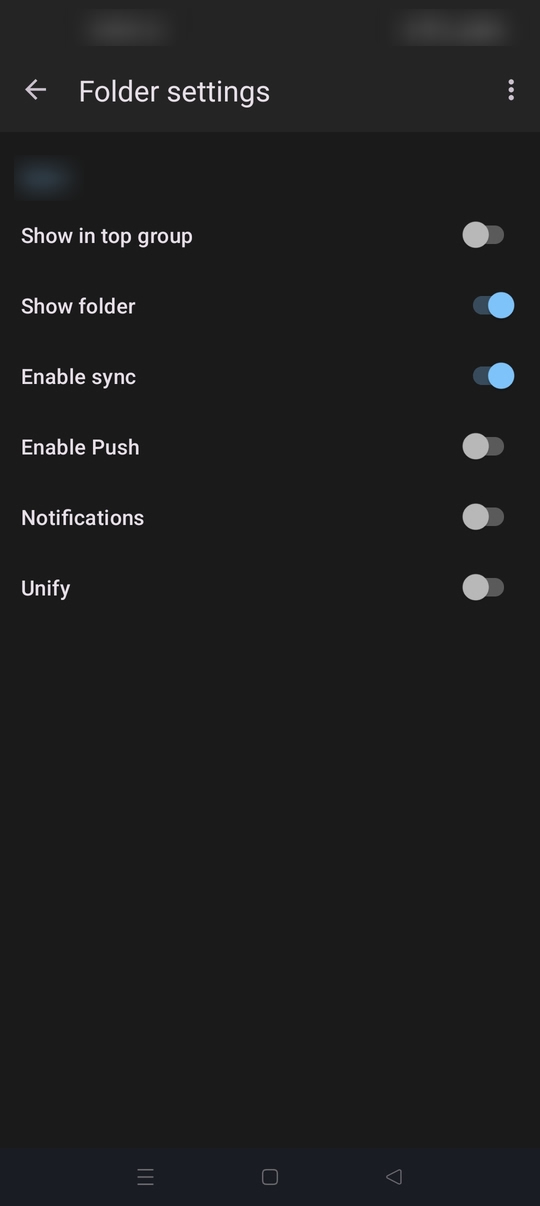
B. Check sync is enabled for your desired folders.
1. Open the side bar with your account folders visible. 2. Tap manage folders from the bottom of the list. 3. Tap an applicable folder (eg. Inbox) 4. Toggle "Enable Sync" On
C. Navigate to settings > general settings > network > Background sync Confirm "When 'Auto-sync' is checked" is selected.