


Windows 10 reached EOS (end of support) on October 14, 2025. For more information, see this article.

חיפוש בתמיכה

יש להימנע מהונאות תמיכה. לעולם לא נבקש ממך להתקשר או לשלוח הודעת טקסט למספר טלפון או לשתף מידע אישי. נא לדווח על כל פעילות חשודה באמצעות באפשרות ״דיווח על שימוש לרעה״.

מידע נוסף

Firefox fails after updating

  • אין תגובות
  • 0 have this problem
  • 9 views
more options

I have just started a new job and installed the Firefox browser on my PC (W11) as part of setting up my new workstation. The application works fine until I get a message that Firefox needs to install an update, 'please close it or it will close automatically in one hour'. After the update I get a message that the update is complete and you can restart the application, but the application no longer works; the icon on the application list no longer works 'The item firefox.exe that this shortcut refers to has been changed or moved'. After re-installing Firefox it works OK again, but the process repeats. Although I have managed to succesfully update a new installation on two occasions, after a few days the process repeats and I need to re-install again.

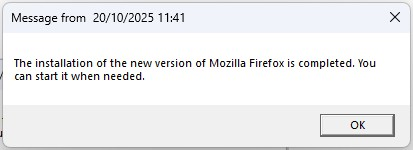
I have just started a new job and installed the Firefox browser on my PC (W11) as part of setting up my new workstation. The application works fine until I get a message that Firefox needs to install an update, 'please close it or it will close automatically in one hour'. After the update I get a message that the update is complete and you can restart the application, but the application no longer works; the icon on the application list no longer works 'The item firefox.exe that this shortcut refers to has been changed or moved'. After re-installing Firefox it works OK again, but the process repeats. Although I have managed to succesfully update a new installation on two occasions, after a few days the process repeats and I need to re-install again.
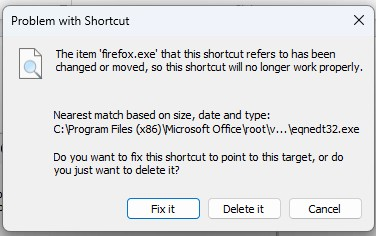
צילומי מסך מצורפים

You must log in to your account to reply to posts. Please start a new question, if you do not have an account yet.