


PDF viewer problem

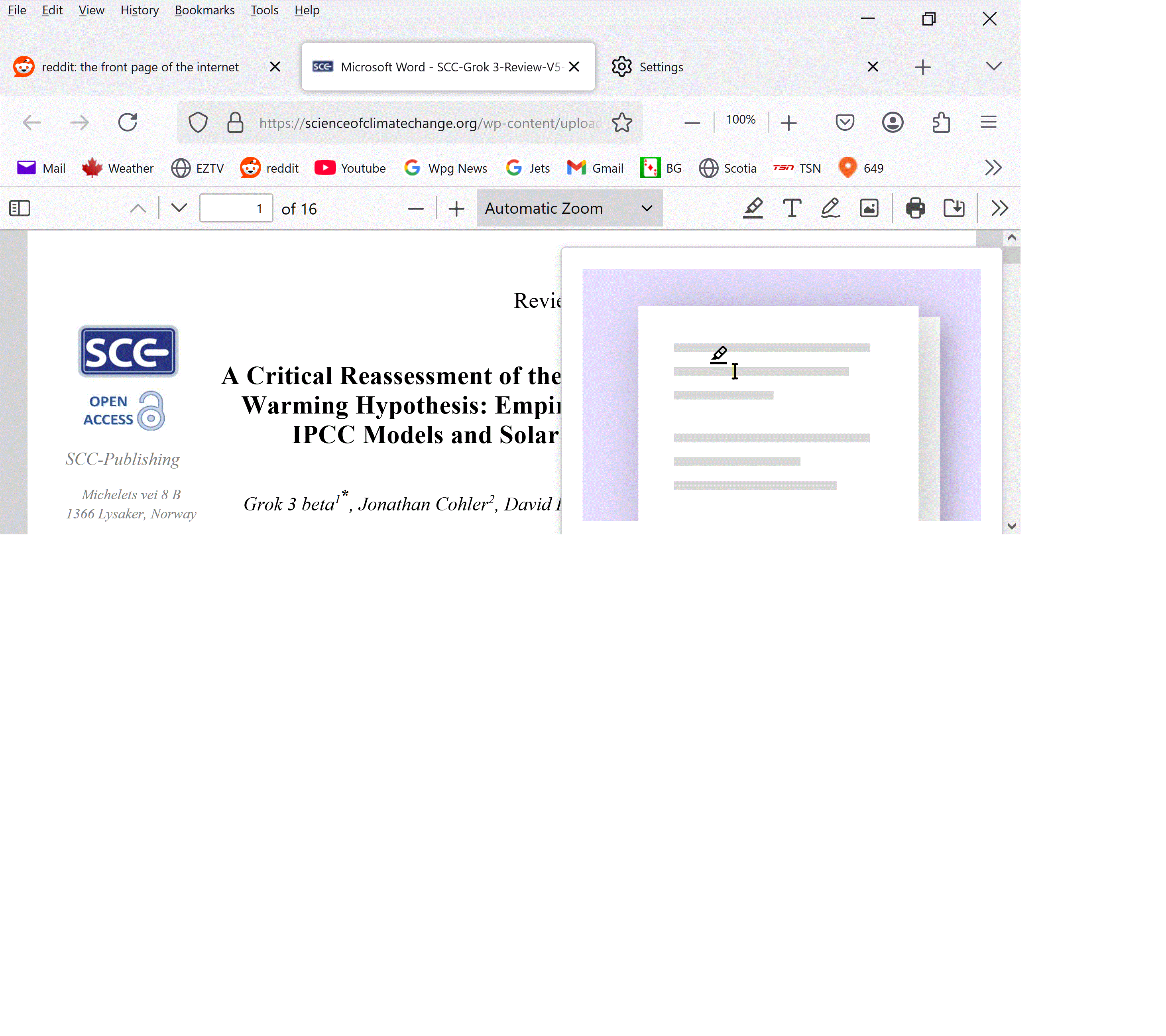
See the attached image. This showed up when viewing PDFs. The highlighter demo can not be removed or turned off. I uninstalled Firefox, reinstalled, still there. Uninstalled Acrobat, the demo is still there.
כל התגובות (3)
Hello
Maybe Studies https://support.mozilla.org/en-US/kb/shield Type about:studies into your address bar to see a list of your studies. Click the Remove button next to the study you want to opt out of.

Thanks for your response. Typed "aboutstudies" in the address bar. All I got was a search for "studies".
I had a past problem with Reditt that may have left my whole computer compromised. They somehow placed a bot of some sort that resulted in the message "Your computer has been locked by your organization" which appeared on the settings page. I uninstalled/reinstalled which cleared that up, temporarily. The message showed up again after I set up another Reditt account, which they immediately shadow-banned. The problem I describe with the Acrobat plug-in only started with those messages appearing.

Hello,
If you typed "aboutstudies" in the address bar it is missing the colon (:) between about and studies.
You should type:
about:studies
Then press Enter
השתנתה ב־ על־ידי Logosor