


Windows 10 reached EOS (end of support) on October 14, 2025. For more information, see this article.

חיפוש בתמיכה

יש להימנע מהונאות תמיכה. לעולם לא נבקש ממך להתקשר או לשלוח הודעת טקסט למספר טלפון או לשתף מידע אישי. נא לדווח על כל פעילות חשודה באמצעות באפשרות ״דיווח על שימוש לרעה״.

מידע נוסף

Printing PDF

  • 2 תגובות
  • 0 have this problem
  • 56 views
  • תגובה אחרונה מאת Desri

more options

When printing a PDF with custom page ranges, the footer text in the print preview (see image) does not match the actual page. As shown in the example image, if I want to print pages 2-16, the preview indicating page 4 is actually page 5.

So, if I want to print with a very custom range, such as 2-4, 6-10, 12-14, 16, it will be very confusing and will take longer to adjust.

And I also print custom ranges like this very often for daily tasks. I’m not sure if this is a bug or just a minor adjustment needed in Firefox’s coding. Thank you in advance for your help.
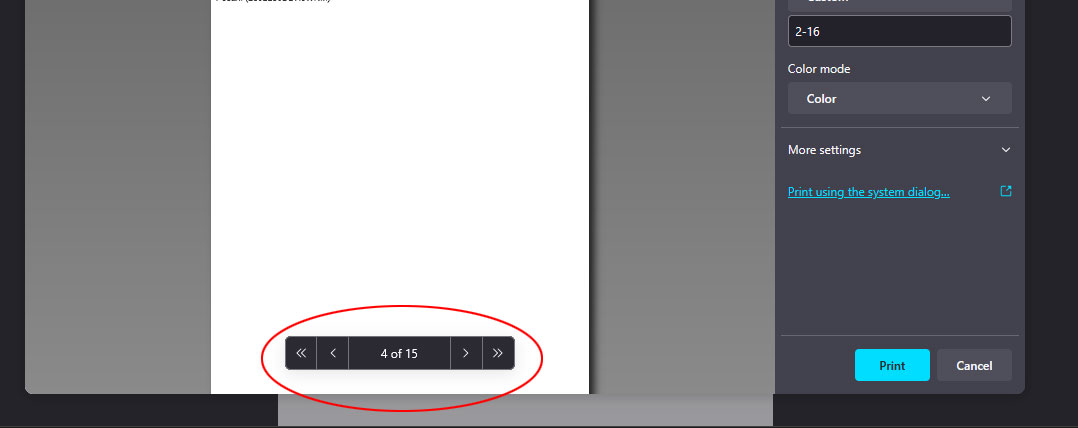
When printing a PDF with custom page ranges, the footer text in the print preview (see image) does not match the actual page. As shown in the example image, if I want to print pages 2-16, the preview indicating page 4 is actually page 5. So, if I want to print with a very custom range, such as 2-4, 6-10, 12-14, 16, it will be very confusing and will take longer to adjust. And I also print custom ranges like this very often for daily tasks. I’m not sure if this is a bug or just a minor adjustment needed in Firefox’s coding. Thank you in advance for your help.
צילומי מסך מצורפים

פתרון נבחר

I solved the problem, after I switched to Chrome. 👍

Read this answer in context 👍 0

כל התגובות (2)

more options

the firefox version 135.0.1 (64-bit) in Win 11

more options

פתרון נבחר

I solved the problem, after I switched to Chrome. 👍

השתנתה ב־ על־ידי Desri