

Wannan tattunawa ta zama daɗaɗɗiya.
Yi sabuwar tambaya idan ka na bukatar taimako.

Ajiyayyu
How to close status bar of the search bar when inputting?

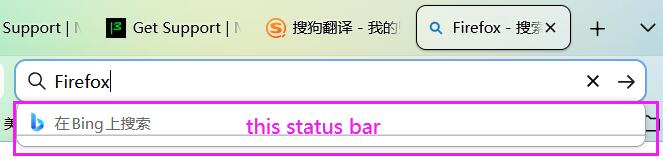
How to close status bar of the search bar when inputting? When I input a search key word, below will show a status(or a remind) bar. This is very annoying, how to turn it off? Thank you!
How to close status bar of the search bar when inputting?
When I input a search key word, below will show a status(or a remind) bar.
This is very annoying, how to turn it off?
Thank you!
All Replies (5)
Hello
browser.urlbar.maxRichResults ?
1 - Go to configuration editor https://support.mozilla.org/en-US/kb/about-config-editor-firefox 2 - Enter a search term browser.urlbar.maxRichResults Double-click on the preference, and, enter a new value 0, and, click the Save button to save the change.
Thank you! but doesn't work!
Ok, sorry, apparently, you use the Search bar https://support.mozilla.org/en-US/kb/add-search-bar-firefox-toolbar
Your version 148
For information https://support.mozilla.org/en-US/questions/1573029


Does the version 149 will work?