


How can I hide the yellow “Your privacy is protected” bar while keeping the privacy features?
I am using Thunderbird on Windows, and I want to hide the yellow “Your privacy is protected” notification bar but still have the privacy protection enabled.
I tried to use a userChrome.css in my Thunderbird profile; here is the path; (C:\User\AppData\Roaming\Thunderbird\Profiles\lz1po89m.default-release\chrome\userChrome.css). I also set toolkit.legacyUserProfileCustomizations.stylesheets to true, but the customization does not work.
If anyone can please help and/or advise me on the correct procedure or CSS selector for this version I would be very much appreciated.

Chosen Solution
No problem. Test the following CSS code:
notification-message[value="remoteContent"] {
 --message-bar-background-color: lavender !important; }
Replace "lavender" with a color code you can choose e.g. here https://cloford.com/resources/colours/500col.htm
All Replies (4)
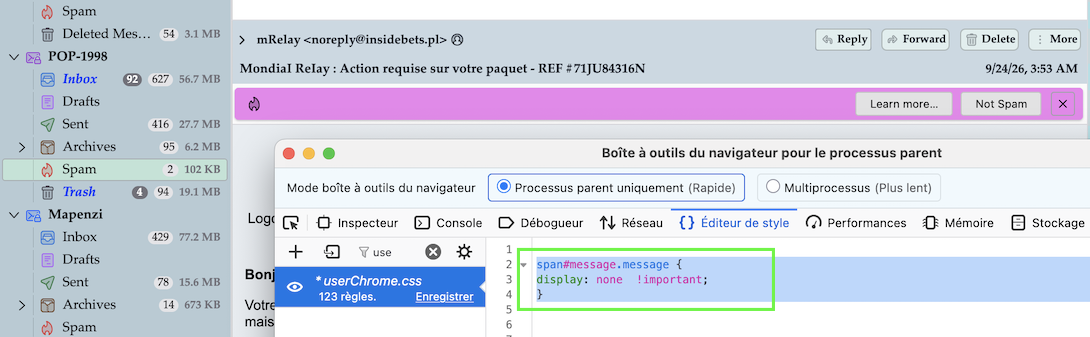
You can hide notifications with the following CSS code in the userChrome.css file
span#message.message {
display: none  !important; }
Unfortunately this code will also hide other notifications such as "maybescam" (image) or "mdnRequested".... I didn't succeed to write a code which hides only ""remoteContent"
Thank you for your help. Would it be possible to change the colour at least, the yellow is kinda an eye sore.
Chosen Solution
No problem. Test the following CSS code:
notification-message[value="remoteContent"] {
 --message-bar-background-color: lavender !important; }
Replace "lavender" with a color code you can choose e.g. here https://cloford.com/resources/colours/500col.htm
Thank you very much for your help.