


I want to use Thunderbird to access different fonts for my email.
I thought that this program was to customize your email.
All Replies (3)
I hope you realize your statement makes almost no sense at all to someone that is a long term user. I really do not know what it is you are asking. Partially because you have made no attempt to define where you want to use these fonts. Speaking for my position there is only one place you get to select fonts, that is when you write an email and by default you can choose most fonts installed on your system. So I really do not understand where you are coming from.
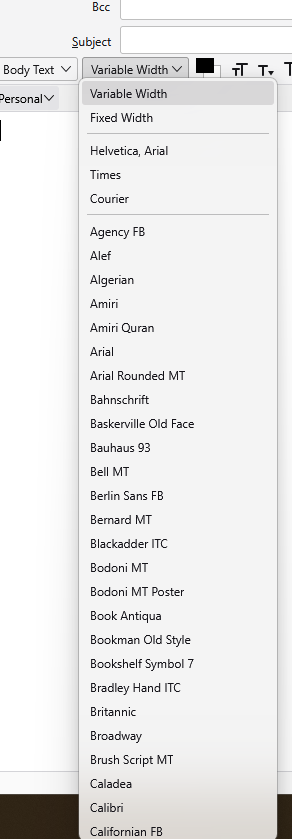
This is what I see when I select the font dropdown in composing an email.. Don't you also have that available?
Your response was not only extremely rude and condescending, but as someone new to the program, I asked the most basic question I had. No, I do not see that dropdown fonts or I wouldn't have made a post requesting assistance. Don't respond to me. If you're in IT, seek alternative employment.
First, you should compose mail in HTML format (Account Settings/Composition & Addressing). Next, the Menu Bar should be visible in the new message window (press Alt if it's hidden). Then, select Format/Font, or choose a font as in the picture above. If the Composition Toolbar is hidden, enable it under View/Toolbars.
Note that any font that is embedded in a message can be overridden by the recipient if they so choose, just as you can set the display fonts in the messages you send or receive.