


how do i get copy command back when right click

when I get new tab I don't seem to be able to connect with web site I am asking for. In addition right click not dot get the menu of command. I just updated with 154.0
Toutes les réponses (5)

Not clear about your issue.
New tab > the type URL in address bar and . . . . you don't get what you want, could you give an example
Right click on what and what menu do you expect to get?
You used to be able to right click the mouse and get a menu with links for different ops i.e. print copy paste and so on. Not available now. When you right click now you get a small menu of things I don't understand. I think it may have something to do with ai. I'd like to get rid of that. If I want to use ai. I'll go to the program or perhaps fire fox can clarify what's going on. As far as the tab when you enter the url you get a blank screen.
Right click on what
I'm still in the dark as to what exactly you are right clicking on . . .
I am trying to right click on a link any link I has something to do with acceleration according to google and I think if I take the time I can get the right click menu to work
Is it possible you added some sidebar integration as: Access AI chatbots in Firefox?
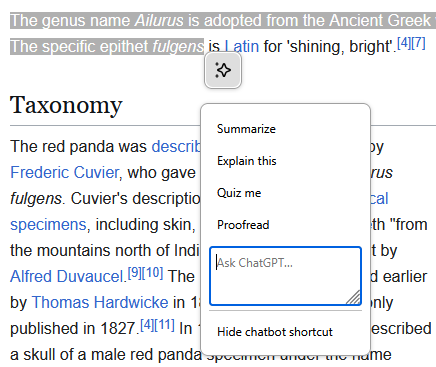
The help page has a section "Hide chatbot shortcut" to help remove that menu — or if you don't want to use any of that functionality, the documents also link steps how to disable the AI or chatbot functionality altogether: Block generative AI features with Firefox AI controls