+ Symbol in tabs bar vanished

A few days back, the browser "+" symbol used to open another tab at the top right of the browser window disappeared like a bad odor in the wind. Performed a search and located instructions on line that explained using 'about:config' settings to restore the symbol. It worked and I was browsing wonderfully again.
After closing the browser a few days later, the + symbol has vanished again upon restarting. Have searched in vain online to locate the parameter in about:config that I need to reset, but cannot locate it and I do not remember the parameter to search. CRS problem.
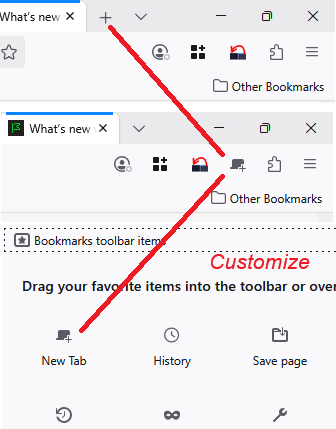
I can go into the Customize menu and drag a folder with a + symbol to the menu bar but it behaves differently. Just want the convenience of clicking the + symbol to automagically start another tab.
Toutes les réponses (1)
wd4hxg said
I can go into the Customize menu and drag a folder with a + symbol to the menu bar but it behaves differently. Just want the convenience of clicking the + symbol to automagically start another tab.
The new tab button looks different when it is on different bars. You should be able to move the button back to the tab bar for the standard appearance:
Can you find that button anywhere? If necessary, you can use the "Restore Defaults" button at the bottom of the Customize panel. (Customize Firefox controls, buttons and toolbars)
Now... what do you mean about the button behaving differently? The button may have different long-press or right-click behaviors, but a simple click should always open a new tab.
P.S. I can't think of any preferences in about:config that would block the button from appearing.