


web pages load and function erratically
Just cleaned up my HD, Firefox acting strangely. e.g: start washingtonpost.com, site loads but not completely as when "sections" is selected nothing happens. A list of sections normally would be across the top. It is not. Other sites are equally inconsistent, first page appears but nothing happens when selecting login. All sites tried in FF work fine in Edge. Have uninstalled FF and reloaded. No change.
Toutes les réponses (5)
Hi, what security software are you using please ?
Try : Try Firefox Safe Mode to see if the problem goes away. Firefox Safe Mode is a troubleshooting mode that temporarily turns off hardware acceleration, resets some settings, and disables add-ons (extensions and themes).
If Firefox is open, you can restart in Firefox Safe Mode from the Help menu:
- Click the menu button
 , click Help
  and select Restart with Add-ons Disabled.
If Firefox is not running, you can start Firefox in Safe Mode as follows:
- On Windows: Hold the Shift key when you open the Firefox desktop or Start menu shortcut.
- On Mac: Hold the option key while starting Firefox.
- On Linux: Quit Firefox, go to your Terminal and run firefox -safe-mode
(you may need to specify the Firefox installation path e.g. /usr/lib/firefox)
When the Firefox Safe Mode window appears, select "Start in Safe Mode".
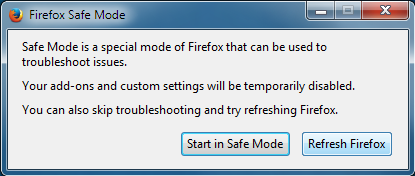
If the issue is not present in Firefox Safe Mode, your problem is probably caused by an extension, theme, or hardware acceleration. Please follow the steps in the Troubleshoot extensions, themes and hardware acceleration issues to solve common Firefox problems article to find the cause.
To exit Firefox Safe Mode, just close Firefox and wait a few seconds before opening Firefox for normal use again.
When you figure out what's causing your issues, please let us know. It might help others with the same problem.
Hmm, I thought I was running AVAST but I don't see it so Windows defender it is.
The safe mode seems to solve the problem. No to figure out what add on is the culprit. Thanks

pedsto said
Hmm, I thought I was running AVAST but I don't see it so Windows defender it is. The safe mode seems to solve the problem. No to figure out what add on is the culprit. Thanks
Disable all of them and go back to regular mode and see if anything happens and then turn one one and restart FF and then turn it off and go to the next addon. Turning each on and the rest off to know what is the problem addon.
Hi, if you are running a AVG or Avast extension that will be the issue :
If thought were running Avast please search for Programs and Features and check that is still not installed.
Disabled all. The Washington Post; The Sections and search titles appear normal now but nothing happens when I select. The list of sections that normally appears across the top is still missing. Everything works normally if I start TB is safe mode ????? I don't hsave Avast or AVG installled.