


Filtering failed today after working fine for years - Win10 laptop PC

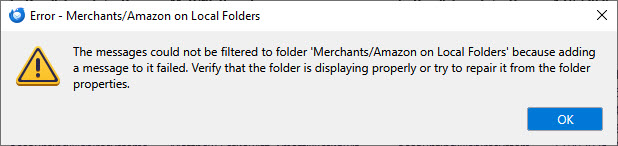
Today filtering of new emails fails for all folders. The message is "The message could not be filtered to folder <folder> because adding a message to it failed. Verify that the folder is displaying properly or try to repair it from the folder properties."
This is new. No problem filtering message a few days ago.
Windows 10 laptop PC.
Lots of free space on my local drive where Thunderbird is installed.
Where are these folders stored? I looked in C:\Program Files\Mozilla Thunderbird but I do not see any such folders there. I looked in C:\ProgramData\Mozilla but nothing there either.
Thank you.
All Replies (2)
Hi Matt,
Access the folders through Thunderbird. In local folders, is there a "Merchants" folder and an "Amazon" sub-folder?
If so, right click on the the Amazon folder, select "Properties", then click on "Repair folder". Does it make a difference?
If it does not, please try this troubleshooting step: Start Windows in safe mode with networking, then start Thunderbird in troubleshooting mode (under the "Help" menu). Does the problem occur?
Ok, I was looking for the folder through Windows Explorer, not though Thunderbird itself.
Yes, I have a "Merchants" folder and "Amazon" sub-folder. Normally Amazon email traffic lands there because of filtering.
I did a full shut-down and re-start. Now filtering is back.
Very odd.
Thank you for jumping in. I am grateful.
-Matthew Lefkowitz