Can't edit/delete imported TB calendar events

After moving from Win 10 to Win 11, I exported my TB calendar events on the Win 10 PC, and imported them on the Win 11 PC. Now I can't edit or delete the imported events. The "edit" and "delete" tasks are greyed out.
All help's appreciated
After moving from Win 10 to Win 11, I exported my TB calendar events on the Win 10 PC, and imported them on the Win 11 PC.
Now I can't edit or delete the imported events. The "edit" and "delete" tasks are greyed out.
All help's appreciated
Valitud lahendus
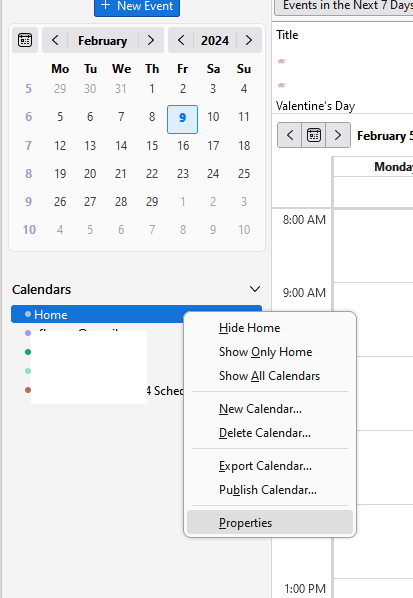
See the attached picture.
Loe vastust kontekstis 👍 0All Replies (3)
Right-click the calendar in the left pane of the calendar tab, Properties. Is it set to Read only?
I don't see "Properties" when I right click the calendar icon... I see New task New event, Next Month, Previous month and Paste. Layout = Classic View, Message List Header
Is there another method?
Valitud lahendus
See the attached picture.