Showing questions for topic:
Showing questions tagged:

taskbar icon does not indicate when new email is available

Taskbar icon does not indicate when new mail has arrived. Does not show a count of new/unread messages. 128.3.2 Windows 11 In settings "incoming mail" icon options I hav… (read more)

Taskbar icon does not indicate when new mail has arrived. Does not show a count of new/unread messages. 128.3.2 Windows 11

In settings "incoming mail" icon options I have chosen "show count of new emails" and "show a tray icon for unread messages is checked".

I am unable to tell at a glance if new email has arrived. I see from researching the KB I'm not the only to have this issue, but none of the settings seem to help.

Solved Archived 5 888

Move Thunderbird data to a new windows computer

Transfer Thunderbird email and data to another computer. I have attempted to transfer my email data from / to Windows 10 computers. The instructions seem straightforward … (read more)

Transfer Thunderbird email and data to another computer. I have attempted to transfer my email data from / to Windows 10 computers. The instructions seem straightforward but so far I have not been able to bring up the "new" computer after copying / transferring the data. I have a Linux laptop I could transfer to, but the versions don't match and I'm not sure it would work anyway. Any help or direction to instructions (I thought I have looked everywhere) would be great. Thanks

Solved Archived 1 658

Dark Mode, Message Pane Text Color Black on Dark Background

Hello, I have enabled the Thunderbird dark mode. My expectation was that all messages in the message list are displayed in white on a dark background. Unfortunately, the… (read more)

Hello, I have enabled the Thunderbird dark mode. My expectation was that all messages in the message list are displayed in white on a dark background.

Unfortunately, the message list often uses a black font on a dark background.

I changed the color in the message pane using settings --> Colour

I followed the instructions/workarounds here for using dark theme, including reset and troubleshoot mode. https://support.mozilla.org/sv/questions/1439922

But it did not help. Maybe you guys can help.

Regards George

Solved Archived 9 649

Empty Trash/Compact driving me crazy - "The messages could not be moved or copied to folder xxxxx because writing to folder failed. To gain disk space, from the file menu, first choose Empty Trash, and then choose Compact Folders, and then try again."

I'm in the process of cleaning up Thunderbird e-mail before moving to a new computer. I started with 11,593 e-mails in my Inbox and 7,799 e-mails in my Sent folder. I'm… (read more)

I'm in the process of cleaning up Thunderbird e-mail before moving to a new computer. I started with 11,593 e-mails in my Inbox and 7,799 e-mails in my Sent folder. I'm now down to 7,634 in my Inbox and 4,965 in my Sent folder. I've allocated 2 weeks for this process and found that it's taking me about 3 hours per day to meet my daily goals. I'm finding that I'm spending at LEAST half the time responding to "Empty-Trash/Compact-folders" requests. There are times I can delete 50 e-mails at a time without getting a request. Other times I will try to delete ten e-mails and get the request. With the old version of Thunderbird I could literally delete hundreds of e-mails at a time. Can you help? Russ Bukwa Yardley, PA ps. I have intentionally given you specific numbers. Based on my software- and test-engineering experience, I speculate you need to create a stress test to solve this nagging problem.

Archived 43 639

Change hyperlink default colour

Hi, I have just started using Thunderbird and I'm trying to change the default colour for a hyperlink. I have tried about:config -> browser.anchor_color and browser.ac… (read more)

Hi,

I have just started using Thunderbird and I'm trying to change the default colour for a hyperlink.

I have tried about:config -> browser.anchor_color and browser.active_color but neither has worked.

I also tried using a user.js file but that didn't work either.

I would have thought this would be a fairly basic thing but it seems to be impossible.

Solved Archived 8 589

New printer will not print emails

I have a new Brother printer MFC-L3780CDW. I can print from Foxfire internet, I can print from Microsoft Word. I can go to my Comcast online account and print emails, but… (read more)

I have a new Brother printer MFC-L3780CDW. I can print from Foxfire internet, I can print from Microsoft Word. I can go to my Comcast online account and print emails, but I cannot print an email from Thunderbird from my desk top. I right click the email to bring up the menu. I select print and nothing happens. It dont bring up a print preview window to select printer. It does nothing. My old printer was also a Brother MFC, just an older model. everything worked fine. I called brother and they say since everything else prints it must be a problem in the Thunderbird Application

Solved Archived 3 529

Thunderbird Page Setup

Using Tbird 78.14.0 (64 bit) with Windows 10. I can no longer access the Page Setup screen properly. I suspect it's because I accidentally put a very big value in for t… (read more)

Using Tbird 78.14.0 (64 bit) with Windows 10. I can no longer access the Page Setup screen properly. I suspect it's because I accidentally put a very big value in for the top margin. The print preview for even a short email says it's many pages, there's no text visible on any of those pages, the only part of the Page Setup screen visible is OK and Cancel at the bottom, and I can't get to the top of the screen. I've tried closing and re-opening Tbird to no avail. How can I get to the top of the Page Setup screen to fix the problem?

Solved Archived 14 509

Thunderbird Daily vs. Release version, subject line in bold format and email address display format

I recently went back from Thunderbird daily to the release channel when I set up my new PC. 1. On opening an email - The Subject display in Daily Version is Bold and ac… (read more)

I recently went back from Thunderbird daily to the release channel when I set up my new PC.

1. On opening an email - The Subject display in Daily Version is Bold and according to the font as set in Thunderbird Settings. Just Perfect. It is not the same in the Release Channel. Looks not so nice.

2. In Release Channel -- under settings If I choose to display the "Name Only" under Message List for address display format. It ignores

3. Release channel is ver 146.0.1 .. If I go back to Thunderbird daily .. will I be able to use the same profile used for the Release channel?

With my thanks in advance

Archived 3 490

Lower part of the message pane

Hi, I'm using Thunderbird version 140.0 on Windows 10 and trying to change the background of the message pane. I've tried: messagepanebox { background-color: #e6f3ff… (read more)

Hi, I'm using Thunderbird version 140.0 on Windows 10 and trying to change the background of the message pane. I've tried:

  1. messagepanebox {
   background-color: #e6f3ff !important; 

}

but it only changes the upper part and I can't find a way to target the whole flex container or the lower part. There is a forum response (titled Message preview pane background) that targets the message pane:

  1. messagePane {

background-image: url("file:///C:/path to image/image.jpg") !important;}

and that fills the message pane when its blank at startup but it disappears when selecting a message from the list.

I can add the background-color statement to :root in Developer Tools and that only works for the current selected message. How can I change the background of the entire Message Pane - the upper and lower part that contains the contents of the message - for each message that is selected? Thanks, David

Solved Archived 3 480

140 change gray interface with addon?

Ciao :) I used to use these add-ons Old Icon Phoenity Buttons Phoenity Icons to make Thunderbird more attractive, but now I'm having constant problems. The interface has… (read more)

Ciao :)

I used to use these add-ons

Old Icon Phoenity Buttons Phoenity Icons

to make Thunderbird more attractive, but now I'm having constant problems. The interface has become schizophrenic, and every time I open it, the icons have a different style, so I've been forced to disable the add-ons.

The question is, are there any supported add-ons left? I can't find any on the website. :(

Archived 22 400

Unable to disable Conversations in version 128.12.0esr

1) Thunderbird 128.12.0es refuses to disable conversation mode, when View/Sort by/Unthreaded is selected for a folder. 2) Thunderbird 128.12.0es does not show the number … (read more)

1) Thunderbird 128.12.0es refuses to disable conversation mode, when View/Sort by/Unthreaded is selected for a folder.

2) Thunderbird 128.12.0es does not show the number of selected messages in the Status Bar when I select multiple messages, instead showing the number of selected conversations.

How can I disable conversation mode?

Archived 6 400

How to delete from server SPECIFIED e-mails

Hi, I download some e-mails. After checking the emails, I want all of them to be deleted from thunderbird but... ...I want only specified emails deleted from server. In M… (read more)

Hi, I download some e-mails. After checking the emails, I want all of them to be deleted from thunderbird but... ...I want only specified emails deleted from server.

In Mac's "Mail" program, there was a special window, where I could see all e-mails on server and just select which I want to remove from server.

In old Outlook, I've used "Rules". There I could set the parameters for specified e-mails and then tell outlook to "leave that message on server" or "Don't download that message from server".

How to do it in Thunderbird?

Archived 12 400

Outlook not working

Hi, I use the latest Thunderbird email client 128.2.2esr (64-bit). Microsoft announced that to make it work with outlook all users have to make changes in settings for m… (read more)

Hi,

I use the latest Thunderbird email client 128.2.2esr (64-bit). Microsoft announced that to make it work with outlook all users have to make changes in settings for more security. I did all that they wrote and can receive emails on my .......@outlook.com email address, but I can't send emails due to absence of authentication setting for outgoing server. I attached screenshots FYI. Is it possible to fix this issue? It's required to add authentication setting for outgoing server.

Regards, Leonid.

Archived 4 360

Trying to set Thunderbird as the operating system default mail application under Win 11 does not work.

Hi! I'm trying to set Thunderbird as the operating system default under Win 11. I tried to follow Mozilla's instructions: 1. Open the Settings application by pressing and… (read more)

Hi! I'm trying to set Thunderbird as the operating system default under Win 11. I tried to follow Mozilla's instructions: 1. Open the Settings application by pressing and releasing the Windows Start button, then clicking the gear icon. 2. Click the Apps icon, then click Default Apps in the list. 3. Click the icon under the heading Email to show your choices. 4. Select Thunderbird. The trouble is that at n. 3 there is no choice. There is only 'OutlookAccounts' and this item cannot be deleted or replaced. Can you help? All the best, Robifiori

Archived 20 359

Account Creation

Is there a way to talk to someone? I put in what was required, but it didn't work. And after that, I don't have a clue what to do next. Mac <phone redacted> … (read more)

Is there a way to talk to someone?

I put in what was required, but it didn't work.

And after that, I don't have a clue what to do next.

Mac <phone redacted>

Archived 1 350

Can't change the background color when replying to html formatted emails, e.g. from support ticket systems

When I receive some special html formatted email e.g. from ticket system like Zendesk they look like this: https://assets-prod.sumo.prod.webservices.mozgcp.net/media/uplo… (read more)

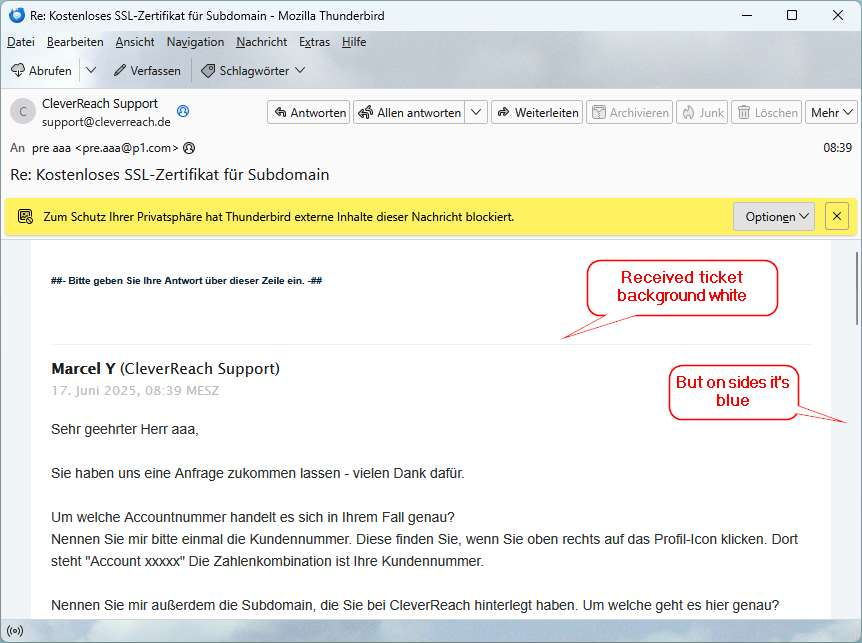
When I receive some special html formatted email e.g. from ticket system like Zendesk they look like this: https://assets-prod.sumo.prod.webservices.mozgcp.net/media/uploads/images/2025-06-17-01-06-32-c4ca42.png

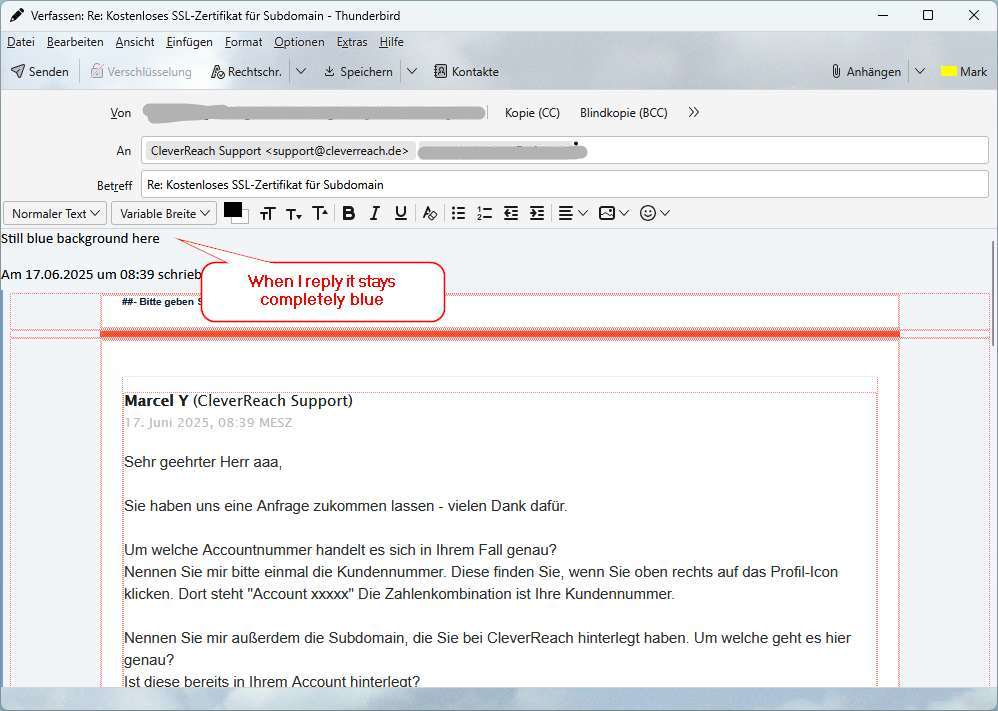
When I want to reply to the text stays at the blue colored background and the text would be hard to read and it looks ugly: https://assets-prod.sumo.prod.webservices.mozgcp.net/media/uploads/images/2025-06-17-01-06-37-c81e72.png

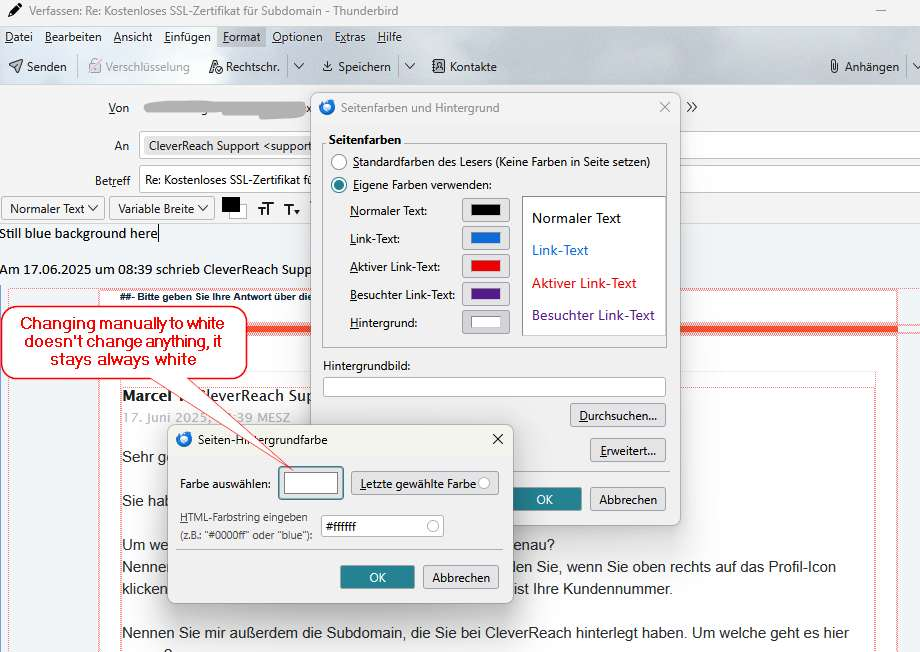
Unfortunately I can't change background color to blank or white in Tunderbird 139.0.2. In menu of reply window "Page colors and Background", "Use custom colors", "Background" I can set to #ffffff of course, click apply and ok, but that doesn't change it: https://assets-prod.sumo.prod.webservices.mozgcp.net/media/uploads/images/2025-06-17-01-06-42-eccbc8.png

I suppose it relies to the html formatting of the received email because on starting to write a complete new email it works. But that's very annoying that Thunderbird doesn't manage to change background colors on already formatted html body. Is this a bug or only poor source code and the programmer didn't have much motivation to write and robust code which could gather all html emails?

Could you check with this test email to test and reproduce? https://limewire.com/d/pqbEk#1idjNje6b2

Thanks a lot! I'd be very happy about your help.

Locked Archived 3 350

i made a donation last week but the inbox folder is blocked asking for donation (locked)

i made a donation last week to thunderbird , but the inbox folder is blocked asking for a donation and not letting me open the emails attached i show the page that appe… (read more)

i made a donation last week to thunderbird , but the inbox folder is blocked asking for a donation and not letting me open the emails attached i show the page that appears on the inbox

Locked Archived 1 340