Showing questions tagged:

Ebay website not displaying shipping info since 132.02 update

Since the 132.02 certain eBay items will not display its shipping info. Only on Firefox. Its not addon because I disabled all and I have the same addons installed on edge… (read more)

Since the 132.02 certain eBay items will not display its shipping info. Only on Firefox. Its not addon because I disabled all and I have the same addons installed on edge and all good there, I can see the shipping info on edge. And its only about 50% of the items which is weird. I have done the basic troubleshooting and I have to think it was this update. If you see the images attached Shipping values should be displayed. Some have a $ value some say +shipping, those are not displaying the value. Please help me figure this out as I use Firefox ALL day but if this continues I HAVE to switch. Ebay is my main source of income now.
Solved Archived 12 100

Yahoo now comes up on my Firefox browser

With reference to my question just posted, also now when I click on my Firefox browser, the Yahoo search engine seems to take over and it won't let me come out of it. Mar… (read more)

With reference to my question just posted, also now when I click on my Firefox browser, the Yahoo search engine seems to take over and it won't let me come out of it. Mark

Solved Archived 12 770

I accidentally denied Firefox access to devices on my local network

Hello all There was a pop-up on my Mac'S Firefox asking if I allow Firefox access to my local network devices. I clicked on 'No' And obviously now I can't access for exam… (read more)

Hello all

There was a pop-up on my Mac'S Firefox asking if I allow Firefox access to my local network devices. I clicked on 'No' And obviously now I can't access for example my router's webpage or any other webpage fromo any devices on my local network. How I can switch it back? Internet access is working fine.

Many thanks, Bogdan

Solved Archived 10 2520

Commenting or Editing my comments on youtube is invisible

Hi ! I am using the latest firefox on win11 (latest updates). Since approx 2-3 days whenever I try to comment on youtube or edit an existing comment I cannot see what I a… (read more)

Hi ! I am using the latest firefox on win11 (latest updates). Since approx 2-3 days whenever I try to comment on youtube or edit an existing comment I cannot see what I am typing. I can still type and commit, the comment will appear and I it will contain what I typed. But when doing it initially it is invisble to me. If I reply to a comment I can see what I type.


Below 1st image shows a comment box I am actively typing in. Everything is invisible. 2nd image shows when I open a reply, you can clearly see the prompt and when I start typing it shows my input

Archived 10 300

Disappearance of saved groups tabs

Hello One morning about a week ago I woke up and opened my computer. Some update has probably been installed, and all the tab groups that I have diligently organized and … (read more)

Hello

One morning about a week ago I woke up and opened my computer. Some update has probably been installed, and all the tab groups that I have diligently organized and saved - disappeared!

The tabs disappeared and all the sites saved within them disappeared also.

Please your help

Archived 9 320

Print Tab Not Displaying on dark page

The "Print Tab" for my cruise does not show... but if i hover over it I can tell there's a tab there? I want dark pages but all fonts to be whatever color I choose but d… (read more)

The "Print Tab" for my cruise does not show... but if i hover over it I can tell there's a tab there? I want dark pages but all fonts to be whatever color I choose but do not understand how to adjust this. Help

Solved Archived 9 90

Download location not respected

I have set E:\ as my default download location. However in some cases Firefox does not respect my choice and silently downloads stuff to C:\Users\Name\Downloads. I really… (read more)

I have set E:\ as my default download location. However in some cases Firefox does not respect my choice and silently downloads stuff to C:\Users\Name\Downloads. I really hate this. One example, a pdf downloaded from here https://scribd.vpdfs.com/. Please fix it. Thx.

Archived 9 190

Unable to scroll ONE web site. BLUE firefoxshield in address bar

I have two installations of Firefox. One windows10 and one Linux. BOTH are doing the same thing on this site https://www.rapidonline.com/ I cannot scroll using the mouse … (read more)

I have two installations of Firefox. One windows10 and one Linux. BOTH are doing the same thing on this site https://www.rapidonline.com/

I cannot scroll using the mouse roller. Page up/down doesn't work. Middle click and drag doesn't scroll either. BUT, for the briefest of time, BEFORE the Firefox shield in the address bar, I can scroll.

Hovering over the blue shield shows the text... Blocking social media trackers, cross site tracking cookies, and fingerprinters. Turning the Firefox protection OFF makes no difference, other than the shield is white and struck out. Disabling uBlock origin, or malwarebytes makes no difference. Both my installations do the same BUT, I called a pal who also uses Firefox on Linux and windows and he reports all is well and he uses uBlock, but not malwarebytes.

I have not actively messed with my settings on either platform. Oh, I was told to clear the cache. No joy.

Why does Firefox think it is blocking stuff but turning the protection off makes no difference? Why should two separate installations behave identically? Why does my pal's Firefox using Linux work on this site 100% ? I feel like I am going insane...

Solved Archived 9 200

False virus detection blocks download

Running Firefox 133.0.3 on Windows 10 22H2 The last week or so, when I try to download my photos from iCloud, Firefox blocks the download, saying it contains a virus or m… (read more)

Running Firefox 133.0.3 on Windows 10 22H2

The last week or so, when I try to download my photos from iCloud, Firefox blocks the download, saying it contains a virus or malware. Of course it does not - it's a zip file of screenshots! Running a scan on the folder once unzipped confirms there is nothing malicious in it. Can you fix that please?

Solved Archived 8 490

History wiped on exit with options not working as per requirements.

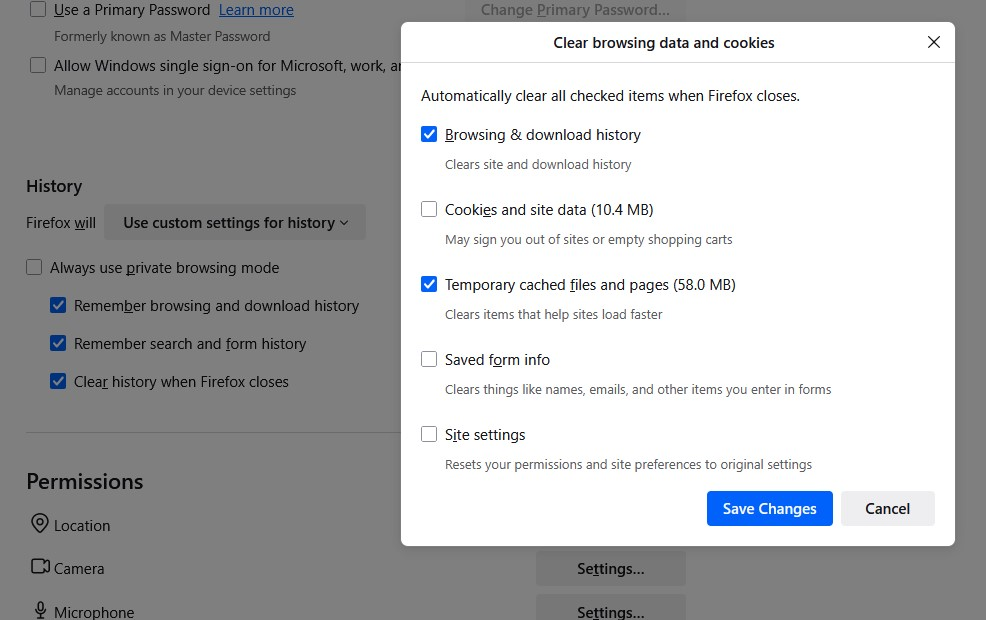
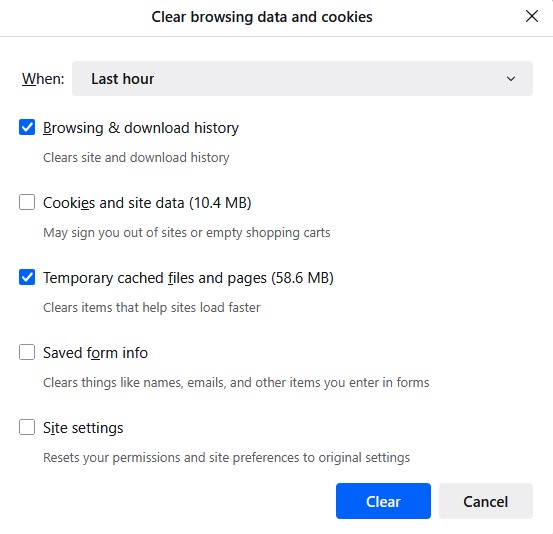
Ok so I usually choose these option to remember history and from time to time delete Browsing & download history and Temporary cached files and pages. https://assets… (read more)

Ok so I usually choose these option to remember history and from time to time delete Browsing & download history and Temporary cached files and pages.

https://assets-prod.sumo.prod.webservices.mozgcp.net/media/uploads/images/2025-06-28-08-45-55-a5277f.png

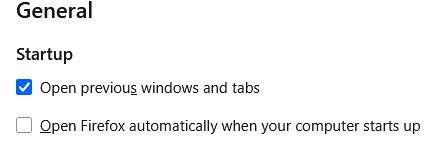
Note: I have "Open previous window and tabs" ticked in general settings which also has a restore previous session option in the history menu. This brings back previous session with tabs etc as is when I close FF. https://assets-prod.sumo.prod.webservices.mozgcp.net/media/uploads/images/2025-06-28-08-45-51-cf2daf.png

I thought I could automate this on exit but don't think its working right. So I change the option to "use custom settings for history" and tick all three options:

Remember browsing and download history Remember search and form history Clear history when Firefox closes For "Clear history when Firefox closes" I ticked Browsing & download history and Temporary cached files and pages. https://assets-prod.sumo.prod.webservices.mozgcp.net/media/uploads/images/2025-06-28-08-45-43-b10213.png

The issue is the restore session option is missing and FF opens with all previous tabs gone. I am frankly not even sure what else is missing such as cookies, site data etc. Is this meant to work like so?

Solved Archived 8 390

LinkedIn "read more" feature not working anymore since last Firefox update

Hi Everyone, ever since the latest Firefox update, the "read more" feature on LinkedIn pages (personal pages, not the feed) does not show up anymore, at least not for me … (read more)

Hi Everyone,

ever since the latest Firefox update, the "read more" feature on LinkedIn pages (personal pages, not the feed) does not show up anymore, at least not for me - the feature allows you to expand the various subsections to read their full content.

I opened LinkedIn on Chrome and Edge to see if it is indeed a browser issue, and it's working fine over there. I also did some troubleshooting (refreshing, clearing cache), but to no avail.

Does anybody else have the same problem?

Thank you!

Via W

Archived 8 140

Cannot access websites because I'm using Firefox.

I have 6 websites that I currently cannot sign into using Firefox. Support tells me to use those two crap browsers Chrome and Edge. I end up using Edge because it is embe… (read more)

I have 6 websites that I currently cannot sign into using Firefox. Support tells me to use those two crap browsers Chrome and Edge. I end up using Edge because it is embedded in my computer and I cannot delete. I will not install Chrome and have put on Avast Secure Browser and CClean browser. Both are just Chrome with a new gooey. My Father is also having the same trouble. Most of the sites are for Utilities and rewards programs. Avast is also blocked. Are you aware and working on getting this fixed?

Solved Archived 7 220

Restore bookmarks

I had to reset windows 11, all my files were kept ,including the history in firefox but the bookmarks of 10 years of work were deleted. I tried to restore it but there is… (read more)

I had to reset windows 11, all my files were kept ,including the history in firefox but the bookmarks of 10 years of work were deleted. I tried to restore it but there is no old version in my computer after the reset. iI am vey sad. please contact me in [email address] for help thank you

Archived 7 110

Private Browsing deleted download files when I closed the window??

It's not that they are not in my Firefox downloads manager, which I expected. It's that I confirmed before closing my private browsing window that they were in my Downloa… (read more)

It's not that they are not in my Firefox downloads manager, which I expected. It's that I confirmed before closing my private browsing window that they were in my Downloads folder on my C drive, and when I went back after closing the private browsing window they were gone. Under "recent files" in my file browser it showed a couple of the most recent downloads and when I tried to click to open them it said they had been moved or deleted. Entering the first couple words of the file titles in the search bar in my file browser yields absolutely nothing.

This was over 30 files or so. It will be really irritating to try to find and download all of them again. Does anyone know of any way for me to get them back???

Archived 7 430

Cross-Origin Request Blocked

I've been having issues with Cross-Origin Request Blocked errors for a while now. I'm on Windows 11. I first noticed this issue when visiting YouTube. I would go to play … (read more)

I've been having issues with Cross-Origin Request Blocked errors for a while now. I'm on Windows 11. I first noticed this issue when visiting YouTube. I would go to play a video and any video I tried to play would just load forever and never play. Then I noticed I was having the same issue on Facebook. The page would load but then a majority of the images wouldn't. I can use YouTube and Facebook just fine on Chrome. The reason for the error shows as "CORS request did not succeed". Initially I tried uninstalling all of my extensions. Then I completely uninstalled Firefox using Total Uninstall (for good measure). Nothing has worked. I'm not sure what changed that would cause these errors. Could this be a network issue? I've been having issues with certain sites on my Macbook Air as well (Chrome and Safari) but I thought maybe that was because it's pretty old and not supported by apple anymore.

Archived 7 170