I am afraid I don't have the knowledge or skills to really know whaty I am doing
tell me if I have more than one version open
Hello Folks I bought a new laptop. How do I get Mozilla on my new laptop? Staples would only offer me MacAfee product Frank [redacted email from community support forum] … (read more)
Hello Folks
I bought a new laptop. How do I get Mozilla on my new laptop? Staples would only offer me MacAfee product
Frank
[redacted email from community support forum]
How can I get Windows 11 to upgrade past version 152?
CAN YOU ADVISE ME ON THE MATTER
I can't get Firefox to update from windows 10 to windows 11 on my desktop pc
give me tips and stages to make it
update mozilla
I just updated my Mozilla VPN to version 2.40. Now, whenever the vpn is started, Windows reports that nvspcap64.dll is not designed to run on Windows or it contains an er… (read more)
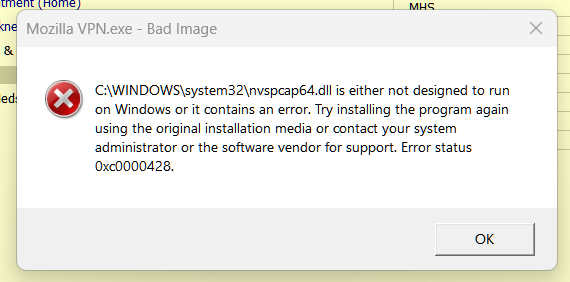
I just updated my Mozilla VPN to version 2.40. Now, whenever the vpn is started, Windows reports that nvspcap64.dll is not designed to run on Windows or it contains an error. Error status 0xc0000428. I have tried uninstalling and reinstalling to no avail. I restored the nvspcap64.dll from a backup which didn't work either. I have attached a screenshot of the message.
Repeated clicking of the "OK" button on the message will eventually allow the vpn to open, but I'm not sure if it is working correctly.
Can this be fixed?
The VPN installation does NOT work. I get the drop down with the icon and "To use the Mozilla VPN Firefox extension, please open the Mozilla VPN app first." There is NO … (read more)
The VPN installation does NOT work. I get the drop down with the icon and "To use the Mozilla VPN Firefox extension, please open the Mozilla VPN app first." There is NO Mozilla VPN app on my computer. It is not on desktop, menu, or app list (?).
Thank you in advance for your support. Dale Warnke [redacted email]
iphone: [redacted phone#]
Working on passkey, back and forth, meanwhile, retyping the above several times. I decided to copy it and save it so I won't have to type it again. we are going aroung in circles too many passwords, passcodes; I have 4 windows open and fell I am not getting anywhere(?)
All I want to know is how to get VPN that I paid for finally installed? There is too much confusion on getting this answered. All I want to do is to download(paid for) VPN and install it on FireFox and make
Have I been hacked, or something else?
Thank you in advance for your support. Dale Warnke [redacted email]
iphone: [redacted phone#]
Have I been hacked?
Hello, I just bought a yearly plan of the Mozilla VPN and would like to use it in a docker container using gluetun. However, I'm not able to find where can I see the conn… (read more)
Hello, I just bought a yearly plan of the Mozilla VPN and would like to use it in a docker container using gluetun. However, I'm not able to find where can I see the connection information. Is there a way to obtain the VPN tunnel information to configure my VPN over it? Thank you.
i want to uninstall the 160.0b2 version
Please download and installate the browser
I am using the current version of Bazzite. When I run Mozilla VPN, I just get a blank window for a few seconds, then it asks if I want to force quit. Uninstalling and rei… (read more)
I am using the current version of Bazzite. When I run Mozilla VPN, I just get a blank window for a few seconds, then it asks if I want to force quit. Uninstalling and reinstalling, and restarting my PC, do not seem to help.
I recently reinstalled Bazzite on this PC, and Mozilla VPN was working on my previous install.
I payed for Mozilla VPN. I downloaded and installed MozillaVPN.msi It does not work. The icon is on the right tool bar but I get a drop down that indicates that i need an… (read more)
I payed for Mozilla VPN. I downloaded and installed MozillaVPN.msi It does not work. The icon is on the right tool bar but I get a drop down that indicates that i need an app I thought I downloaded the app. Here is the message: "Open Mozilla VPN
To use the Mozilla VPN Firefox extension, please open the Mozilla VPN app first. Open Mozilla VPN Get help The is no Mozilla VPN in my program files(?) Please help. Is there two programs that I must install? [redacted email]
I bought the annual subscription to Mozilla VPN and found that it wouldn't install. This Mac runs Sierra, version 10, I don't need VPN on my newer Mac. How do I submit f… (read more)
I bought the annual subscription to Mozilla VPN and found that it wouldn't install. This Mac runs Sierra, version 10, I don't need VPN on my newer Mac.
How do I submit for a refund?
Thanks, Erik
I tried to update from Mozilla VPN v. 2.36 to v. 2.37 by clicking the Update button in the message I received. I did not shut down the old version first. When I receive… (read more)
I tried to update from Mozilla VPN v. 2.36 to v. 2.37 by clicking the Update button in the message I received. I did not shut down the old version first. When I received the "old version is running" message, I clicked the "automatically close app" selection. All seemed to be going well until a message popped up saying "The feature you are trying to use is on a CD-ROM or other removable disk that is not available. Insert the 'Mozilla VPN' disk and click OK." When I clicked OK, a message said "The path " cannot be found. Verify that you have access to this location and try again, or try to find the installation package 'MozillaVPN.msi' in a folder from which you can install the product Mozilla VPN." I found the folder containing the MozillaVPN.msi file, but when I use it to restart the installation, I end up with the same error message. If I click Cancel instead of OK on the "Insert the disk" message, and error message pops up saying "The older version of Mozilla VPN cannot be removed. Contact your technical support group." Now my old version is gone, but I don't have a new version to use. What should I do now?
Hello Community and/or Support, After installing the latest "Mozilla VPN Release 2.40.0" upon Windows 11 Version 26H2 OS Build 26300.9711, I received the follow error mes… (read more)
Hello Community and/or Support,
After installing the latest "Mozilla VPN Release 2.40.0" upon Windows 11 Version 26H2 OS Build 26300.9711, I received the follow error message 3 to 4 times in a row. after acknowledging the error (pressed "OK").
(See attached image) Mozilla VPN.exe - Bad Image is either not designed to run on Windows or It contains an error. Try installing the program again using the original installation media or contact your system administrator or the software vendor for support. Error status OxcOOON28.
Prior to installation, I just booted my computer and observed that my VPN App needed to be updated. I did not open any other app or perform any other work.
The VPN update informed me that it needed to close my current VPN connection to continue with the installation Update, which I allowed the update to manage.
In my troubleshooting efforts, reviewing other forums, and ask Google Gemini, I have performed the following. 1). Rebooted the computer after install. (Same Error Message) 2). Uninstall and reinstall Mozilla VPN. (Same Error Message) 3). Updated my NVIDIA GeForce GTX 1660 Ti driver to the latest release. (Same Error Message) 4). Ran "sfc /scannow" as administrator within the Command Prompt (Same Error Message). 5). Ran "dissm /online /cleanup-image /restorehealth" (Same Error Message).
Is there a method to correct the "Bad Image" error from popping up after restarting my computer? Also, would someone be so kind to inform the Mozilla VPN software team of this error?
Thank you all for your time!

update and instaling
update mozila firefox
I recently installed Firefox over Firefox Beta because I didn't like the daily updates. Now I'm stuck with this popup every time I open Firefox. It's stupid as the appl… (read more)
I recently installed Firefox over Firefox Beta because I didn't like the daily updates. Now I'm stuck with this popup every time I open Firefox. It's stupid as the application runs normally.
HOW DO I GET RID OF IT?