Showing questions tagged:

Lost my list of shortcuts on the firefox home page and now I cannot add any to recreate them

Title says it. As of yesterday, my Firefox home page shortcuts (6?) are all gone. Restarted my Win 11 laptop a couple of times and no change. Can't even add any new on… (read more)

Title says it. As of yesterday, my Firefox home page shortcuts (6?) are all gone. Restarted my Win 11 laptop a couple of times and no change. Can't even add any new ones. Settings allow for it but issue persists and browser is up-to-date. Shortcuts are one of the best things about using the Firefox browser...so very disappointing.

Solved 3 1 120

Profile mismatch: active profile directory empty, but history and extensions in inactive profile directory

I've been using the extension "Tree Style Tab" and "TST Colored Tabs." I've been looking for a way to disable the native Firefox tab bar, whether on top of the window or … (read more)

I've been using the extension "Tree Style Tab" and "TST Colored Tabs." I've been looking for a way to disable the native Firefox tab bar, whether on top of the window or to the left side. I haven't been successful on my own.

After a couple of hours troubleshooting this with CoPilot, It suggested I post the following short summary:

============

Firefox 152.0.6 (64-bit) about:profiles shows active profile: C:\Users\dmerc\AppData\Roaming\Mozilla\Firefox\Profiles\usm8kxcr.default-release

Opening that directory from about:support shows an empty folder.

profiles.ini references: agwp164m.default-release

userChrome.css loads correctly in a separate profile but not in the profile containing my current extensions and history.

============

The details of how it came to this conclusion:

============

Based on everything you've found:

The profile with your current extensions and recent history is reported as: usm8kxcr.default-release

Opening that profile folder shows an empty directory. The only other real profile on disk is: agwp164m.default-release

We successfully proved userChrome.css loads in a different test profile (Profile 1) because the toolbar turned red. Therefore, the CSS mechanism itself works on your machine.

My conclusion is that your Firefox profile registration has become inconsistent. Firefox appears to be using a profile that does not correspond cleanly to the profile folders you're seeing in Explorer. At this point I would:

Back up the entire folder: (NOTE: DONE - backed to to another drive) C:\Users\dmerc\AppData\Roaming\Mozilla\Firefox

Keep using the profile that contains your extensions and recent history. Avoid deleting any profiles or profile folders.

Post the details you've collected to either: the Mozilla Support forum, or r/firefox

The key facts to provide are: Firefox 152.0.6 (64-bit)about:profiles shows active profile: C:\Users\dmerc\AppData\Roaming\Mozilla\Firefox\Profiles\usm8kxcr.default-release.

Opening that directory from about:support shows an empty folder.

profiles.ini references: agwp164m.default-release

userChrome.css loads correctly in a separate profile but not in the profile containing my current extensions and history. \ Those facts point to a profile-management issue rather than a Tree Style Tab or CSS issue.

The good news is that your current extensions and recent history are still accessible, so this doesn't look like data loss. The profile mapping itself needs to be untangled before custom CSS can reliably be applied.

=

It also suggested not copying any folders and files between profiles for now.

Solved 2 1 40

How to show bookmark bar

How can do get this very basic setup on my new PC??? I don't understand why this did not happen automatically when I imported my bookmarks. This has been very frustrating… (read more)

How can do get this very basic setup on my new PC??? I don't understand why this did not happen automatically when I imported my bookmarks. This has been very frustrating.

Solved 12 1

Quality of audio output changes when starting a new window

Has anybody else experienced a similar problem? Or can you help me trouble shoot this issue please? I'm busy playing audio in a tab of the browser. The sound quality is g… (read more)

Has anybody else experienced a similar problem? Or can you help me trouble shoot this issue please?

I'm busy playing audio in a tab of the browser. The sound quality is good (rich, full, deep). Next, I open a new window by any means (Ctrl+N / Open link in new window / Menu > New window) As the new window appears, the current audio playback becomes tinny / lower quality. After a 3 seconds, the normal good sound quality starts again.

I'm currently using Bluetooth connected headphones and this happens on different headphones. I have to find some wired headphones first before I can try that. This happens with every new window that I open, regardless of the number of open tabs in current windows or how many previous open windows I already have. This happens regadless if audio enhancements of the output device are enabled or not. Spatial sound is set to off. Windows is set to 'do nothing' & will not adjust the volumes of different sounds when I'm using my PC to place or receive telephone calls.

OS: Windows 11 with latest patches Firefox: latest & older builds Hardware drivers: All manufacturer drivers applied

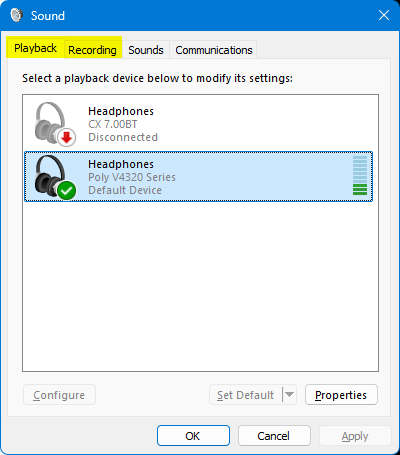
PS I can replicate this issue by changing between the 'Playback' & 'Recording' tab in the Sound Control Panel applet. That is to say, the same decrease in audio quality happens when I change from the Playback tab to the Recording tab. Audio quality improves again when I change from the Recording tab to the Playback tab https://assets-prod.sumo.prod.webservices.mozgcp.net/media/uploads/images/2026-09-12-15-38-23-1accad.png

PPS My new windows are set to open on 'about:support'

PPPS Can't reply to previously archived question : https://support.mozilla.org/en-US/questions/1525613

Solved 1 1 10

Start Page has inserted itself as my default browser

Suddenly Start Page has become my default browser when I open Firefox. Duck Duck Go has always been my default browser. I did not download Start Page. I don't want Sta… (read more)

Suddenly Start Page has become my default browser when I open Firefox. Duck Duck Go has always been my default browser. I did not download Start Page. I don't want Start Page. My PC Win 11 is set to use Duck Duck go as the default browser. Why is this happening?

Solved 4 1 10

Firefox Built-in VPN Suddenly Stopped Working

Hello Mozilla Support Team, I'm experiencing an issue with Firefox's built-in VPN. The VPN was working perfectly until a few minutes ago, when it suddenly stopped connect… (read more)

Hello Mozilla Support Team,

I'm experiencing an issue with Firefox's built-in VPN.

The VPN was working perfectly until a few minutes ago, when it suddenly stopped connecting and displayed the following error:

"Couldn't connect to VPN."

After that, the VPN panel started showing the "Get started" page again. Whenever I click the button and sign in with my Mozilla account, my email is successfully verified, but I'm redirected to the same page.

Here are some details:

Firefox version: 159.0.1

Mozilla account sign-in: Successful

Regular internet connection: Working normally

Enterprise Policies: Inactive

Signing out and signing back in: Didn't solve the issue

Could you please investigate whether this is an account authorization issue or a problem with the VPN service?

Thank you for your help.

Solved 1 1 30

I have 4 rows for shorcuts but missing 3 at the end and have no way to add those last 3 shortcuts, how can I do that?

I have selected the 4 rows for shortcuts on my tab and have installed all but the last 3 spaces in the end of the 4th row. There's no option whatsoever to continue to add… (read more)

I have selected the 4 rows for shortcuts on my tab and have installed all but the last 3 spaces in the end of the 4th row. There's no option whatsoever to continue to add those remaining 3 spaces. Any suggestions?

Solved 6 1 100

UI errors after updates- PDFs, Google Sheets and other graphic elements showing up as just black

I'm encountering some UI errors with the last couple updates. With an update from a couple weeks ago, I noticed when viewing PDFs in the browser, random characters would … (read more)

I'm encountering some UI errors with the last couple updates. With an update from a couple weeks ago, I noticed when viewing PDFs in the browser, random characters would be invisible, and in Google Sheets I'd notice some cells appeared blank, though selecting them showed that there was text inside. I also noticed disappearing text in a Google Doc I was working on. Now with the update that was just released today (154.0) all PDFs, and entire screens in Sheets and Docs, and other random graphic elements, are showing up as just flat black (see attached screenshot). My job involves working with spreadsheets and PDFs a lot so this is severely impacting my workflow, and I am reluctantly working in a different browser today.

I did a browser refresh, and then I uninstalled and re-installed, and that didn't help anything. What should I try next?

I should note I am using Firefox on Windows 11. I am not experiencing any issues with Firefox on iOS or Mac OS.

Edit: I was able to troubleshoot and fix this by disabling hardware acceleration under performance settings. Problem solved!

Solved 1 1 110

When Firefox is not maximized, an unwanted empty space appears to the left of the tabs.

When Firefox is running in a non-maximized window, an unwanted empty space appears on the left side of the tab bar, before the first tab. This space is not present when t… (read more)

When Firefox is running in a non-maximized window, an unwanted empty space appears on the left side of the tab bar, before the first tab.

This space is not present when the Firefox window is maximized. It appears automatically whenever the window is restored to a smaller/non-maximized size.

The issue affects the tab bar layout and leaves a noticeable unused area on the left side of the tabs. I would like to know whether this is expected behavior or a UI bug.

Firefox version: 155.0 64-bit Operating system: WINDOWS 11 25H2 64-bit

Solved 1 1 40

Access key issue on the right click menu

Due to a recent Firefox update, I found that add-ons now have access keys in the right-click menu, which is extremely annoying—especially when their hotkeys conflict with… (read more)

Due to a recent Firefox update, I found that add-ons now have access keys in the right-click menu, which is extremely annoying—especially when their hotkeys conflict with the existing default keys.

Could you please address this issue? It would be great if you could allow users to customize right-click access keys, or consider reverting this feature update.

Solved 1 1 30

What happened??? How do I restor firefox back to the way I had everything where I wanted it?

it looks like mozillo ambushed me, did away with all of my setting I spent years getting where I wanted them and left a folder called Old firefox data on my desk top. ho… (read more)

it looks like mozillo ambushed me, did away with all of my setting I spent years getting where I wanted them and left a folder called Old firefox data on my desk top. how do I make it look and act like the old firefox? I do not want the side bar I want the icons on the same line as the search bar. I want firefox to be my default everything like it was. I hate edge but it seams the only way i could get rid of it was to uninsal firefox and reintal this new pink firefox home page. I want my home page to be foxnews. how do I restore everything from teh old data filke to this confusing new page?

Solved 3 1 100

Network.lna.blocking parameter since Update 152.0.5 creates an issue within commercial web app OIDC authentication and service worker reloading

Our team has already tried to fix the issue for a week now and none of the approaches seem to fix the issue. Does the Firefox dev department have any hints or clues for u… (read more)

Our team has already tried to fix the issue for a week now and none of the approaches seem to fix the issue. Does the Firefox dev department have any hints or clues for us?

Short description: Firefox network.lna.blocking blocks same-origin/loopback requests when the page is controlled by a Service Worker

Symptom: Login via OIDC fails in Firefox (the backend call after the IdP redirect is blocked). The error disappears if either network.lna.blocking=false is set or the Service Worker is disabled.

Environment: - Frontend (react) and backend run on the same machine (loopback/localhost)—no cross-network scenario. - Firefox with active network.lna.blocking (experimental Local Network Access feature, Chromium’s equivalent is Private Network Access).

Root Cause (Analysis): 1. apps/react/sw.js registers a global fetch listener via Workbox and calls workbox.core.clientsClaim(). This causes every open page to be immediately controlled by the Service Worker. 2. registerServiceWorker() is called unconditionally on every app start, regardless of authentication state—even on the login/OIDC page. 3. The app uses hash-routing (URL fragments like “#/oidc”); the login page and the rest of the app share the same document URL, so you can’t restrict the SW scope to “everything except login.” 4. Once a page is Service-Worker-controlled, every fetch—including requests not explicitly handled by Workbox routes—first goes through the SW’s fetch event (default behavior when any fetch listener is registered) before proceeding to the network if it isn’t intercepted. 5. Hypothesis: Firefox’s LNA implementation doesn’t correctly inherit the address-space classification (loopback/private/public) for SW-forwarded requests across the controlling client. A direct document fetch (loopback→loopback) is allowed, but an identical target fetch routed through the SW is blocked.

Reproduction (minimal): 1. Use Firefox with network.lna.blocking=true (the default in affected versions). 2. Load a page that registers a Service Worker with a fetch-event listener (e.g. via Workbox precacheAndRoute + clientsClaim()). 3. Ensure both the page and the target resource are served from localhost/loopback. 4. From the SW-controlled page, call fetch() against the loopback target resource → the request is blocked. 5. By comparison, the same fetch from a non-SW-controlled page succeeds. 6. Setting network.lna.blocking=false also allows the fetch to succeed under SW control.

Excluded Causes: - Different address spaces for frontend/backend (both are on the same loopback machine)—ruled out. - Misclassification due to redirect_uri or cross-origin navigation—the OIDC redirect is a top-level navigation (unaffected); only the subsequent backend call (token exchange/session validation in SsoLogin.tsx → ssoLoginSubmit) fails.

Solved 2 1 139

How to show tab visuals?

The top row in Firefox browser doesn't have any tabs, it looks as pictured in screenshot (Chrome below for comparison). I only see the icon and text for a page, but that … (read more)

The top row in Firefox browser doesn't have any tabs, it looks as pictured in screenshot (Chrome below for comparison). I only see the icon and text for a page, but that isn't enough to know clickable area, and it makes it unintuitive.

I tried several browser themes but none of them changes this. There doesn't seem to be a setting for hardware acceleration anymore that used to solve it for some users in the past based on a search on topic.

Maybe this really is how it's meant to look but the design just went backwards from what we want to see; tabs are no longer tabs but something vague. Can never please everyone i suppose, but i want old back.

Solved 5 1 60

Cannot log into x.com

Firefox 152.0.6 1. I go to X.com and am presented with the logon screen and the option to logon using Email or Username, Phone, Google and Apple. 2. Try entering my email… (read more)

Firefox 152.0.6

1. I go to X.com and am presented with the logon screen and the option to logon using Email or Username, Phone, Google and Apple.

2. Try entering my email address in the logon screen and get a red ! error: "Please enter a username, email, or phone number."

3. Try entering my username in the logon screen and get a red ! error: "Please enter a username, email, or phone number."

4. Try using the Google option and it performs as if I was logged in but the system never leaves the logon screen.

5. Try using the Phone option and enter my phone number and get a red ! error: "Something went wrong. Please try again."

6. Delete all history, cookies, etc. Restart Firefox. Same issues as above.

7. I disable all Extensions and restart Firefox. Same issues as above.

8. I try a Private window and am able to log in just fine.

I am at a loss here on how to proceed. This is happening on two individual systems in my home both running the same version of Firefox.

Solved 4 1 110

I wanted to use VPN but it continually says it's not working.

I have tried several times to get into the new VPN of Firefox, but in settings, I didn't check to eliminate browsing history, thumbnails and the like. Is that what's kee… (read more)

I have tried several times to get into the new VPN of Firefox, but in settings, I didn't check to eliminate browsing history, thumbnails and the like. Is that what's keeping me from not being able to access the new VPN offered by Firefox? It says it's not working and to turn it off and then on which I've done several times, but I'm still not in. Any ideas???

Solved 3 1

"Access denied" error on specific website

I am running Firefox version 153.0.1 on a 64bit install of Windows 11. A few days ago I had to factory reset my computer, including a clean Windows install. Since then, … (read more)

I am running Firefox version 153.0.1 on a 64bit install of Windows 11.

A few days ago I had to factory reset my computer, including a clean Windows install. Since then, when attempting to access https://vodafone.cz/muj/prihlaseni, I get an Imperva Error 15 "Access Denied" error screen - screenshot attached here. Clicking the Imperva logo on the bottom of the error message leads to https://www.imperva.com/why-am-i-seeing-this-page/?src=23.

I was able to access the site in the past, most recently on July 8, 2026 - this would have been Firefox version 152.0.5.

This error persists in troubleshooting mode but not in private/anonymous (with or without extensions enabled), nor does it appear in Microsoft Edge or Firefox on Adroid.

Clearing cookies and cache did not help - in fact the error first showed up on a clean install of Firefox, when there weren't any cookies or cache stored yet. I've tried different DNS over HTTPS settings and listing the site as an exception in settings, but none of this made a difference. Enabling Firefox's built in VPN also made no difference, regardless of the selected location.

I found a recent post (https://support.mozilla.org/en-US/questions/1588627) describing a similar issue on a different website and tried the suggestion listed there to try a fresh profile - this seemed to work, but within a couple of minutes of browsing the error message returned. I've even reinstalled Firefox entirely, but this too did not help for long.

Interestingly enough, the error message lists a proxy IP address (not blacked out on the screenshot) despite the fact that I am not using a proxy.

The website provider's tech support claims this is an issue on the user side, not theirs - they have not been able to replicate the issue.

Is there anything I'm missing that would explain why this is happening?

Thanks!

Solved 3 1 60