


My old Pd

New PDF viewer doesn't work. The udate to the latest PDF viewer is terrible. PDF's now take significantly longer to preview, many times I won't be able to preview the entire document (only 1 out of 3 pages will load), I can't print them or it takes significantly more time to print them, I don't have access to the same tools that I used to (rotate page, save, etc.). I use this on a daily basis but I can't figure out how to get pack to my previous settings. I disable the PDF viewer add-on but that didn't work. Help - I like firefox but I may have to switch to Explorer.
Chosen solution
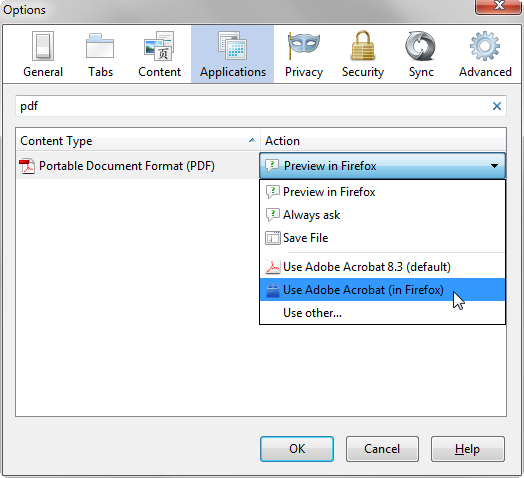
hello, firefox 19 has introduced its own integrated pdf viewer - if you want to switch back to the plugin you've used before to view pdfs just go to firefox options > applications & define the default action for the portable document format (pdf).
View and edit PDF files using Firefox’s built-in viewer
edit: btw in the firefox inbuilt viewer the option to rotate a document is accessible when you right-click somewhere in the document & the save-button is the second button from the right on the top toolbar...
Read this answer in context 👍 1All Replies (3)
Chosen Solution
hello, firefox 19 has introduced its own integrated pdf viewer - if you want to switch back to the plugin you've used before to view pdfs just go to firefox options > applications & define the default action for the portable document format (pdf).
View and edit PDF files using Firefox’s built-in viewer
edit: btw in the firefox inbuilt viewer the option to rotate a document is accessible when you right-click somewhere in the document & the save-button is the second button from the right on the top toolbar...
Modified by philipp
Thank you so much madperson. It is back to the way it was. PDF's load so much faster & completely plus the access to the tools will save me a ton of time.
Thanks,
I am on Mac up to Firefox 18 I used this plug-on: http://code.google.com/p/firefox-mac-pdf/ I had to change though the maximum version number inside the xpi file so that it is still usable, but I have found this plugin way superior to anything else. Since Firefox 18 I cannot use it -- even though I set the max version number above 100:) When I try to install my tweaked version, Firefox just reports that it is not compatible without any further information.
Unfortunately, the new built-in viewer is not a good solution for me as it has all kind of font rendering problems, especially when it comes to printing (I am mostly reading and printing math).
Any help would be much appreciated or, sadly, I will need to forget about using Firefox. I wasted quite a few sheets of papers printing gibberish as I keep forgetting that printing just does not work from the browser.
Thanks,
Csaba
Modified by szepi