


Can't download files from web

Just upgraded to Mac OS 27.0.1. I'm running DuckDuckGo as my Search Engine. Since the upgrade, I can't download files/PDFs from websites, as before. Any thoughts? Thanks!
Επιλεγμένη λύση
Yo, jbr, you hit it with that link — not exactly, but Haik Aftandilian's post there inspired me to check System Settings.
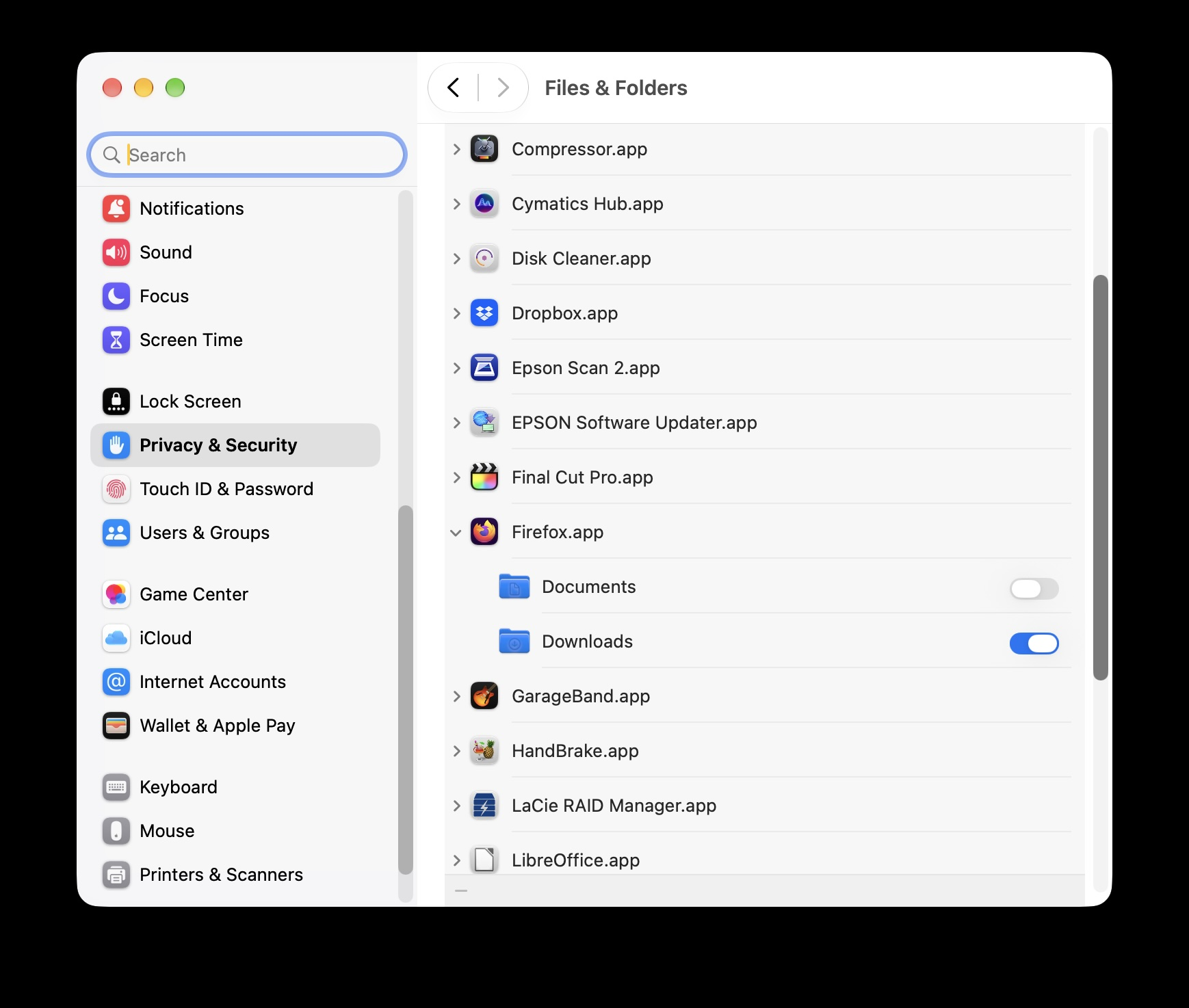
So the problem is: for some reason, the OS 27.0.1 update turned off Firefox's permission to access the Downloads folder.
Go into System Settings, go to Privacy & Security, click on Files & Folders, then scroll down to Firefox, open the pulldown, then enable the Downloads folder > see attached pic.
Thanks to you and Paul for helping me out!
Όλες οι απαντήσεις (5)
Hi
What happens when you try to download a file? Is there any error message?
Hi Paul, thanks for responding!
No error message. I click to download and it looks like it's doing the standard thing but then nothing happens, no download action.
OK, I just purchased an audio plug-in tonight online. When I went to download it, the same thing happened: it wouldn't download when I clicked the download button.
I copied and pasted the link in Safari and it downloaded as usual.
Something is afoot in either Firefox or DuckDuckGo as they interface with Mac OS 27.0.1.
Any thoughts?
Thanks!
There seems to be the system permission for "Downloads" folder access missing.
It might be related to the same security issue as https://bugzilla.mozilla.org/show_bug.cgi?id=2077390
Επιλεγμένη λύση
Yo, jbr, you hit it with that link — not exactly, but Haik Aftandilian's post there inspired me to check System Settings.
So the problem is: for some reason, the OS 27.0.1 update turned off Firefox's permission to access the Downloads folder.
Go into System Settings, go to Privacy & Security, click on Files & Folders, then scroll down to Firefox, open the pulldown, then enable the Downloads folder > see attached pic.
Thanks to you and Paul for helping me out!