


Windows 10 reached EOS (end of support) on October 14, 2025. For more information, see this article.

Αναζήτηση στην υποστήριξη

Προσοχή στις απάτες! Δεν θα σας ζητήσουμε ποτέ να καλέσετε ή να στείλετε μήνυμα σε κάποιον αριθμό τηλεφώνου ή να μοιραστείτε προσωπικά δεδομένα. Αναφέρετε τυχόν ύποπτη δραστηριότητα μέσω της επιλογής «Αναφορά παραβίασης».

Μάθετε περισσότερα

Passwords and Logins not Saving

  • 2 απαντήσεις
  • 0 έχουν αυτό το πρόβλημα
  • 18 προβολές
  • Τελευταία απάντηση από dmkgge

περισσότερες επιλογές

Hi there; I have just read the article about settings on password saving. I am complying with those settings, but yet my logins must be entered constantly, lately. What am I doing wrong? Where do I look next? Thank you.
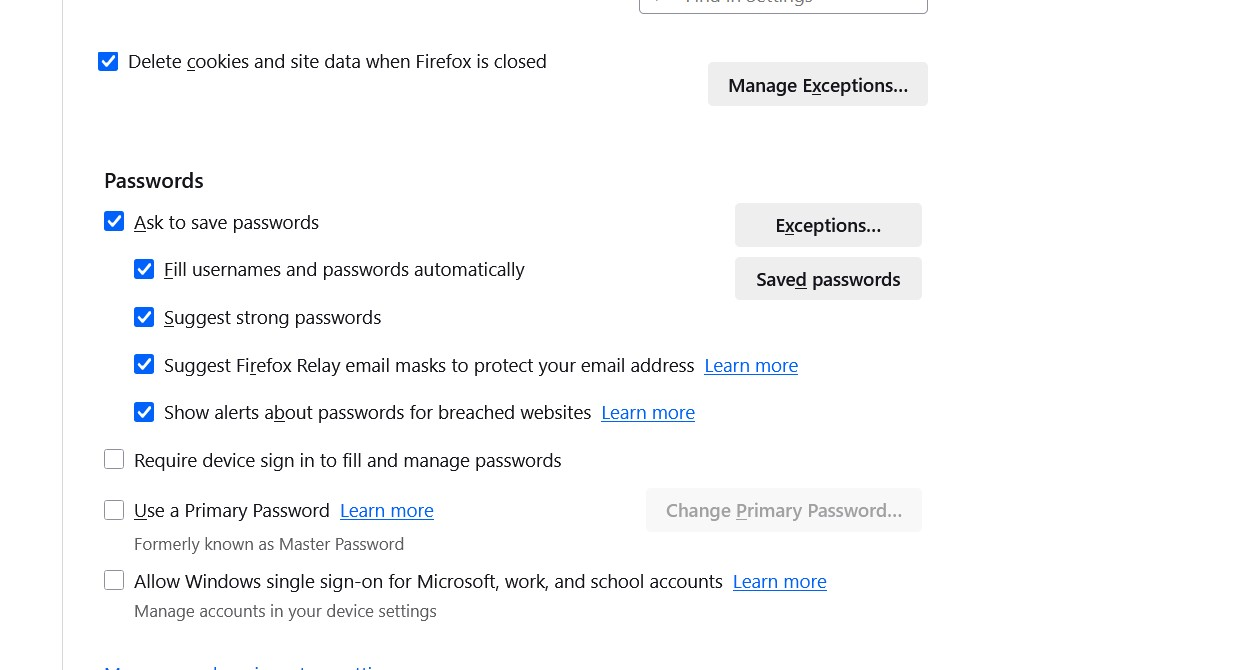
Hi there; I have just read the article about settings on password saving. I am complying with those settings, but yet my logins must be entered constantly, lately. What am I doing wrong? Where do I look next? Thank you.
Συνημμένα στιγμιότυπα

Όλες οι απαντήσεις (2)

περισσότερες επιλογές

Hi dmkgge,

I noticed you checked the box about "Delete cookies and site data when firefox is closed" in your settings. Some websites use cookies stored on your computer to avoid asking you a passwords every time you are reach the website. With this option checked, firefox will delete all cookies, that should be the reason why you constanly get ask your login and password.

Unchecked this box and restart firefox, that must solve the problem.

Have a good day,

περισσότερες επιλογές

Thanks SO much, devnull! I have changed it. I bet that will fix it. I appreciate your time.

Υποβολή ερώτησης

Πρέπει να συνδεθείτε στον λογαριασμό σας για να απαντήσετε σε δημοσιεύσεις. Ξεκινήστε μια νέα ερώτηση εάν δεν διαθέτετε ακόμα λογαριασμό.