


Thunderbird 140.2.0esr problem — fan. Mac 10.15 (catalina)

Hello,
I am using a MacBook Pro (16-inch, 2019) 2.3 GHz Intel Core i9 8-core processor 16 GB 2667 MHz DDR4 memory
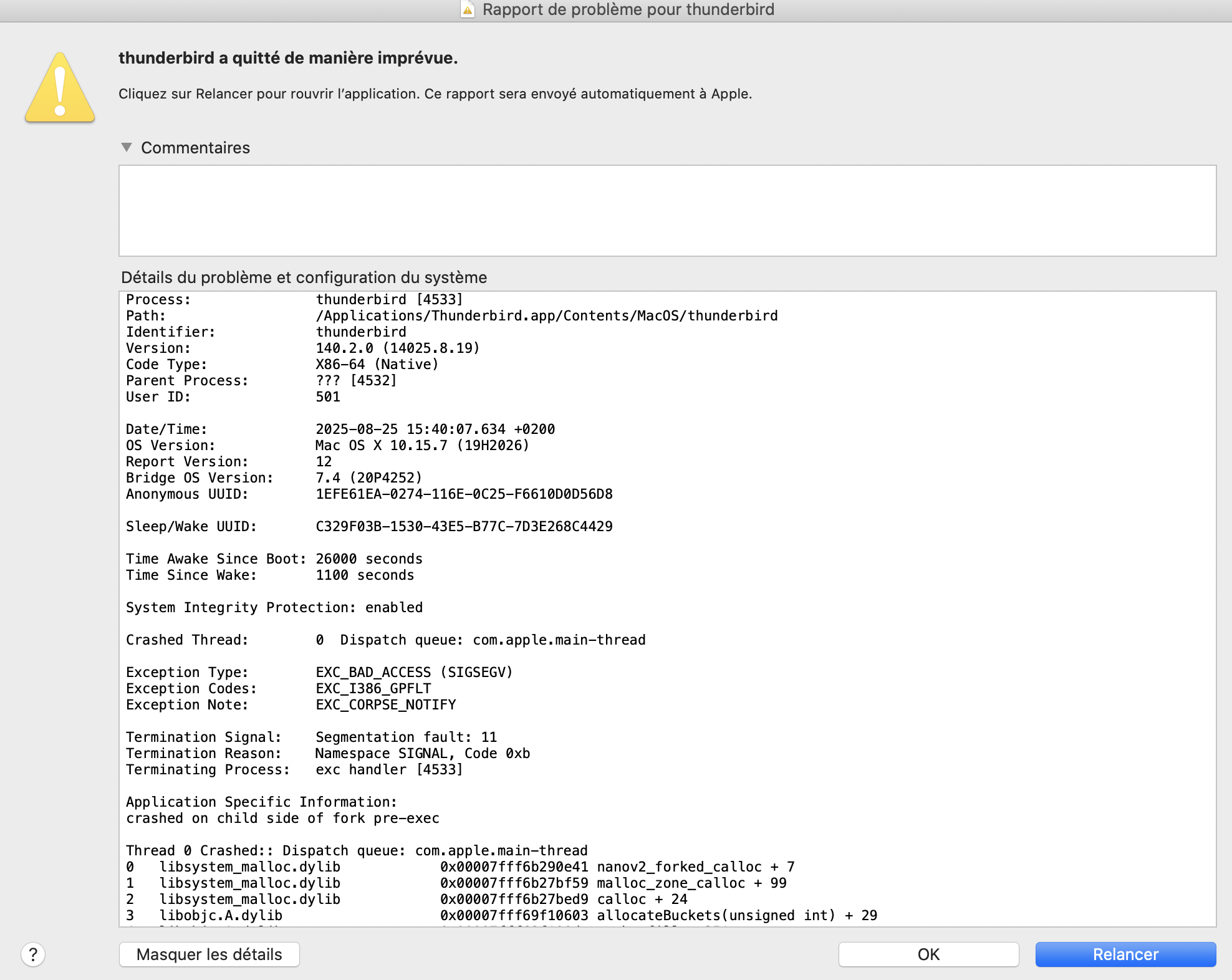
When I launch Thunderbird, the fans start up. As soon as I stop Thunderbird, the fans stop. When I close Thunderbird, I receive an error message (see attached).
Could you help me?
Thank you, Have a nice day,
Τροποποιήθηκε στις από τον/την Wayne Mery
Όλες οι απαντήσεις (4)
Launch Thunderbird with:
MOZ_DISABLE_FORK=1
If it works, then you are seeing https://bugzilla.mozilla.org/show_bug.cgi?id=1984061.
Let us know your results.
Hello,
Thank you for your reply.
I followed these instructions:
"You can launch Thunderbird using an AppleScript to work around the bug. It's very simple. Open the Script Editor application and paste this text:
do shell script “MOZ_DISABLE_FORK=1 /Applications/Thunderbird.app/Contents/MacOS/thunderbird &> /dev/null &” display notification “Thunderbird has been launched with MOZ_DISABLE_FORK=1.” with title "Launch successful "
Then export the script as an application, give it a name, and place it in the Dock. Use the application to launch Thunderbird. If the problems disappear, it proves that the bug is indeed the same."
The problem seems to be solved by implementing this process.

Hi, I had a similar issue with Thunderbird 140.0.1esr on Catalina 10.15.7. Found Fix: 1977514 to circumvent the issue using an AppleScript.
<AppleScript> set tbird140 to "-MOZ_CRASHREPORTER_DISABLE=1" display notification "Thunderbird Starting" do shell script "/Applications/Thunderbird.app/Contents/MacOS/thunderbird " & tbird140 </AppleScript>
Just installed the latest TB v140.2.esr and getting the same issue! Now using the same AppleScript, however, it appears to have caused an additional issue.
I use the TB Mac OS X Address Book. It successfully displays 900+ entries when starting TB normally, but when starting up using the AppleScript the Mac OS X Address Book shows zero entries.
Thank you for this information!
To be continued. :)