


How To Add Back Small Search Bar
Hello! Several days ago I had to make a new Win10 computer account and being that when my FireFox reinstalled all my settings from my FireFox Account after signing in I noticed the small search bar at the top where you could use a different search engine was missing. I have been racking my brain to figure how to get it back. Could someone be so kind as to let me know how do I get the small search bar back at the top. Thank you.
Respectfully, Don
Επιλεγμένη λύση
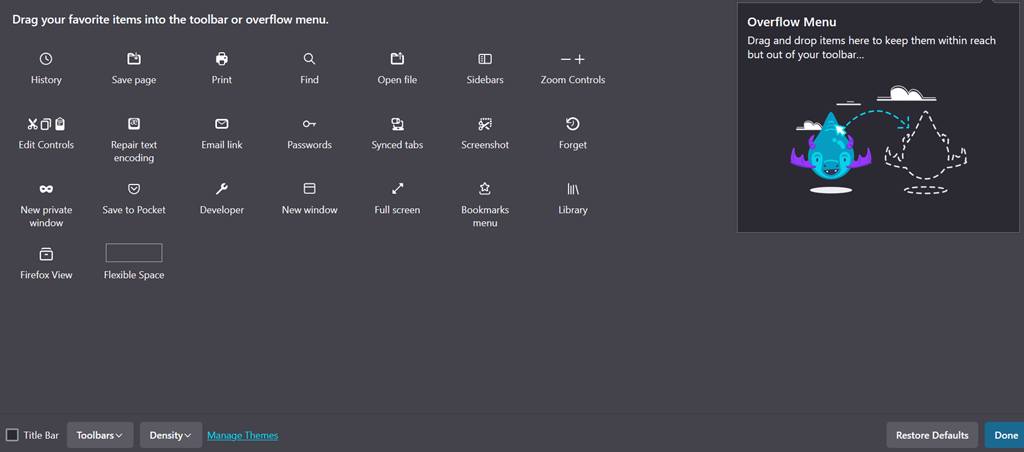
This would suggest that the search bar already is placed on a toolbar.
Your screenshot doesn't show the toolbar area, can you show a screenshot that includes the toolbar area?
- if missing items are in the Customize palette, drag them back from the Customize page to the toolbar
- if you do not see an item on a toolbar and in the Customize palette, click Restore Defaults in the Customize palette window to restore the default toolbar set.
Όλες οι απαντήσεις (4)
Go to menu ≡ -> More tools -> Customize toolbar…. Move Search bar next to the address bar.
@TyDraniu Thank you very much for your response. I did as you instructed but I do not see Search bar in the items to drag. I have attached a pic of my items in my Customize toolbar. I am on Version 130.0.1 64 Bit.
Respectfully, Don
Επιλεγμένη λύση
This would suggest that the search bar already is placed on a toolbar.
Your screenshot doesn't show the toolbar area, can you show a screenshot that includes the toolbar area?
- if missing items are in the Customize palette, drag them back from the Customize page to the toolbar
- if you do not see an item on a toolbar and in the Customize palette, click Restore Defaults in the Customize palette window to restore the default toolbar set.
@cor-el Thank you so much for your help. I clicked on the Restore Defaults and sure enough the small search bar appeared so I dragged it to its proper place on the tool bar and all is working perfectly like it was before I made a new Win10 Account. You are a wizard with FireFox and thank you again for your suggestion and help.
Respectfully, Don