


How do I get rid of Password Box icon appearing in my tool bar and asking me daily to open an account?

This box appeared on my toolbar a few weeks ago and will not go away by removing or moving to the menu. It can be moved, but always appears back on the toolbar when restarting Firefox. Have tried restoring to default settings with no luck.
Ŋuɖoɖo si wotia
Hello,
I am glad to hear that your problem has been resolved.
If you have not already, please mark this thread as solved by marking the solution.
This will help other users experiencing similar problems find help faster and more efficiently.
I hope you continue using our products and thank you for contacting Mozilla Support.
Xle ŋuɖoɖo sia le goya me 👍 0All Replies (7)
Can you attach a screenshot?
- http://en.wikipedia.org/wiki/Screenshot
- https://support.mozilla.org/kb/how-do-i-create-screenshot-my-problem
Use a compressed image type like PNG or JPG to save the screenshot.
Did you check you installed extensions?
Start Firefox in Safe Mode to check if one of the extensions (Firefox/Tools > Add-ons > Extensions) or if hardware acceleration is causing the problem.
- Switch to the DEFAULT theme: Firefox/Tools > Add-ons > Appearance
- Do NOT click the Reset button on the Safe Mode start window
- https://support.mozilla.org/kb/Safe+Mode
- https://support.mozilla.org/kb/Troubleshooting+extensions+and+themes
You can check for problems with preferences.
Delete a possible user.js file and numbered prefs-##.js files and rename (or delete) the prefs.js file to reset all prefs to the default value including prefs set via user.js and prefs that are no longer supported in the current Firefox release.

It could be the work of one of your add-ons, or even add / mal-ware. Look thru your add-ons list and make sure you know what each one is there for. Also, check the programs that are on your computer
Windows: Start > Control Panel > Uninstall Programs. Mac: Open the "Applications" folder Linux:
- Ubuntu Unity {web link}
- Xfce: Applications Menu category sections
- options depends on the package manager and the desktop environment
Go thru the list. If you find something that you don't know what it is, use a web search.
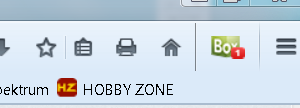
The cube shaped box with the "1" on it.
I don't see anything unusual in the Control Panel program listing.
That is part of the Password Box program and its Firefox browser extension. Try asking about that issue at the Password Box Helpdesk. https://help.passwordbox.com/
Strange...I never enabled any add-ons, yet there it was enabled. I disabled it and all is well. I'm having some other Firefox issues that began about the same time. I'll research those tomorrow.
Thanks everyone for your help!
Ɖɔɖɔɖo si wotia
Hello,
I am glad to hear that your problem has been resolved.
If you have not already, please mark this thread as solved by marking the solution.
This will help other users experiencing similar problems find help faster and more efficiently.
I hope you continue using our products and thank you for contacting Mozilla Support.