


How get rid of unwanated item on Firefox

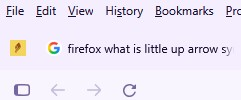
Small yellow arrow has appeared on top left corner of screen. I want to remove it permanently but don't know how. See attached image.
Wubrane rozwězanje
Well the help article support.mozilla.org/en-US/kb/pinned-tabs-keep-favorite-websites-open#w_how-do-i-remove-a-pinned-tab has a section inconspicuously called "How do I remove a Pinned Tab?" that would help.
Spoiler alert: If you right click the icon, there might be "Unpin Tab" menu item. You can then close the tab normally.
Wšykne wótegrona (3)
Isn't that a page you have pinned?
Pinned Tabs - keep favorite websites open and just a click away
I don't know if it is a pinned item or not. How do I unpin it?
Wubrane rozwězanje
Well the help article support.mozilla.org/en-US/kb/pinned-tabs-keep-favorite-websites-open#w_how-do-i-remove-a-pinned-tab has a section inconspicuously called "How do I remove a Pinned Tab?" that would help.
Spoiler alert: If you right click the icon, there might be "Unpin Tab" menu item. You can then close the tab normally.